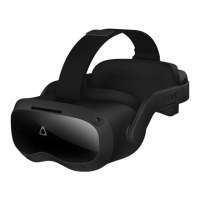
VIVE Focus 3 Eye Tracker
91H0xxxx-xxM Rev.A
Quick start guide
快速入門指南
퀵 스타트 가이드
クイックス タート ガ イド
快速入门指南
EN
AR
SC
JP
KR
TC
1
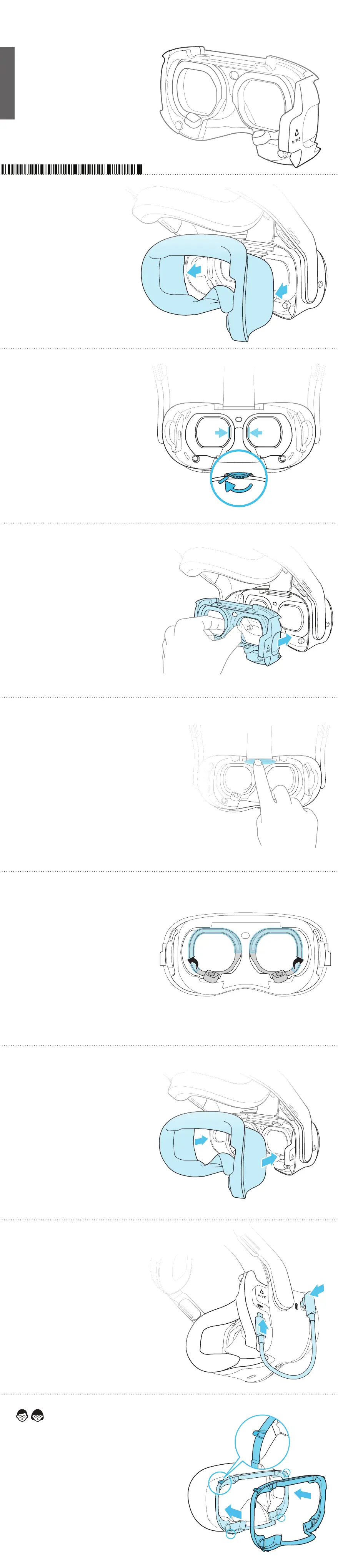
Remove the face cushion
拆下面部衬垫
フェイスクッション を 取 り外します
取下臉部靠墊
2
Turn the IPD dial all the way to
the left
(IPD)
将瞳孔间距旋钮一直转到最左边
IPDダイヤル を左いっぱいまで回します
IPD
將瞳距旋鈕轉到最左邊
3
Squeeze the eye frames together while
attaching the tracker to the headset
将追踪器安装到头戴式设备的同时,向内按压追踪器外框
ア イ フ レ ー ム 部 を 挟 ん で 持 ち 、ヘ ッ ド セ ッ ト に 取 り 付 け ま
す
向內按壓追蹤器的邊框再安裝到頭戴式裝置
4
Press rmly, then turn the IPD dial to make sure
the lenses and eye frames move together
(IPD)
用力按下追踪器,再拨动瞳孔间距旋钮,以确保镜头镜片和外框一
起移动
しっかりと押したあと、IPDダイヤルを回して、レンズとアイフレーム
が一緒に動くことを確認します
IPD
用力壓下追蹤器以確保緊扣,旋轉瞳距旋鈕以確認追蹤器邊框
隨著頭戴式裝置鏡頭一起移動
5
Remove the protective lms from the
frames
撕下外框上的保护膜
フレ ーム の 保 護フィル ム を は がします
撕下邊框上的保護膜
(Optional) Attach a Gasket Spacer to the face cushion
with the tabs fully locked in place
)(
(可选)将垫片安装到面部衬垫上,并使卡舌完全锁定就位
( オプ ション)ガスケットスペ ー サ ー をフェイスクッション に
取り付ける場合は、つまみが所定の位置にきちんとはまる
ようにします
Gasket Spacer
(選用) 將墊片裝到臉部靠墊上,讓卡榫完全卡入定位
6
Reattach the face cushion
重新安装面部衬垫
フェイスクッション を 再 び 装 着します
裝回臉部靠墊
7
Connect the eye tracker to the headset
using the USB cable
USB
使用 USB 数据线将眼球追踪器连接到头戴式设备
USBケ ー ブ ル で ア イトラッカ ー と ヘ ッド セット を 接 続 し ま す
USB
使用 USB 連接線將眼球追蹤器連接到頭戴式裝置


 To Previous Page
 Loading...