
 Need help?
Do you have a question about the Vlectro OP 012824 and is the answer not in the manual?
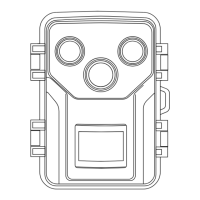
The primary device for capturing images and video.
Component for audio output from the device.
Connection point for external 6V 1.5A power.
Interface for data transfer and potential firmware updates.
Receptacle for storing captured photos and videos.
Controls the device's operational mode or power.
Housing for installing batteries to power the device.
Interface for navigating menus and controlling settings.
The visual display for settings and media preview.
Infrared LEDs for night vision that are not visible.
Components for mounting the camera to surfaces.
Cable for data transfer and external power connection.
Strap for securing the camera to trees or posts.
Details on photo resolution, video resolution, and time lapse video.
Information on detection angle, distance, trigger time, and waterproof level.
Specs on working temperature, power supply, battery type, and voltage.
Details on memory card compatibility and file formats.
Available modes include Photos, Videos, and Photos & Videos.
Configuration for audio recording and motion sensor sensitivity.
Support for multiple languages and photo timestamp options.
Switching the device to 'Test' mode and adjusting camera settings.
Switching to 'On' mode to begin taking pictures or recording videos.
Procedure for attaching the camera to a wall using the mounting kit.
Method for securing the camera to a tree with the installation belt.
 General
| Brand | Vlectro |
|---|---|
| Model | OP 012824 |
| Category | Security Camera |
| Language | English |

 To Next Page