15
Remote Control
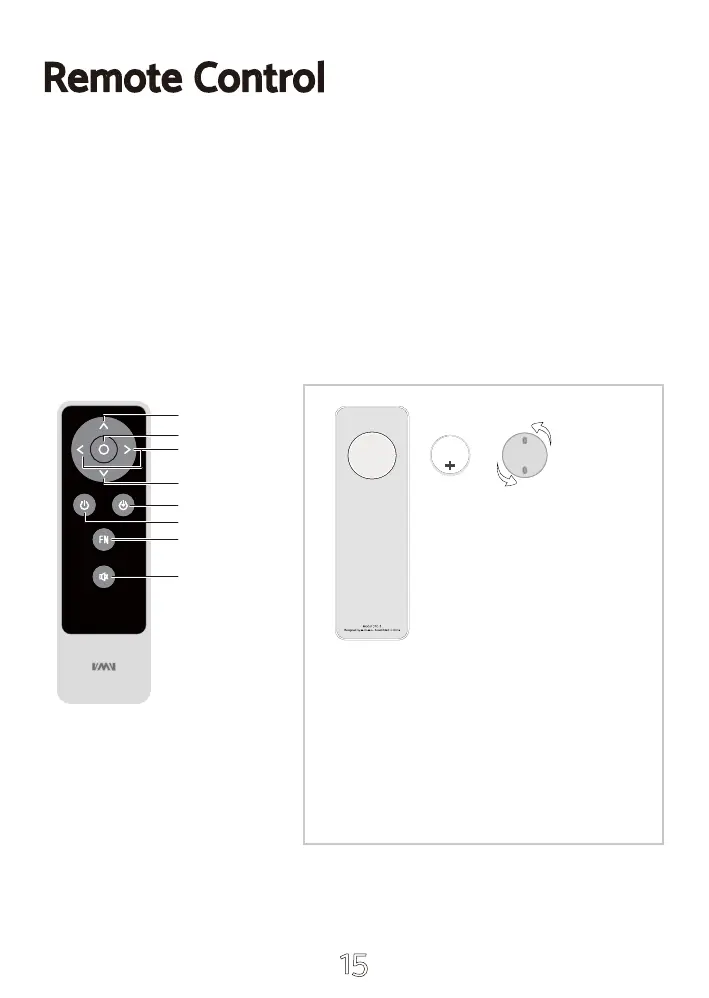
Volume UP
Menu Select
Volume Down
Input Select
ON/OFF
Mute
Menu
Install CR2032 or BR2032 lithium 3V coin battery as instructions
When using the remote control, point it toward the remote con-trol signal receiver on the
main unit from a distance of 5 m (16 ft) or less. Do not place obstructions between the main
unit and the remote control.
The remote control might not work if the remote control signal receiver on the unit is
exposed to direct sunlight or bright light. If this occurs, try moving the unit.
Beware that use of this remote control could cause the unin-tentional operation of other
devices that can be controlled by infra.
Release
Cr2032
or
Br2032
1.Find the battery component on the back of your Remote.
2.Turn the battery door counterclockwise until the door
opens
3.Remove the old battery.
4.With the positive side facing up toward you, put in the
newCR2032 or BR2032 lithium 3V coin battery (available at
mostelectronic and drug stores).


 To Next Page
 Loading...