b) Be careful not use a headset with a built in microphone as this may cause transmissions to
the umpires. THIS IS NOT PROTOCOL so please use the supplied CHS if you do not have your
own headset.
3) 2 umpire headsets (UHS)
a) A Jabra headset works as a replacement for the supplied UHS so use these if they are
available.
4) 3 flat cable connectors (FCC)
There are two options for the connections.
• On most occasions you will have the 3 way option already preset
• On some occasions only the V6 units (RR) will be connected
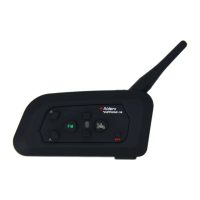
Check to see if one of the above pairings is present by switching all 3 radios on via the INTERCOM
button (right of the LED with the motor cyclist symbol).
These instructions look long and complicated but after several goes at pairing the radios you will be
become very familiar with the routine.
TO CONNECT 1 x V4 (YR) and 2 x V6 (RR)
The radio marked yellow is where to start. Because the pairing of the radios survives, on most
occasions that is, when the radios are switched off or on charge it is very likely that you will not need
to go through steps 3-5.
1. Nos 1 & 2 only apply to test an already paired set of triple radios
a. Press the INTERCOM button on the YR until the LED flashes red – it will then go to
blue.
b. Press the INTERCOM on the first RR YR until the LED flashes red – it will then go to
blue.
c. Press the INTERCOM button on the second RR YR until the LED flashes red – it will
then go to blue.
d. In each bag there should be 3 headsets and 3 FCCs
i. The headset with red masking tape over the microphone is for the YR.
ii. The other headsets are interchangeable between the RRs.
e. Connect a FCC to each radio unit and then connect your headsets to the FCC. If you
don’t use the flat cable connector (FCC) the headsets may not work.
f. Once plugged in then please test them to see if 3 way contact is enabled.
g. REMEMBER the RRs should be able to give and receive communication from each
other but the YR is only able to hear broadcasts from the RRs.
What to do if the 3 way connection has not been established
2. If you have completed 1 above and the radios do not communicate correctly then you need
to
a. Disconnect the headsets from all the radios. This makes handling each radio unit
easier as there will be no wires in the way.
b. Go through steps 3, 4 and 5.


 To Next Page
 Loading...