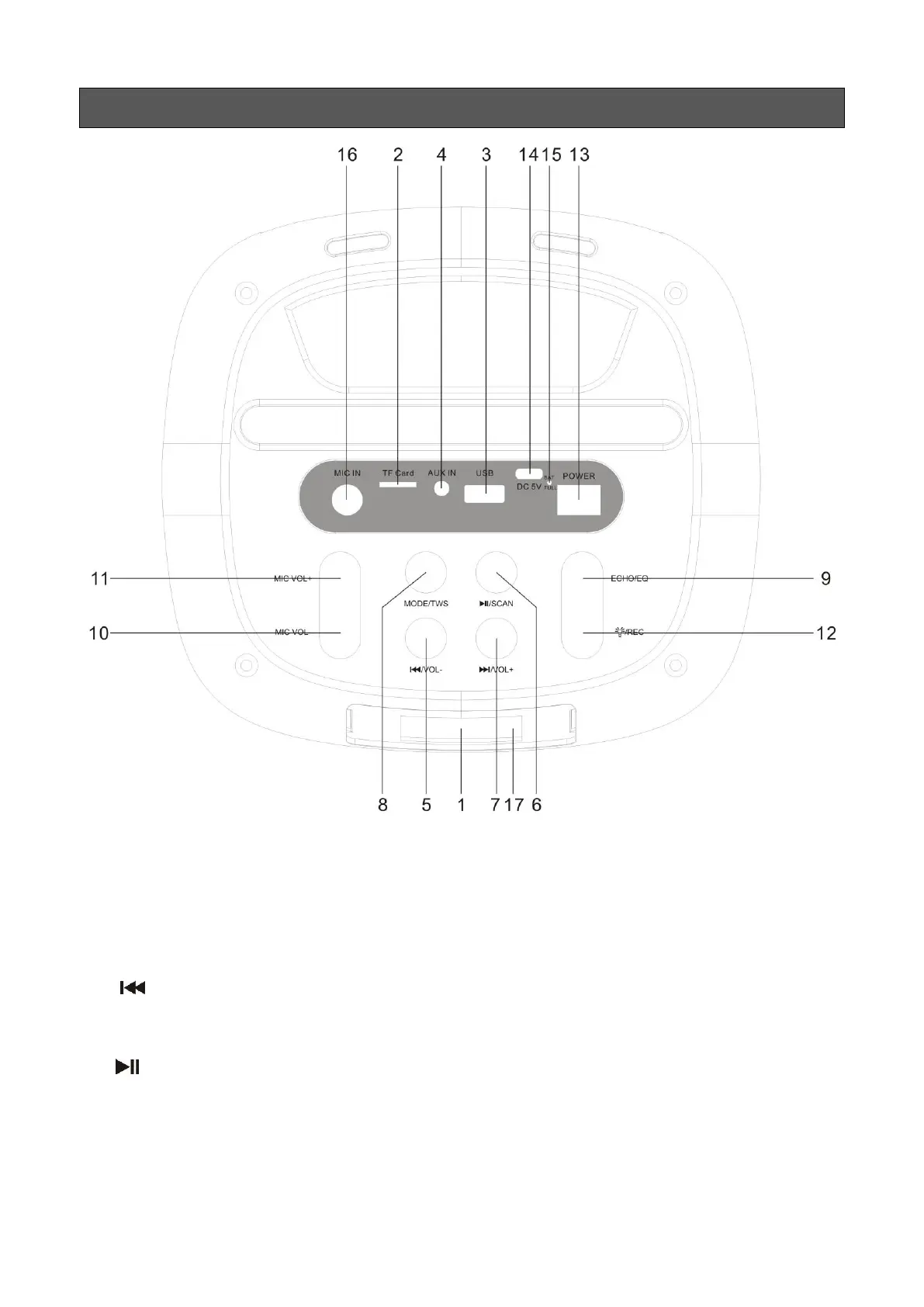
1. LED Screen.
2. TF Port: Read audio files in MP3 format in TF card in capacity up to 32G (FAT32).
3. USB Port: Read audio files in MP3 format in USB storage device in capacity up to 32G
(FAT32).
4. AUX IN: External sound source input port (plug-and-play).
5. /VOL-: In the play status of USB/TF Card/Bluetooth, short press it to select the previous
channel. In FM receiving status, short press it to select the previous channel after a full station
search has been executed. long press will decrease the volume.
6. /SCAN: In USB/TF card/Bluetooth reading status, short press it to play/pause, In USB/TF
card reading status, long press it to select one of four playback sequencing modes (All - play all
tracks in sequence; RAND - play in random; ONE - repeat one track; FOL - repeat all tracks in a
folder). In FM receiving status, long press it to execute a full search (it is recommended to execute
at least one full search before using radio receiving function. All stations will be saved even in
power-off). In AUX input / FM radio status, short press it to toggle between mute and normal


 To Next Page