EasyManua.ls Logo

Vodafone THG3000 - Connecting Hub via Phone Socket; Initial Connection Steps; Powering On the Hub

Vodafone THG3000
8 pages
Print Icon
To Next Page IconTo Next Page
To Previous Page IconTo Previous Page
Loading...
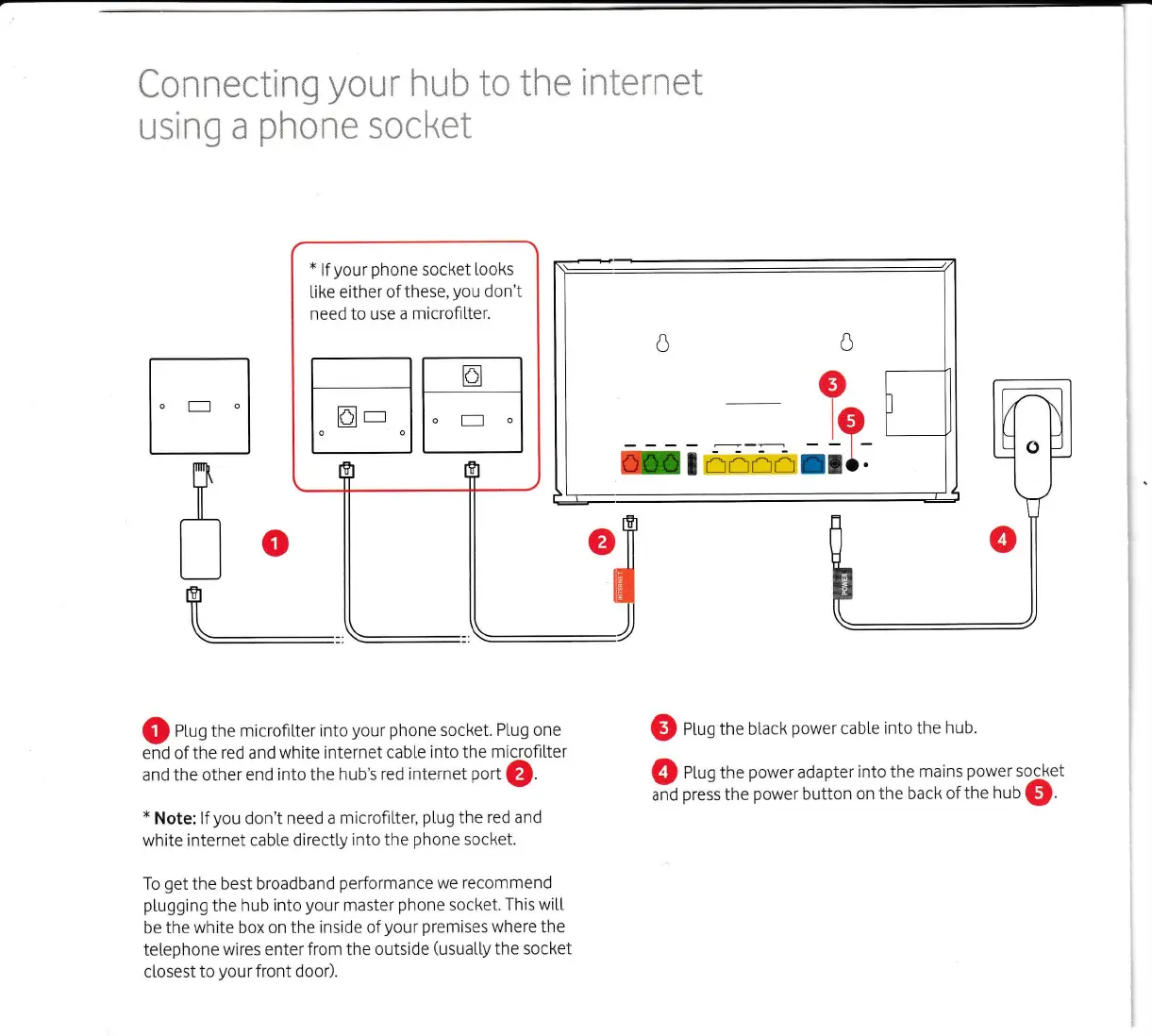
Connecting
your
hub to the
internet
using
a
phone
socket
x
lfyour
phone
socket looks
tike either of
these,
you
don't
need to use a
microfitter.
EE
o
-.ftffi-*
Q
nfug the
microfiLter into
your phone
socket.
Ptug one
end of the red and white internet cab[e
into the
microfilter
and the other
end into the
hub's red internet
pott
O.
x
Note:
lf
you
don't need a
microfiLter,
pLug
the
red and
white
internet cable directty
into the
phone
socket.
To
get
the best broadband
performance
we recommend
ptugging
the hub
into
your
master
phone
socket.
This witt
be the
white box on the inside
of
your
premises
where the
tetephone
wires enter from the outside
(usuatty
the socket
closest
to
your
front door).
@
eLrg the bl.ack
power
cabte
into the
hub.
@
nLrg the
power
adapter
into the
mains
power
socket
and
press
the
power
button
on the
back of the
hub
@.