2. Depress and hold a preset button. The audio will cut out. Keep the button depressed until the audio comes on again
(approx. 2 seconds).
3. The frequency is now stored on this preset button.
C - Preset buttons
To select a pre-programed radio frequency, depress the preset button. The set frequency will be displayed.
pg. 138 Radio SC-813
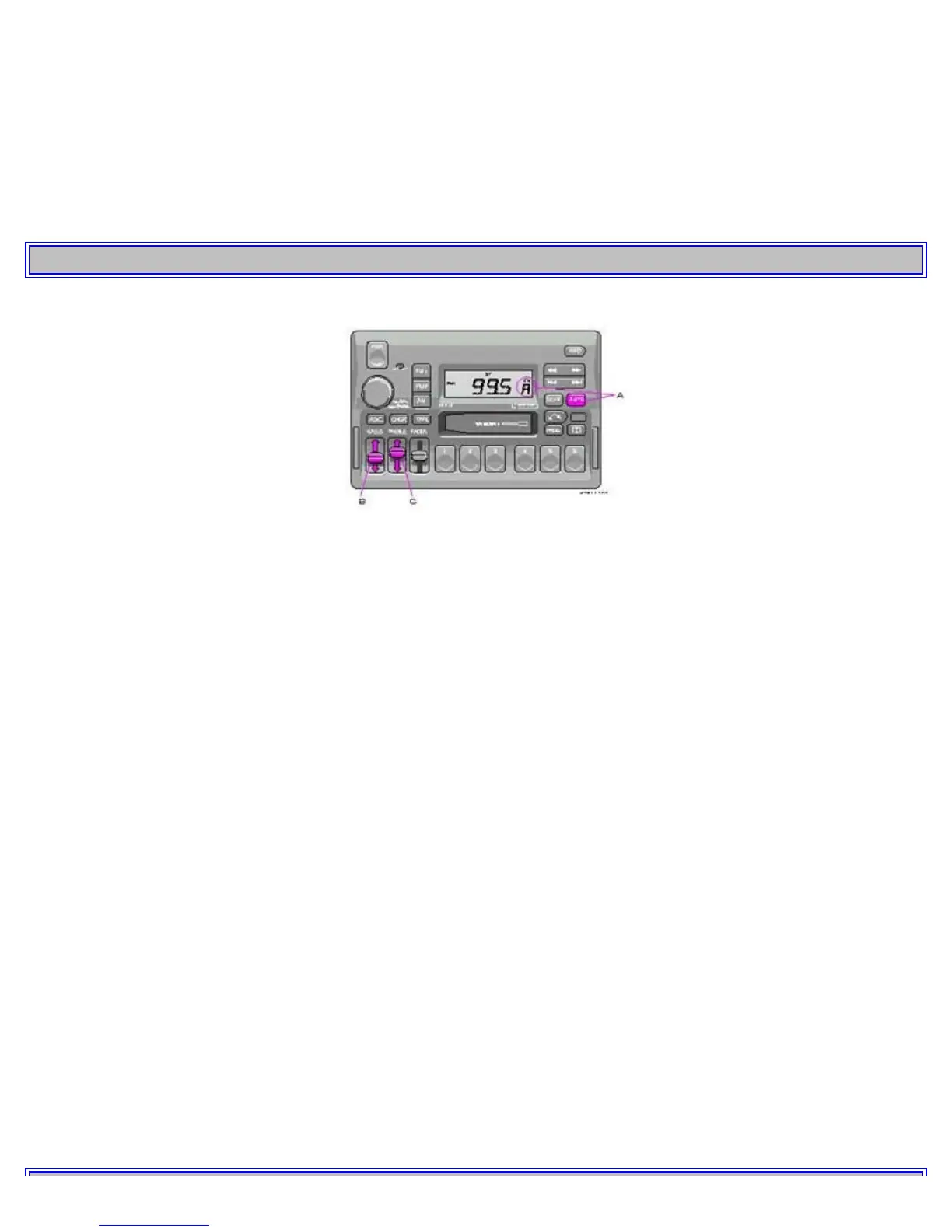
A - Automatic programming (Auto)
Please note that this function will not interfere with pre-stored stations on buttons 1-6.
This function automatically seeks and stores up to 8 strong AM or FM stations.
This is especially useful when travelling in areas where radio stations are unfamiliar.
1. Depress and hold the "AUTO" button for at least 1 second. A number of strong stations (max. 8) on the chosen
waveband are now automatically stored in the memory.
If there are no audible stations, "- - - -" is displayed.
2. Press the "AUTO" button (for less than 1 second) to obtain another autostored station.
A new station will be selected each time the button is pressed momentarily.
B - Bass control
Adjust the bass by sliding the control up or down (up to increase, down to decrease).
A "detent" indicates "equalized" bass.
C - Treble control
Adjust the treble by sliding the control up or down (up to increase, down to decrease).
A "detent" indicates "equalized" treble.



 To Next Page