03 Your driving environment
Windows, rearview and door mirrors
03
101
Door mirrors
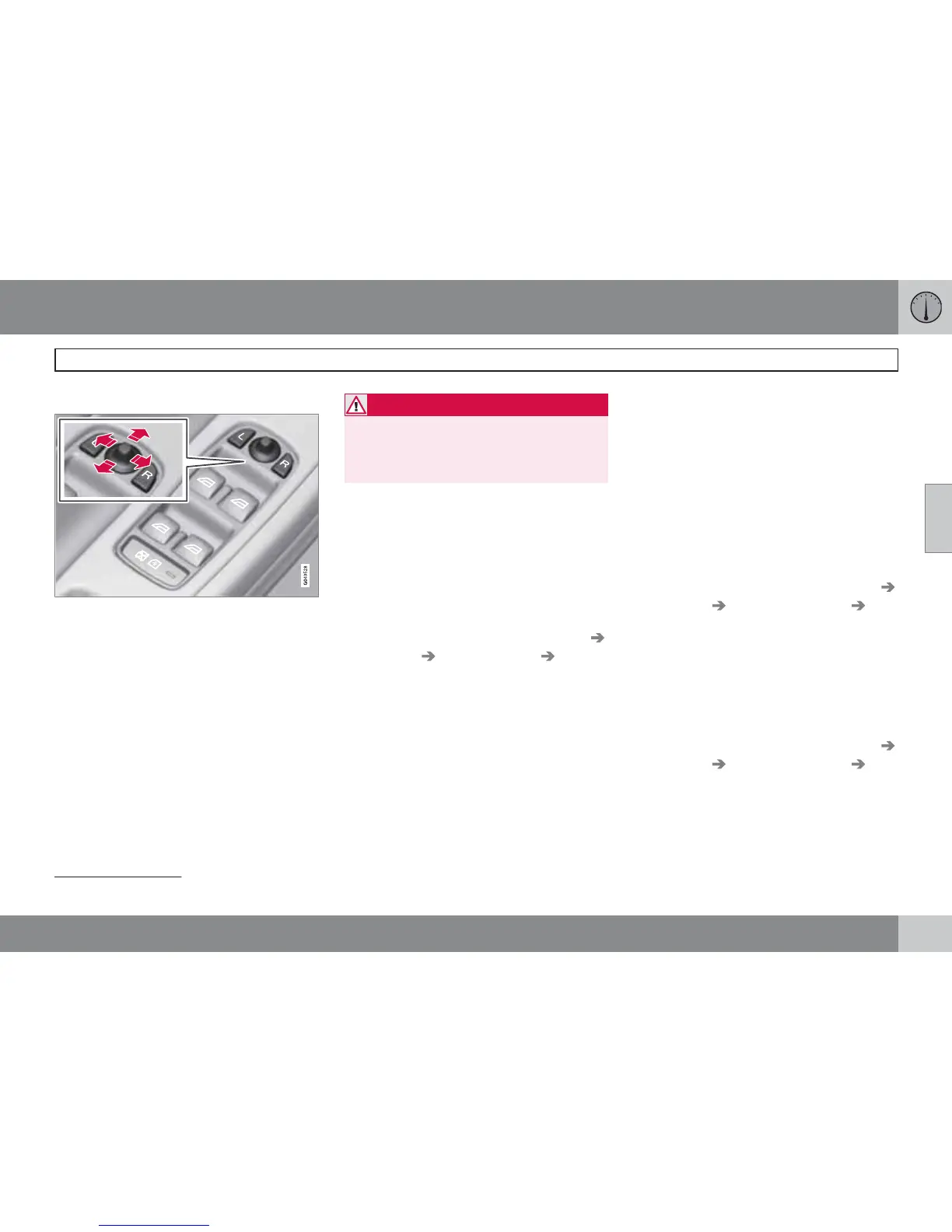
Door mirror controls.
Adjusting
1.
Press the L button for the left-hand door
mirror or the R button for the right-hand
door mirror. The light in the button illumi-
nates.
2. Adjust the position with the joystick in the
centre.
3.
Press the L or R button again. The light
should no longer be illuminated.
WARNING
The mirror on the driver's side is the wide-
angle type to provide optimal vision.
Objects may appear further away than they
actually are.
Storing the position
1
The mirror positions are stored in the key mem-
ory when the car has been locked with the
remote control key. When the car is unlocked
with the same remote control key the mirrors
and the driver's seat adopt the stored positions
when the driver's door is opened.
The function can be activated/deactivated in
the menu system MY CAR under Settings
Car settings Car key memory Position
of door mirrors and driver's seat in key. For
a description of the menu system, see
page 145.
Angling the door mirror when parking
1
The door mirror can be angled down for the
driver to view the side of the road when parking
for example.
–
Engage reverse gear and press the L or R
button.
When reverse gear is disengaged the mirror
automatically returns to its original position
after approx. 10 seconds, or sooner by press-
ing the L and R button.
Automatic angling of the door mirror
when parking
1
When reverse gear is engaged the door mirror
is automatically angled down so that the driver
can see the side of the road when parking for
example. When reverse gear is disengaged the
mirror automatically returns to its original posi-
tion after a short time.
The function can be activated/deactivated in
the menu system MY CAR under Settings
Car settings Side mirror settings Tilt
left mirror or
Tilt right mirror. For a descrip-
tion of the menu system, see page 145.
Automatic retraction when locking
1
When the car is locked/unlocked with the
remote control key the door mirrors are auto-
matically retracted/extended.
The function can be activated/deactivated in
the menu system MY CAR under Settings
Car settings Side mirror settings Fold
mirrors. For a description of the menu system,
see page 145.
1
Only in combination with power seat with memory, see page 80.



 To Next Page