03 Your driving environment
Instruments and controls
03
74
Clock
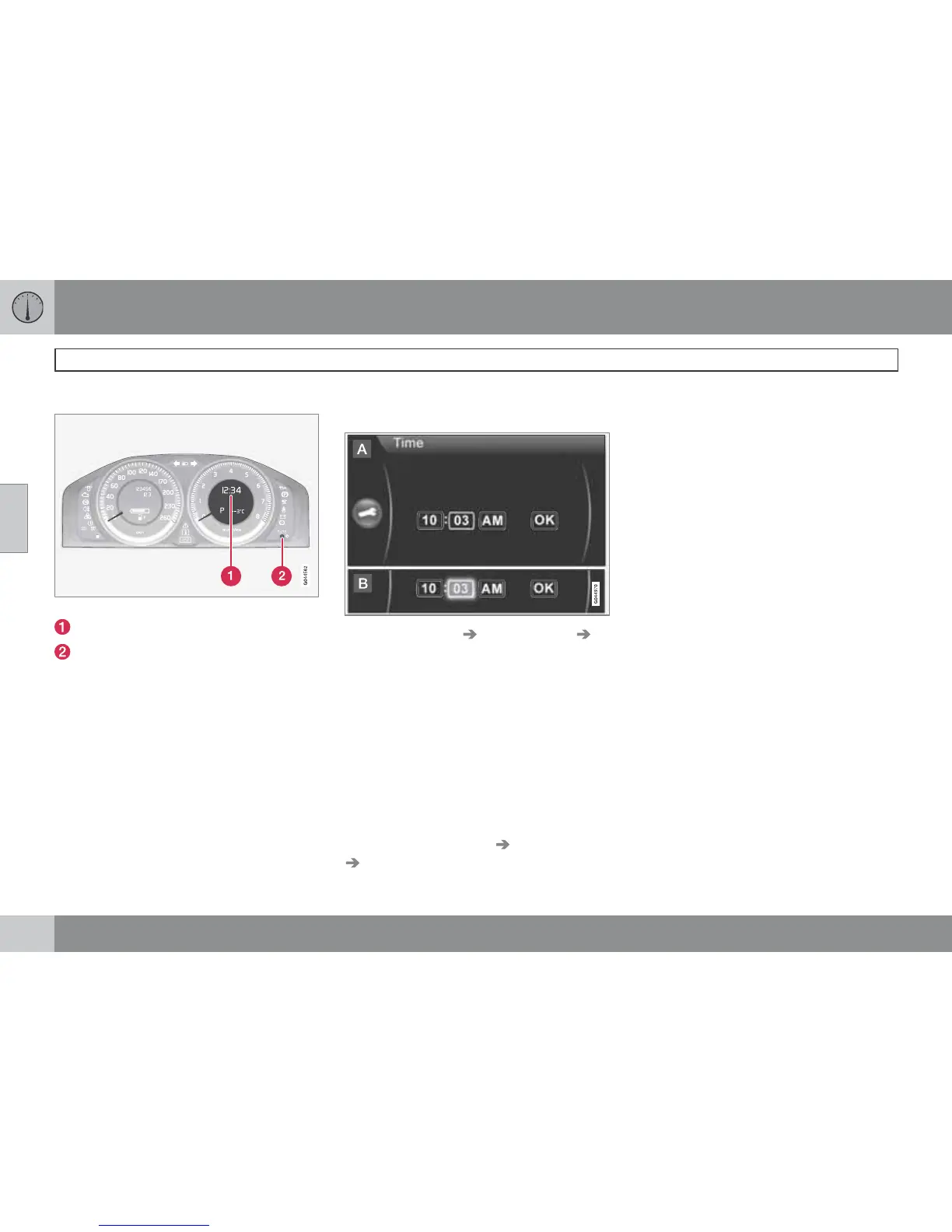
Clock and setting knob.
Display for showing the time.
Controls for setting the clock.
Turn the knob clockwise/anticlockwise to set
the clock. Turn first to the end position and then
turn past/over the end position a further
approx. 1 mm - a "click" sounds and is felt in
the button. Each "click" scrolls 1 minute. In
order to change quickly - hold in the "click
position".
In connection with a message the clock can be
temporarily replaced by a symbol, see
page 142.
Setting the clock in MY CAR
In addition to the previous manual/mechanical
method the clock can also be set in the menu
group MY CAR, for more information see
page 144.
1.
Locate Settings
System options
Time.
2. The cursor is located in the first box for
Hour: Press OK - the box is activated.
3.
Turn TUNE to set the correct hour and
press OK - the box is deactivated.
4.
Turn TUNE to select the box for Minute (A)
and press OK - the box is activated (B).
5.
Turn TUNE to set the correct minute and
press OK - the box is deactivated.
6.
Turn TUNE to select the box for
OK and
press OK - the setting is complete.
The menu option Settings
System options
Time format selects the 24h or 12h system
(AM/PM).



 To Next Page