||
SEATS AND STEERING WHEEL
* Option/accessory.
188
The lumbar support is adjusted using the multi-
function control in cars with four-way lumbar sup-
port*, or using the round button in cars with two-
way lumbar support*. The control is located on
the side of the seat's seating section. Depending
on the equipment level selected, the lumbar sup-
port can be adjusted forward/back and up/down
(four-way lumbar support) or forward/back (two-
way lumbar support).
Adjust the lumbar support in the car
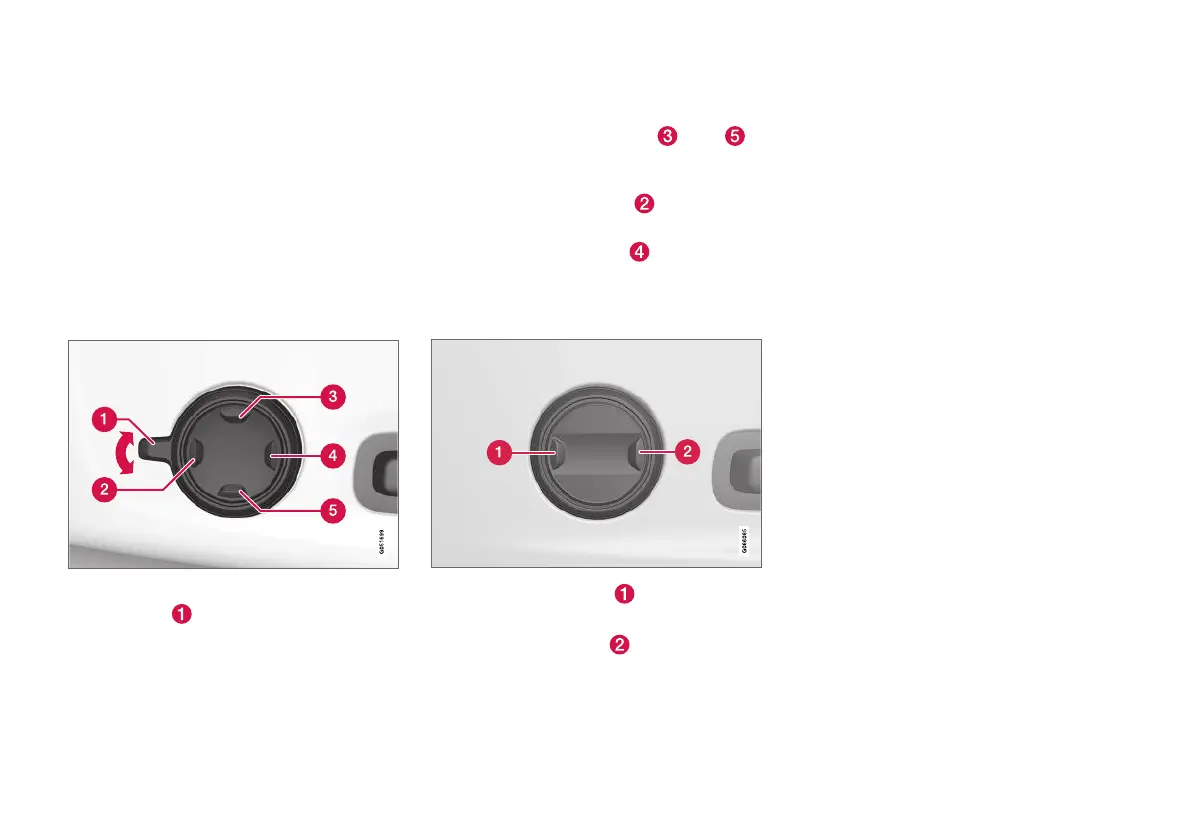
using the four-way lumbar support
1. Activate the multi-function control by turning
the control
upwards/downwards. The
seat settings view will be shown in the centre
display.
2.
Select
Lumbar in the seat settings view.
•
Press the round button up
/down
to move the lumbar support upwards/
downwards.
•
Press the front section
of the button
to increase lumbar support.
•
Press the rear section
of the button to
decrease lumbar support.
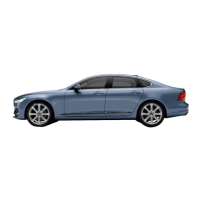
Adjust the lumbar support in the car
using the two-way lumbar support
1.
Press the front section of the round but-
ton to increase lumbar support.
2.
Press the rear section
of the round but-
ton to decrease lumbar support.
Related information
•
Manual front seat (p. 180)
•
Power* front seat (p. 181)
•
Adjusting the power* front seat (p. 181)
•
Storing position for seat, door mirrors and
head-up display* (p. 182)
•
Using a stored position for seat, door mirrors
and head-up display* (p. 183)
•
Adjusting massage settings* in the front seat
(p. 185)
•
Adjusting* the length of the seat cushion in
the front seat (p. 186)
•
Massage settings* in the front seat (p. 184)
•
Adjusting the side support* in the front seat
(p. 187)
•
Adjusting the passenger seat from the driv-
er's seat* (p. 189)



 To Next Page