DRIVER SUPPORT
}}
* Option/accessory.
319
Related information
•
Driving support systems (p. 278)
•
Adaptive cruise control* (p. 298)
•
Pilot Assist (p. 307)
•
Distance Warning* (p. 296)
•
Head-up display* (p. 138)
Drive mode for driver support
The driver can select different driving styles for
how driver support should maintain the preset
time interval to the vehicle ahead.
Selection is made via the drive mode control
DRIVE MODE.
Select one of the following options:
•
Eco – The driver support focuses on optimal
fuel economy, which means longer time
interval to the vehicle ahead.
•
Comfort – The driver support focuses on
following the set time interval to the vehicle
ahead as smoothly as possible.
•
Dynamic* – The driver support focuses on
following the set time interval to the vehicle
ahead more closely, which in certain cases
may mean heavier acceleration and braking.
Related information
•
Driving support systems (p. 278)
•
Drive modes* (p. 425)
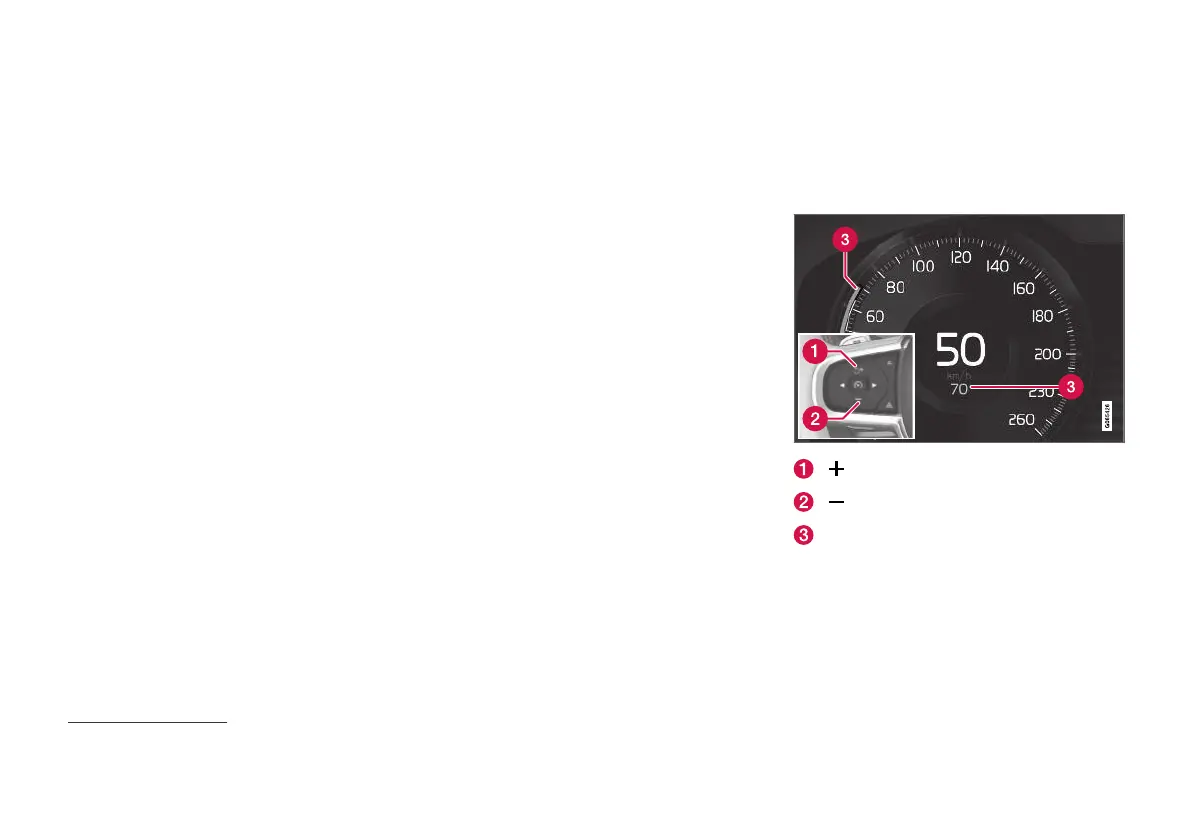
Set the stored speed for driver
support
It is possible to set stored speed for the Speed
Limiter, Cruise Control, Adaptive Cruise Control
(ACC)*
54
and Pilot Assist functions.
: Increases the stored speed.
: Reduces stored speed.
Stored speed.
54
Adaptive Cruise Control


 To Next Page