15
Go.
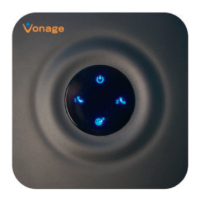
Understanding the blue LED lights on your Vonage Box
TM
:
POWER INTERNET ETHERNET PHONE LINES 1-2
Pick up
your
phone.
Listen for
a dial
tone.
A solid blue light indicates
the unit is powered on.
A solid blue light indicates
the unit is connected to the
Internet.
If it’s off, your Internet cable
may not be securely connected
or your modem/router may be
turned off.
If it’s blinking, you may
have a problem with your
Internet connection.
A solid blue light indicates
that a device such as a
computer or another router
is connected to the unit’s
Ethernet (LAN) port.
A solid blue light indicates you
can place and receive calls.
If it’s blinking slowly, you have
a voicemail message waiting
for you.
If it’s off, the unit is unable
to register with the Vonage
Network.
If it’s blinking quickly, you
may have a problem with your
phone or home phone wiring.



 To Next Page