5
2.
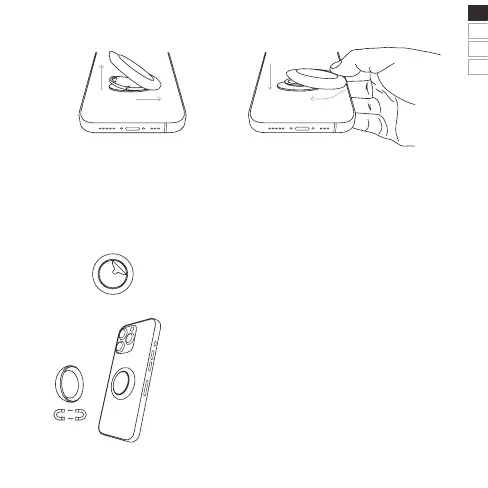
Carefully pull off the foil on the back of your Backflip
®
Dot.
Attach your Backflip
®
Dot to a smooth surface and then
you are free to magnetically attach your smartphone with
Backflip
®
to the Backflip
®
Dot.
Adhere your Backflip
®
Dot to a smooth surface,
now your Backflip
®
can attach magnetically to
the Backflip
®
Dot.
REMOVE | Pull the tab on the base of
the Backflip
®
slightly upwards and push.
ATTACH | Position Backflip
®
so that the logo
is right side up. Attach Backflip
®
by sliding it
sidewards onto the base, then snap it back
into place with light pressure.
EN
DE
ES
FR
Product Features
1. 3.4.
magnetic



 To Next Page