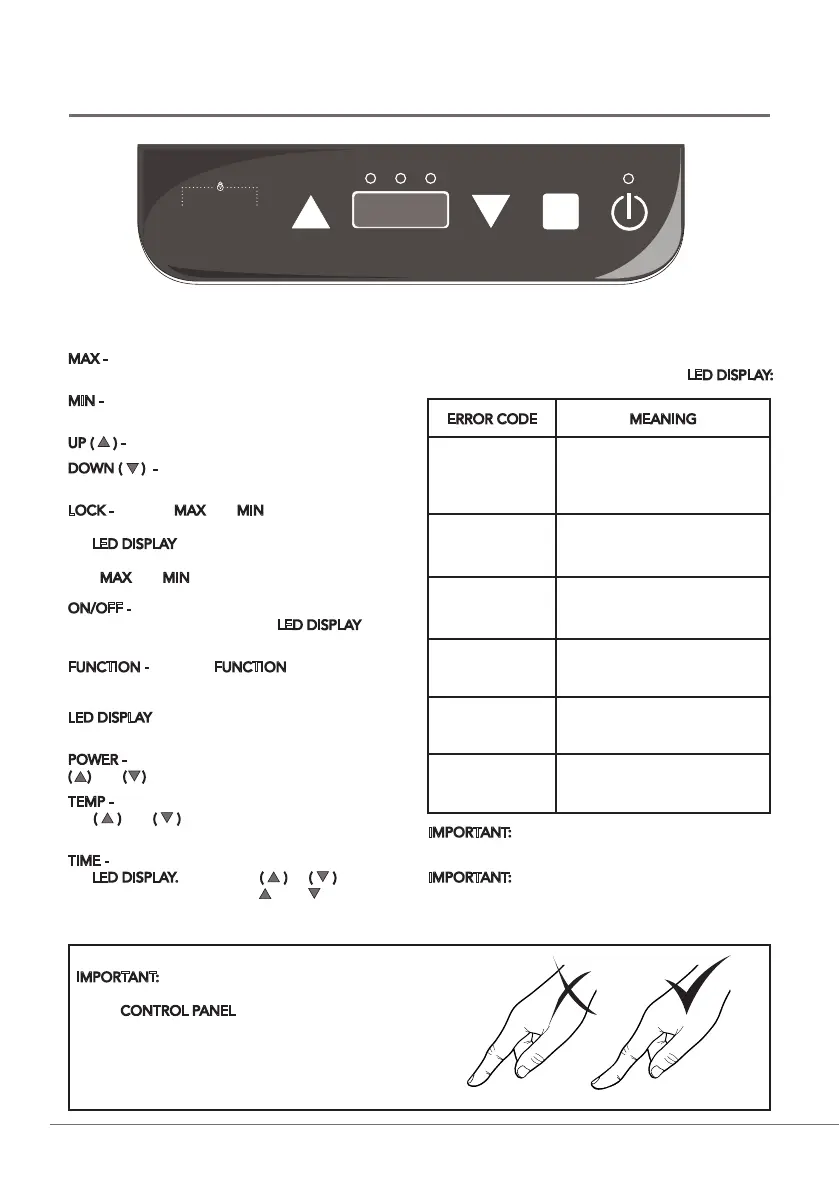
CONTROL PANEL
ON/OFF - Switches the appliance on and off. The
‘Power’ indicator light above the LED DISPLAY will
illuminate.
FUNCTION - Press the FUNCTION button to cycle
through the available functions ‘Power’, ‘Temp’ and
‘Time’. The corresponding indicator light above the
LED DISPLAY will illuminate to show the function
chosen.
POWER - Adjustable from 200W - 1800W using the
( ) and ( ) buttons.
TEMP - There are 10 levels to select (60ºC- 240ºC);
use ( ) and ( ) to increase or decrease during
operation.
TIME - The default time setting will display ‘0’ on
the LED DISPLAY. Press either ( ) or ( ) to adjust
(5-180 minutes). Holding the ( ) or ( ) button
will increase or decrease the time by 10 minutes
increments.
MAX - Instantly switches the power or temperature to
maximum.
MIN - Instantly switches the power or temperature to
minimum.
UP ( ) - Increases the power, temperature and time.
DOWN ( ) - Decreases the power, temperature and
time.
LOCK - Pressing MAX and MIN at the same time will
engage the safety lock feature. ‘LOC’ will appear on
the LED DISPLAY and a beep sound will be emitted.
All other buttons will become inoperable. Press and
hold MAX and MIN again to unlock.
ERROR CODE MEANING
E0
• No pan in place
• Wrong size pan used
• Pan used is not induction
hob compatible
E2
• Component overheat -
allow to cool sufficiently
E3
• High voltage protection
E4
• Low voltage protection
E5
• Pan has overheated -
allow to cool sufficiently
E6
• Component overheat -
allow to cool sufficiently
If there is a problem with the Induction Hob, one of the
following error codes may appear on the LED DISPLAY:
IMPORTANT: Always ensure pans are placed centrally
on the Hob for even heat distribution.
IMPORTANT: -H- will be displayed when the appliance
is turned off to indicate that the surface will be hot to
touch.
IMPORTANT: You will need to make full contact with
the touch screen sensors in order for all operations
on the CONTROL PANEL to work. This may require
you to make contact with the button itself and the
sensory area surrounding it (it may be necessary
to use your thumb rather than finger for better
coverage).
5
MAX MIN
Power Temp Timer
FUNCTION ON/OFF


 To Next Page
 Loading...