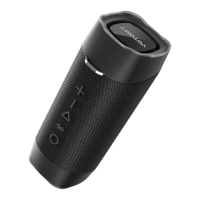
When your speaker is turned off, press and hold the " "
button until you hear a rising tone and the LED indicators turn
blinking blue.
Go to the Bluetooth settings on your mobile device, search
and select "VT360" from the list of device(s).
Once paired, the LED indicators turn solid blue.
•
•
•
Make sure that the speaker is within 10 meters from your mobile
device.
Play/ Pause
Decrease Volume
Increase Volume
Next Song
Previous Song
Bluetooth /TWS Mode Pairing
Click
Click
Click
Click
Press and Hold
Press and Hold
Answer an incoming call
Reject an incoming call
End the current call
Press " " and " " buttons simultaneously until LED Indicator
fast blinking blue to disconnect the currently connected device,
and restart a new Bluetooth-pairing status.
Click
Press and Hold
Click
Note: When powered on, the speaker automatically reconnects to
the previously connected device. (The speaker has memories of up to
8 paired devices.)
The speaker will automatically shut down after 10 minutes if not in use.


 To Next Page
 Loading...