Last Step
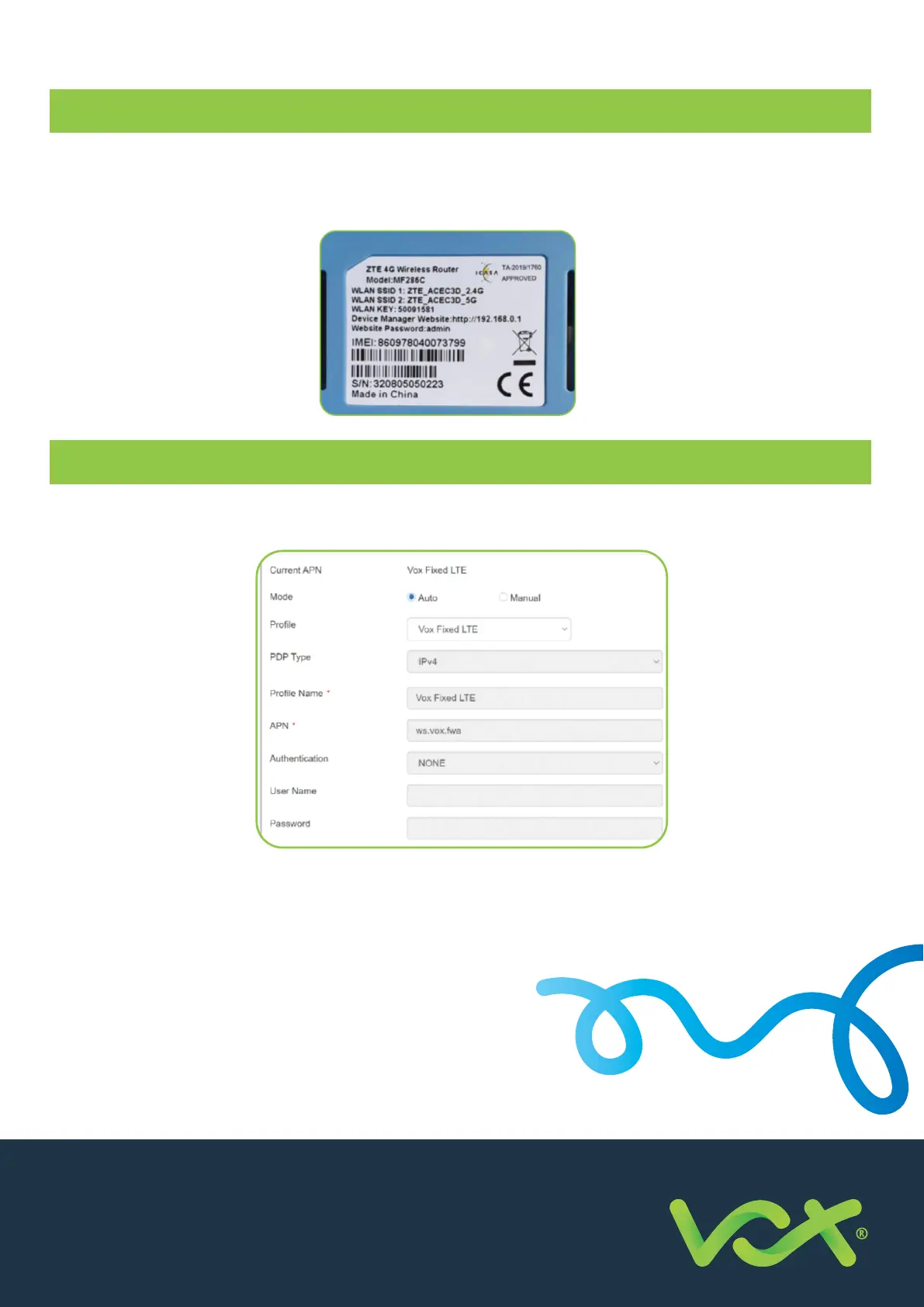
To log into the router, connect to the router’s Wi-Fi network (SSID) using the WLAN KEY (password) indicated on the
sticker under the device, and then from your PC, laptop or mobile phone, connect to the router from a browser at
http://192.168.0.1 using the password shown on your router’s sticker. See example sticker below.
APN Pro le
If you already own an MTN-approved router, you will need to create a new APN pro le with the Vox APN settings,
as follows:
Save the new pro le as the default and then proceed with the SIM activation steps as per page 1 of this guide. Please
note that the images provided are of the ZTE MF286C router. Other router models may di er.
Should you experience any problems, please contact
our customer support desk for assistance.
Need Help?
Business Support : +27 (0) 87 805 0500
Email: help@voxtelecom.co.za
For more information on complementary or
alternative products, visit us at vox.co.za
New Business Sales JHB : +27 (0) 87 805 5050
Consumer Support : +27 (0) 87 805 0530
Business Support : +27 (0) 87 805 0500
Email: info@voxtelecom.co.za
APN: ws.vox.fwa


 To Previous Page
 Loading...