EasyManua.ls Logo

Voyager WVOS541 - User Manual

Voyager WVOS541
4 pages
Print Icon
To Next Page IconTo Next Page
Loading...
WVOS541
(WVOM541AP+WVCMS130AP)
Digital Wireless
Observation System
Patent # (9,054,743)
YOU WILL NEED:
Voltage Meter
Water Proof Sealant
Drill with 1/8" drill bit
Phillips head screwdriver
English
WV
O
(
WV
O
M
Di
g
ital
W
O
bserv
a
KEY FEATURES:
Easy installation, ts most applications
5.6" monitor comes with suction cup mount and
12 Volt DC plug for easy portability
Camera connects to rear clearance lights
WiSight
®
technology- No cable or wiring necessary
No interference
Signal transmits through and around objects up to 60+ feet away
Sharp,clear,uninterrupted picture
Extend to 4 wireless and 1 wired cameras available
Camera source with trigger selection available
(Optional Harness with Trigger function sold separately )
Image mirror function available
Image ip function available
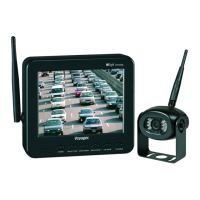
Package includes a 5.6" LCD color monitor, one 12 Volt DC accessory plug,
a suction cup monitor mount, one rear color camera, stainless steel hardware,
and non-corrosive camera mounting bracket.
WVOM541AP
WVCMS130AP
Question and Answer IconNeed help?

Do you have a question about the Voyager WVOS541 and is the answer not in the manual?

Summary

Installing the Camera

Camera Installation Steps

Detailed steps for mounting the camera, including pre-drilling, sealing, and alignment for optimal view.

Installing the Monitor

Monitor Mounting and Connection

Instructions for attaching the suction cup bracket, connecting the power cord, and aligning the antenna.

System Operation

Monitor Power and Settings

Guide to powering on the monitor, checking signal strength, adjusting viewing angle, and mirror settings.

Pairing Process

Auto-Pairing Wireless System

Steps for pairing the monitor and camera if the system is not receiving a signal, including status indicators.

Troubleshooting and Warnings

Trouble Shooting Common Issues

Addresses common issues like 'No Signal' or intermittent reception, with suggested solutions.

Important Warnings and Notices

Covers camera-monitor system warnings, important notes, and specific notices regarding usage and modifications.

Overview

The Voyager Digital Wireless Auto-Pairing Observation System, featuring WiSight technology, is designed to provide a clear and uninterrupted view for various applications, particularly for vehicles. The system includes a 5.6" LCD color monitor and a rear color camera, offering an easy-to-install and portable solution for enhanced visibility.

Function Description:

The primary function of this system is to provide a digital wireless observation solution for vehicles. It allows users to monitor their surroundings, particularly the rear, through a wirelessly connected camera and monitor. The auto-pairing feature simplifies the setup process, ensuring that the monitor and camera connect seamlessly. WiSight technology ensures a strong and stable signal transmission, even through and around objects, up to 60+ feet away, minimizing interference and delivering a sharp, clear picture. The system can be expanded to include up to four wireless cameras and one wired camera, offering comprehensive coverage. Camera sources can be selected with trigger functions (optional harness sold separately), and image mirror and flip functions are available for optimal viewing.

Important Technical Specifications:

  • Monitor: 5.6" LCD color monitor.
  • Camera: Rear color camera (WVCMS130AP).
  • Wireless Technology: WiSight® technology.
  • Signal Range: Transmits through and around objects up to 60+ feet away.
  • Power Input: 12 Volt DC for both monitor and camera.
  • Expandability: Supports up to 4 wireless and 1 wired cameras.
  • Mounting: Monitor comes with a suction cup mount; camera includes stainless steel hardware and a non-corrosive mounting bracket.
  • Patent: Patent # (9,054,743).

Usage Features:

  • Easy Installation: Designed for easy installation, fitting most applications. The camera connects to the rear clearance lights, and the monitor plugs into a 12 Volt DC outlet.
  • Portability: The 5.6" monitor comes with a suction cup mount and a 12 Volt DC plug, making it easily portable.
  • Auto-Pairing: The system features an auto-pairing function, simplifying the connection between the monitor and camera. If the monitor is not receiving a signal, users can manually pair the devices by pressing and holding the "SELECT/PAIR" button on the monitor for 5 seconds and then applying 12 Volt DC power to the camera.
  • No Interference: WiSight technology ensures no interference, providing a stable and reliable signal.
  • Sharp, Clear Picture: Delivers a sharp, clear, and uninterrupted picture for improved visibility.
  • Multiple Camera Support: Can be extended to include up to four wireless and one wired camera, allowing for comprehensive observation.
  • Trigger Selection: Camera source with trigger selection is available (optional harness with trigger function sold separately), enabling automatic switching to specific camera views based on vehicle actions.
  • Image Mirror Function: Allows the user to mirror the image displayed on the monitor, useful for rear-view applications.
  • Image Flip Function: Provides the ability to flip the image, offering flexibility in camera mounting and viewing orientation.
  • Signal Strength Meter: The monitor displays a signal strength meter in the top right corner, indicating the quality of the wireless connection.
  • Adjustable Viewing Angle: The suction cup bracket for the monitor allows for adjustment to provide the best viewing angle.
  • Monitor Setup: Users can set up the monitor for "Mirror ON" or "Mirror OFF" by pressing and holding the "POWER" button for 5 seconds.

Maintenance Features:

  • Weather Proofing: It is recommended to apply weather-proof sealant to pre-drilled holes and additional sealant to screw heads and brackets during camera installation to ensure a weather-proof seal.
  • Troubleshooting:
    • Monitor not turning on: Check power cord connection at the monitor and 12VDC socket, and inspect the fuse in the cigarette socket adapter.
    • Monitor display "No Signal": Verify 12VDC power at the camera, ensure the antenna is tight and pointed correctly, confirm the monitor is set to AV1, and try manually pairing the system.
    • Intermittent reception: Ensure the antenna is tight and installed vertically.
  • FCC Compliance: The device is designed to comply with FCC RF exposure requirements, requiring the antenna(s) to be installed to provide a separation distance of at least 20 cm from all persons. Users are advised to avoid changes or modifications not expressly approved by the grantee to prevent voiding the user's authority to operate the equipment.
  • Interference Mitigation: In case of harmful interference, users are advised to reorient or relocate the receiving antenna, increase separation between equipment and receiver, connect equipment into a different circuit, or consult a radio/TV technician.
  • RF Device Separation: It is recommended to maintain at least three feet of separation between the WiSight components and other RF transmitting/receiving devices (e.g., in-vehicle Wi-Fi, personal Wi-Fi hotspots, Bluetooth devices) to prevent operational difficulties.

Voyager WVOS541 Specifications

General IconGeneral
BrandVoyager
ModelWVOS541
CategoryAutomobile Accessories
LanguageEnglish