The VRS DirectForce Pro Formula Wheel is a high-performance steering wheel designed for sim racing, offering advanced features and customization options for an immersive driving experience. This user manual provides comprehensive instructions for installation, usage, maintenance, and troubleshooting.
Function Description:
The VRS DirectForce Pro Formula Wheel serves as a game controller for racing simulations, providing tactile feedback and precise input for steering, shifting, and other in-game functions. It is designed to be mounted on a wheel base and connects to a PC via USB or Bluetooth®. The wheel features a range of buttons, rotary switches, and clutch paddles, all configurable through dedicated software. The dual clutch system allows for precise control during race starts, with options for a master clutch and a second clutch limited by a "clutch bite point" slider. Alternatively, independent clutch mode allows each paddle to operate a separate axis, enabling their use as throttle and brake inputs for pedal-less driving. The wheel also incorporates a shifter attack point and hysteresis settings to fine-tune the engagement and disengagement of the shifters.
Important Technical Specifications:
- Model: DFP-FS1
- Connectivity: USB, Bluetooth®
- Battery: Rechargeable NiMH battery (Eneloop Pro HRO3 Mignon)
- Battery Life (Suspended): Approximately 2 years (not connected via Bluetooth® or USB)
- Battery Life (Operational): Approximately 24 hours (continuous usage with active clutches), up to 7 days (without active clutches)
- Charging Time: Approximately 15 hours (in Bluetooth® mode with USB connected)
- Operating Temperature: 5-40°C (41-104°F)
- Relative Humidity: Under 70%
- Altitude: Up to 5000m (16,000ft)
- Dimensions: 287mm (width) x 165mm (height) x 82mm (depth, including grips)
- Mounting: Compatible with any 70mm PCD motorsport adapter/extender (VRS® Hub or VRS® Quick Release)
- Button Count: Up to 64 buttons (Legacy mapping), up to 32 buttons (Modern mapping for wider game compatibility)
- Rotary Switches: 12-way rotary pulsed, 12-way rotary (continuous), or Encoder mode
Usage Features:
- Installation: The wheel can be easily installed using countersunk screws with either the VRS® Hub or VRS® Quick Release system.
- USB Cable Handling: The USB cable should be carefully aligned and securely connected to prevent strain or damage, ideally connected directly to the wheelbase adapter for sustained reliability.
- Bluetooth® Connectivity: The wheel supports Bluetooth® pairing, indicated by a blinking blue LED. It remains in Bluetooth® mode even when connected via USB, allowing for charging during operation.
- LED Signals: Various LED colors and blinking patterns indicate different operational states, such as Bluetooth® discovery, connection status, USB connection/disconnection, battery charging, low battery, and bite point configuration.
- Software (VRS® DirectForce® Config Tool):
- Home UI: Provides an overview of active devices, device information (name, model), and real-time feedback of parameters (clutch input, button selections).
- Device Profile: Allows selection of preset adjustment profiles, loading/saving profiles locally, and saving profiles to the device.
- Calibration: Enables calibration of the device and offers options for factory reset and firmware updates.
- Wheel Settings:
- Analog Input Mode: Configures dual clutch operation (master clutch with bite point) or independent clutch operation (each paddle as a separate axis, usable as throttle/brake).
- Master Clutch Selection: Allows choosing the left or right clutch as the master.
- Clutch Dead Zones: Adjusts the raw input range for the game to register actual input (bottom) and maximum input (top), affecting initial paddle movement and max travel for 100% input.
- Clutch Bite Point: Scales the second clutch paddle's input relative to the master clutch paddle.
- Shifter Attack Point and Hysteresis: Determines the travel required for shifters to engage and disengage, defining engagement and disengagement thresholds.
- Rotary Switch Mode: Configures rotary switches for 12-way pulsed, 12-way continuous, or encoder operation.
- Encoder Pulse Width: Sets the duration of the pulse for each encoder increment.
- LED Brightness: Adjusts the overall brightness of the central LED.
- Input Mapping: Supports "Legacy" and "Modern" input mappings, with "Modern" being optimized for wider compatibility with older games that support up to 32 buttons.
Maintenance Features:
- Grip Removal: Grips can be carefully removed using a 2.5mm allen/hex key by unscrewing three screws per grip.
- Paddle Adjustment: Clutch paddle throw can be adjusted by loosening two upper screws with the supplied tool, pushing or pulling the paddle housing, and then retightening.
- Button Reset: Holding the red button inside the right funky switch while reconnecting the USB cable performs a steering wheel reset, useful for recovering from undesired states or entering bootloader mode.
- Software Reset with Enter Bootloader: Holding both red buttons inside the funky switches while reconnecting the USB cable enters bootloader mode. This should only be done after contacting customer support.
- Clutch Calibration On-Wheel: Pressing and holding both funky switches for 3 seconds activates on-wheel clutch calibration (LED turns white). Clockwise rotation of the left funky switch increases the bite point by 1%, while the right funky switch increases it by 0.1%. Holding both switches again for 3 seconds returns to normal function, retaining the new setting.
- Regular Inspection: Users are advised to regularly inspect the equipment, including wires and connectors, for damage. Any unusual sounds, smells, or overheating should prompt immediate disconnection and replacement of damaged parts.

 Need help?
 General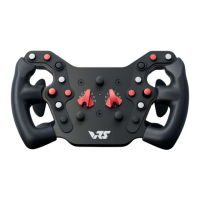

 To Next Page