
 Need help?
Do you have a question about the VS Sassoon VSM350A and is the answer not in the manual?
Keep unit dry, unplug near water, avoid use near tubs/showers.
Avoid immersion, protect skin from blades, supervise children, consider user capabilities.
Use only the provided detachable supply unit for recharging the battery.
Always switch off when not in use; avoid heat surfaces and dropping.
Use only approved attachments and ensure parts are undamaged for safe operation.
Handle the power cord carefully, avoid water near the adaptor, and ensure correct voltage.
Use indoors, avoid aerosols/oxygen, stop use if damaged, replace damaged cords.
Consider installing an RCD for additional electrical protection in bathrooms.
Identifies key shaver parts: heads, buttons, LED display, trimmer, and accessories.
Charge the shaver for 3 hours before its first use to ensure optimal performance.
Charge using provided accessories or USB port; monitor via LED display.
A full charge takes 3 hours and provides 99 minutes of runtime.
Recommended to fully discharge and recharge every 3 months for battery health.
Understand LED indicators for battery status: time remaining, low battery, charging, and fully charged.
Connect the USB cable and adaptor to charge; it takes 3 hours for a full charge.
Avoid charging the appliance for longer than the recommended duration.
Inspect shaver heads, blades, and foil for damage; test for skin sensitivity.
Do not shave on open wounds, burns, or skin conditions like psoriasis or eczema.
Exfoliate to prevent ingrown hairs, refine skin texture, and improve product absorption.
Exfoliate the day before and before shaving; a warm shower softens hair.
Start from neck, hold heads parallel, and use overlapping circular motions.
Use light pressure; avoid pressing too hard to prevent irritation and ensure a good shave.
Allow 2-4 weeks for skin adaptation; apply moisturizer after shaving.
Shows battery time remaining, low charge, charging status.
Displays shaving session time and cleaning reminders.
Indicates when cleaning is due and when the unit is fully charged.
The LED display automatically turns off after 8 seconds to save power.
Displays battery runtime estimates and charging status; runtime varies with conditions.
Shows session time and provides alerts for cleaning the shaver.
Indicates battery level and alerts about shaver stopping if filled with debris.
Press and hold the ON/OFF button for 3 seconds to activate the travel lock.
Press and hold the ON/OFF button again to disengage the travel lock and unlock the shaver.
Pull the release button to expose the trimmer, then use it for sideburns or beard areas.
Hold trimmer blades at a right angle to the skin and move downwards for precise trimming.
Clean excess hair from the chamber and around blades after each use with the brush.
Rinse shaver heads under tap water to remove hair and debris, then air dry.
Replace blade head assembly approximately every 2 years; contact customer service for replacements.
Remove and clean foils/blades separately underwater or with a brush, then reassemble.
Reinstall the shaving head and secure it with the locking wheel by turning clockwise.
Lubricate blades and trimmer; switch on shaver to distribute oil evenly.
Do not clean or interchange blades individually as they are matching sets.
The shaver is compatible with 100-240V power supplies worldwide via USB.
Chart detailing required plug adaptors, voltage settings, and corresponding countries for travel.
Contains a Nickel Metal-Hydride battery requiring safe disposal for environmental protection.
Take the appliance to a recycling centre for professional removal and recycling of the battery.
Contact your local council or waste disposal service for more recycling information.
Guarantees under Australian Consumer Law for replacement or refund for major failures.
Retain this booklet with your receipt for warranty service and present proof of purchase.
Provide date of purchase, retailer, product details, and problem description for claims.
Retain your proof of purchase (receipt/invoice) for warranty claims.
Details consumer rights, statutory guarantees, and remedies under the Australian Consumer Law.
Conair provides a 24-month express warranty against faults in materials or workmanship.
Lists conditions including proper product use and exclusions from warranty coverage.
Warranty is void if serial numbers are removed or unauthorized repairs are performed.
Product is for domestic use only; warranty requires purchase from authorized retailers.
Return product to place of purchase; Purchaser covers postage and freight charges for claims.
Warranty excludes consumable items like blades and normal wear and tear.
Contact details are provided for ordering replacement spare parts.
Conair Australia and New Zealand contact details and trademarks.
Provides phone numbers for customer service and an email for advice and tips.
Visit VSFORMEN.COM.AU for grooming tips and follow on social media.
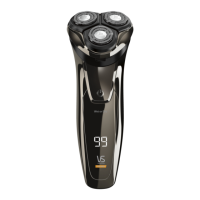
The VS Sassoon Precision Shave is a USB rechargeable rotary shaver designed for men, featuring 3D floating heads for a close shave. This grooming tool is cordless, offering convenience and flexibility during use.
The primary function of the Precision Shave is to provide a close and smooth shave using its 3 flexing rotary shaver heads and blades. These 3D floating heads are engineered to adapt to the contours of the face, ensuring efficient hair removal. The shaver is suitable for both wet and dry use, allowing users to choose their preferred shaving method. An integrated pop-up trimmer is included for precision detailing, such as trimming sideburns or shaping beard lines that are not intended for a full shave. The device is powered by a rechargeable Nickel Metal-Hydride battery, providing cordless operation for up to 99 minutes on a full charge.
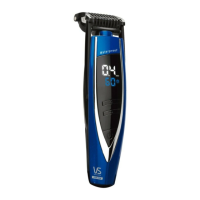
Before its first use, the shaver requires a continuous 3-hour charge to ensure optimal power performance. The LED display provides crucial information during operation and charging. When turned on, it shows the battery remaining run time in minutes (e.g., "50" for 50 minutes). During charging, a charging icon appears, and the LED display flashes the remaining operating time, which increases as the battery charges. Once fully charged, the LED displays "99" and a fully charged icon. The display automatically turns off after 8 seconds to conserve battery power.
The shaver can be charged using the provided USB cable and wall adaptor, either by connecting it to the charging stand or directly into a USB port. The adaptor is suitable for worldwide voltage (100-240V), though a suitable plug adaptor may be required depending on the country.
To operate the shaver, users press the on/off button. A travel lock feature is included to prevent unintentional activation. To engage the travel lock, the on/off button must be held for 3 seconds until a lock icon appears and a beep sounds. To unlock, the on/off button is held again; the lock icon will flash, and a countdown from 3 to 0 will be displayed before the shaver becomes operational.
For shaving, it is recommended to prepare the skin by ensuring it is clean and free from oil and dirt. Exfoliating the skin once a week and taking a warm shower before shaving can help straighten hairs and make shaving easier. Users should hold the shaver heads parallel to the skin and use short, overlapping circular motions, both clockwise and anti-clockwise. It is advised to start shaving from the neck area, which is more sensitive. Light pressure should be applied, allowing the shaver heads to do the work, as excessive pressure can cause irritation and prevent a perfect shave. It may take 2 to 4 weeks for skin to adapt to a new shaver. Using a facial moisturizer after shaving is recommended, avoiding aftershave solutions that contain alcohol.
The pop-up trimmer is accessed by pulling the trimmer release button downward. Once exposed, the shaver is switched on, and the trimmer blades are held at a right angle to the skin. For sideburns, it's advised to comb them in the direction of hair growth and move the shaver down and away from the desired edge. After trimming, the shaver should be switched off before returning the trimmer to its original position.
Regular cleaning is essential for maintaining the shaver's performance and hygiene. After each use, the shaver should be turned off, and the shaving head release button pressed to open the head. Any excess hair from the hair chamber and around the blades should be cleaned with the supplied brush.
A cleaning reminder icon will appear on the LED display after each shave of 2 minutes or longer, accompanied by a beep if the shaver has not been cleaned for an extended period. This indicates that the shaver heads should be rinsed under tap water to remove hair and debris from the hair chamber and foils, then air-dried.
For deep cleaning or replacement, the foils and blades can be removed. The blade head assembly is recommended for replacement approximately every 2 years of regular daily use. To remove, the shaving head release button is pressed, and the head is pulled upwards. With the shaver head on a flat surface, foils facing down, the locking wheel in the center is turned counterclockwise to unlock and remove the retaining frame. Blades and foils should be removed and cleaned one set at a time, either underwater or with a brush. After cleaning, the foils and blades are reinstalled, secured with the locking wheel (turned clockwise), and the shaver head is firmly inserted back into the shaver body until it clicks into place.
It is recommended to lubricate the blades and pop-up trimmer with a few drops of lubricating oil or spray designed for clippers and blades. After lubrication, the head should be closed, and the shaver switched on for a few seconds to distribute the oil. It is crucial not to clean more than one blade at a time, as they are matching sets, and interchanging them could affect shaving results. The shaver will stop working if it is filled with hair or debris to prevent damage, emphasizing the importance of regular cleaning.
To maintain the rechargeable battery's optimum capacity, it is highly recommended to allow the shaver to fully discharge and then recharge for 3 hours every 3 months. For battery disposal at the end of its useful life, the appliance should be taken to a recycling center where the internal rechargeable battery can be professionally removed and recycled separately.
 General
| Model | VSM350A |
|---|---|
| Brand | VS Sassoon |
| Blade Material | Stainless Steel |
| Number of Batteries | 2 |
| Floating Heads | Yes |
| Trimmer | Yes |
| Type | Shaver |
| Power Source | Battery |
| Features | Pop-up Trimmer |
| Product Type | Shaver |
| Wet/Dry | Yes |




 To Next Page