Specifications are subject to change without notice.
© 2020 VTech Communications, Inc.
All rights reserved. 03/20. VS112-X_QSG_V1.0
Document order number: 96-013088-010-100
Technical specifications
Frequency
control
Crystal controlled PLL synthesizer
Transmit
frequency
Handset: 1921.536-1928.448 MHz
Telephone base: 1921.536-1928.448 MHz
Channels DECT channel: 5
Nominal
effective
range
Maximum power allowed by FCC and IC.
Actual operating range may vary according to
environmental conditions at the time of use.
Power
requirement
Handset: 2.4 VDC, AAA x 2, Ni-MH battery
Telephone base: 6V DC @ 400mA
Charger: 6V DC @ 400mA
Memory Phonebook: 1000 memory locations;
up to 30 digits and 15 characters
Caller ID log: 50 memory locations;
up to 24 digits and 15 characters
Call block: 1000 entries
Go to www.vtechphones.com
to register your product for enhanced
warranty support and latest VTech
product news.
Quick start guide
VS112
VS112-2
VS112-3
VS112-4
VS112-17
VS112-27
VS112-37
VS112-47
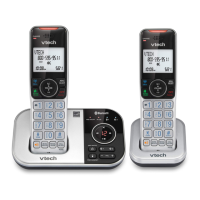
DECT 6.0 Cordless Answering System
with Smart Call Blocker
Phonebook
The phonebook can store up to 1000 entries, which are shared
by all handsets. Each entry may consist of a telephone number
up to 30 digits, and a name up to 15 characters.
Add a phonebook entry
Review phonebook entries
Delete a phonebook entry
When your desired phonebook entry display:
Caller ID
If you subscribe to caller ID service, information about each
caller appears after the first or second ring.
The caller ID log stores up to 50 entries. Each entry has up
to 24 digits for the phone number and 15 characters for the
name.
Review caller ID log entries
Telephones identified with this logo have reduced noise and
interference when used with most T-coil equipped hearing aids and
cochlear implants. The TIA-1083 Compliant Logo is a trademark of
the Telecommunications Industry Association. Used under license.
T
Compatible with
Hearing Aid T-Coil
TIA-1083
The ENERGY STAR
®
program (www.energystar.gov) recognizes and
encourages the use of products that save energy and help protect our
environment. We are proud to mark this product with the ENERGY
STAR
®
label indicating it meets the latest energy efficiency guidelines.
Disclaimer and Limitation of Liability
VTech Communications, Inc. and its suppliers assume no responsibility for any damage or
loss resulting from the use of this user’s manual. VTech Communications, Inc. and its suppliers
assume no responsibility for any loss or claims by third parties that may arise through the use
of this product.
Company: VTech Communications, Inc.
Address: 9020 SW Washington Square Road - Ste 555 Tigard, OR 97223, United States
Phone: 1 (800) 595-9511 in the U.S. or 1 (800) 267-7377 in Canada
Volume
Press
- OR -
Put the handset
in the telephone
base or charger
End a home call
Answer a home call
Make a home call
1
Press
- OR -
2
Enter the phone number.
ECO
Handset
10:15p
M 12/25
595-9511_
ECO
Enter number
595-9511_
ECO
Enter name
ECO
Mike Smith
ECO
ECO
Handset
10:15p
M 12/25
Mike Smith
800-595-9511
ECO
Mike Smith
800-595-9511
ECO
Delete entry ?
ECO
ECO
Handset
10:15p
M 12/25
Mike Smith
595-9511
ECO
Dial a caller ID log entry
When your
desired caller ID
entry displays
on the handset
screen:
Press
- OR -
- OR -
Save a caller ID log entry to the phonebook
Delete a caller ID log entry
When your
desired caller ID
entry displays
on the handset
screen:
When your
desired caller ID
entry displays
on the handset
screen:
Press
ECO
Mike Smith
595-9511
NEW
09:05pM 12/25
ECO
Mike Smith
595-9511
NEW
09:05pM 12/25
ECO
Mike Smith
595-9511
NEW
09:05pM 12/25
>To Phonebook
ECO
Edit number
800-595-9511_
ECO
Edit name
Mike Smiths_
ECO
Important safety instructions
When using your telephone equipment, basic safety precautions should always be followed
to reduce the risk of fire, electric shock and injury, including the following:
1. Read and understand all instructions.
2. Follow all warnings and instructions marked on the product.
3. Unplug this product from the wall outlet before cleaning. Do not use liquid or aerosol
cleaners. Use a damp cloth for cleaning.
4. Do not use this product near water such as near a bath tub, wash bowl, kitchen sink, laundry
tub or a swimming pool, nor in a wet basement or shower.
5. Do not place this product on an unstable table, shelf, stand or other unstable surfaces.
6. Avoid placing the telephone system in places with extreme temperature, direct sunlight, or
other electrical devices. Protect your phone from moisture, dust, corrosive liquids and fumes.
7. Slots and openings in the back or bottom of the telephone base and handset are provided
for ventilation. To protect them from overheating, these openings must not be blocked by
placing the product on a soft surface such as a bed, sofa or rug. This product should never
be placed near or over a radiator or heat register. This product should not be placed in any
area where proper ventilation is not provided.
8. This product should be operated only from the type of power source indicated on the
marking label. If you are not sure of the type of power supply in your home or office,
consult your dealer or local power company.
9. Do not allow anything to rest on the power cord. Do not install this product where the cord
may be walked on.
10. Never push objects of any kind into this product through the slots in the telephone base or
handset because they may touch dangerous voltage points or create a short circuit. Never
spill liquid of any kind on the product.
11. To reduce the risk of electric shock, do not disassemble this product, but take it to an
authorized service facility. Opening or removing parts of the telephone base or handset
other than specified access doors may expose you to dangerous voltages or other risks.
Incorrect reassembling can cause electric shock when the product is subsequently used.
12. Do not overload wall outlets and extension cords.
13. Unplug this product from the wall outlet and refer servicing to an authorized service facility
under the following conditions:
• When the power supply cord or plug is damaged or frayed.
• If liquid has been spilled onto the product.
• If the product has been exposed to rain or water.
• If the product does not operate normally by following the operating instructions.
Adjust only those controls that are covered by the operation instructions. Improper
adjustment of other controls may result in damage and often requires extensive work
by an authorized technician to restore the product to normal operation.
• If the product has been dropped and the telephone base and/or handset has been
damaged.
• If the product exhibits a distinct change in performance.
14. Avoid using a telephone (other than cordless) during an electrical storm. There is a remote
risk of electric shock from lightning.
15. Do not use the telephone to report a gas leak in the vicinity of the leak. Under certain
circumstances, a spark may be created when the adapter is plugged into the power
outlet, or when the handset is replaced in its cradle. This is a common event associated
with the closing of any electrical circuit. The user should not plug the phone into a power
outlet, and should not put a charged handset into the cradle, if the phone is located in
an environment containing concentrations of flammable or flame-supporting gases,
unless there is adequate ventilation. A spark in such an environment could create a fire
or explosion. Such environments might include: medical use of oxygen without adequate
ventilation; industrial gases (cleaning solvents; gasoline vapors; etc.); a leak of natural gas; etc.
16. Only put the handset of your telephone next to your ear when it is in normal talk mode.
17. The power adapter is intended to be correctly oriented in a vertical or floor mount
position. The prongs are not designed to hold the plug in place if it is plugged into a
ceiling, under-the-table or cabinet outlet.
18. For pluggable equipment, the socket-outlet shall be installed near the equipment and shall
be easily accessible.
19.
i
CAUTION: Use only the batteries indicated in this manual. There may be a risk
of explosion if a wrong type of battery is used for the handset. Use only the
supplied rechargeable batteries or replacement batteries (BT162342/262342)
for the handset. Do not dispose of batteries in a fire. They may explode.
20. Use only the adapter included with this product. Incorrect adapter polarity or voltage can
seriously damage the product.
SAVE THESE INSTRUCTIONS
Battery
• CAUTION: Use Only Supplied Battery.
• Do not dispose of the battery in a fire. Check with local waste management codes for
special disposal instructions.
• Do not open or mutilate the battery. Released electrolyte is corrosive and may cause
burns or injury to the eyes or skin. The electrolyte may be toxic if swallowed.
• Exercise care in handling batteries in order not to create a short circuit with conductive
materials.
• Charge the battery provided with this product only in accordance with the instructions
and limitations specified in this manual.
Precautions for users of implanted cardiac pacemakers
Cardiac pacemakers (applies only to digital cordless telephones):
Wireless Technology Research, LLC (WTR), an independent research entity, led a
multidisciplinary evaluation of the interference between portable wireless telephones and
implanted cardiac pacemakers. Supported by the U.S. Food and Drug Administration, WTR
recommends to physicians that:
Pacemaker patients
• Should keep wireless telephones at least six inches from the pacemaker.
• Should NOT place wireless telephones directly over the pacemaker, such as in a breast
pocket, when it is turned ON.
• Should use the wireless telephone at the ear opposite the pacemaker.
WTR’s evaluation did not identify any risk to bystanders with pacemakers from other persons
using wireless telephones.
About cordless telephones
• Privacy: The same features that make a cordless telephone convenient create some
limitations. Telephone calls are transmitted between the telephone base and the cordless
handset by radio waves, so there is a possibility that the cordless telephone conversations
could be intercepted by radio receiving equipment within range of the cordless handset.
For this reason, you should not think of cordless telephone conversations as being as
private as those on corded telephones.
• Electrical power: The telephone base of this cordless telephone must be connected to a
working electrical outlet. The electrical outlet should not be controlled by a wall switch.
Calls cannot be made from the cordless handset if the telephone base is unplugged,
switched off or if the electrical power is interrupted.
• Potential TV interference: Some cordless telephones operate at frequencies that may
cause interference to televisions and VCRs. To minimize or prevent such interference, do
not place the telephone base of the cordless telephone near or on top of a TV or VCR. If
interference is experienced, moving the cordless telephone farther away from the TV or
VCR often reduces or eliminates the interference.
• Rechargeable batteries: Exercise care in handling batteries in order not to create a
short circuit with conducting material such as rings, bracelets and keys. The battery or
conductor may overheat and cause harm. Observe proper polarity between the battery
and the battery charger.
• Nickel-metal hydride rechargeable batteries: Dispose of these batteries in a safe manner.
Do not burn or puncture the battery. Like other batteries of this type, if burned or
punctured, they could release caustic material which could cause injury.
Quick
start
guide
2 sets for
VS112-2
3 sets for
VS112-3
4 sets for
VS112-4
2 sets for
VS112-2
7
3 sets for
VS112-3
7
4 sets for
VS112-47
1 set for
VS112-2
2 sets for
VS112-3
3 sets for
VS112-4
1 sets for
VS112-2
7
2 sets for
VS112-3
7
3 sets for
VS112-47
Introducing
Smart call
blocker
What’s in the box
Connect the telephone base
If you subscribe to digital subscriber line (DSL) high-speed
Internet service through your telephone line, make sure you
connect a DSL filter (not included) to the telephone wall jack.
Install the battery
Connect the charger
Charge the battery
12 hrs
Display
Handset:
The battery is low and needs
charging.
The battery is charging.
The battery is fully charged.
Handset ringer is off.
New voicemail received from your
telephone service provider.
NEW
There are new caller ID log entries.
$1621
Answering system is on.
MSG#
0
Number of new/old messages
recorded.
(&2
The ECO mode activates automatically
to reduce power consumption when
the handset is within range of the
telephone base.
Handset
ECO
NEW
ANS ON
10:15
pm
MSG#
0
T
H
I
S
S
I
D
E
U
P
/
C
E
CÔT
É
V
E
R
S
L
E
H
A
U
T
B
a
t
t
e
r
y
Pa
c
k
/
Bl
o
c
-
p
i
l
e
s
:
B
T1
62
3
4
2
/
B
T
2
6
2
3
4
2
(
2
.
4
V
3
0
0
m
A
h
N
i
-
MH
)
W
A
R
N
I
N
G
/
A
V
E
R
TI
S
S
E
M
E
N
T
:
D
O
N
O
T
B
U
R
N
O
R
P
U
N
C
T
U
R
E
B
A
T
T
E
R
I
E
S
.
N
E
P
A
S
I
N
C
I
N
É
R
E
R
OU
P
E
R
C
E
R
L
E
S
P
I
L
E
S
.
Ma
d
e
i
n
C
h
i
n
a
/
F
a
b
r
i
q
u
é
en
c
h
i
n
e
C
R
1
95
1
THIS SIDE UP
T
HIS
S
I
DE
U
P
/
CE
C
Ô
T
É
V
E
R
S
L
E
H
A
UT
B
a
t
te
ry
P
ac
k
/
B
l
o
c
-pi
les
:
B
T1
8
33
4
2/
BT
2
8
33
42
(
2
.4
V
400mA
h
Ni
-
MH
)
WA
R
N
I
NG
/
A
VE
R
TISSEM
E
N
T
:
D
O
NO
T B
U
R
N
OR
PU
NCT
U
R
E
B
A
TT
E
R
IE
S
.
N
E
PAS
I
NC
I
N
É
R
ER
O
U
PERC
ER
LE
S
P
IL
ES.
M
a
d
e
i
n C
h
in
a
/
F
a
bri
q
ué
en
c
hine
C
R1
9
51
After you install your telephone or power returns following
a power outage and battery depletion, the handset will
prompt you to set the date and time, and to configure the
Smart call blocker and answering system through voice
guide.
When the handset
prompts you to set
the date and time
Date and time
Follow the steps below to set the date and time. For
example, if the date is 25 December, 2019, and the time is
10:59 AM:
Date: MM/DD/YY
ECO
Date: 12/2?/YY
ECO
Date: 12/25/19
ECO
Time: 1?:MM --
ECO
Time: 10:59 AM
ECO
1
Enter the date.
2
Press SELECT.
3
Enter the time.
4
Press SELECT.
Voice guide for Smart call blocker
After setting the date and time, the handset will prompt if
you want to set Smart call blocker. For more details, see Use
voice guide to set Smart call blocker* in the Introducing
Smart call blocker leaflet.
Setup your Smart call blocker by
inputting the designated numbers as
instructed in the voice guide.
“Hello! This voice guide will assist
you with the basic setup of Smart
call blocker“
When the handset prompts you to set up the Smart call blocker via
voice guide
Voice guide to...
ECO
Press SELECT.
Voice guide for answering system
After setting the Smart call blocker, the handset will display
Start voice guide to set up Answering system now?
This feature assists you to do the basic setup of the
answering system. You can follow the voice guide to record
your own announcement, set the number of rings and the
message alert tone.
When the handset prompts you to set up the answering system via
voice guide
set up Ans sys?
ECO
Press SELECT.
Setup your answering system by
inputting the designated numbers
as instructed in the voice guide.
“Hello! This voice guide will assist
you with the basic setup of your
answering system“
Connect and install
1
Setup
2
Make a cell call
1
Press
then
to select a device.
Answer a cell call
Press
- OR -
Press
- OR -
- OR -
Press any dialing keys
- OR -
Press any dialing keys
End a cell call
Press
- OR -
Put the handset
in the telephone
base or charger
Press
*
Includes licenced Qaltel
TM
technology.
Qaltel
TM
is a trademark of Truecall Group Limited.
LCD language setting
If you accidentally set the LCD language to Spanish or French, press MENU and then enter 364# to change the handset LCD
language back to English while the handset is not in use.
1
Enter the phone
number.
2
Press MENU.
3
Press SELECT.
4
Enter the name.
5
Press SELECT.
1
Press , then the
number of entries
displays.
2
Press T/S to
browse the entries.
1
Press DELETE.
2
Press SELECT.
Phonebook
Basic operation
Caller ID
2
Enter the phone number.
3
Press
to dial.
Mike Smith
800-595-9611
ECO
Dial a phonebook entry
When your desired phonebook entry displays:
Mike Smith
800-595-9511
ECO
Press
- OR -
- OR -
1
Press .
2
Press T/S to
browse the entries.
1
Press MENU.
2
Press SELECT to
select To
Phonebook.
3
Edit the number
if needed, then
press SELECT.
4
Edit the name
if needed, then
press SELECT.
Saved
ECO

 Need help?
 General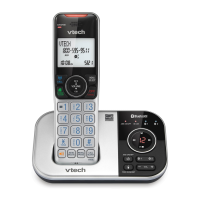

 To Next Page