English
4
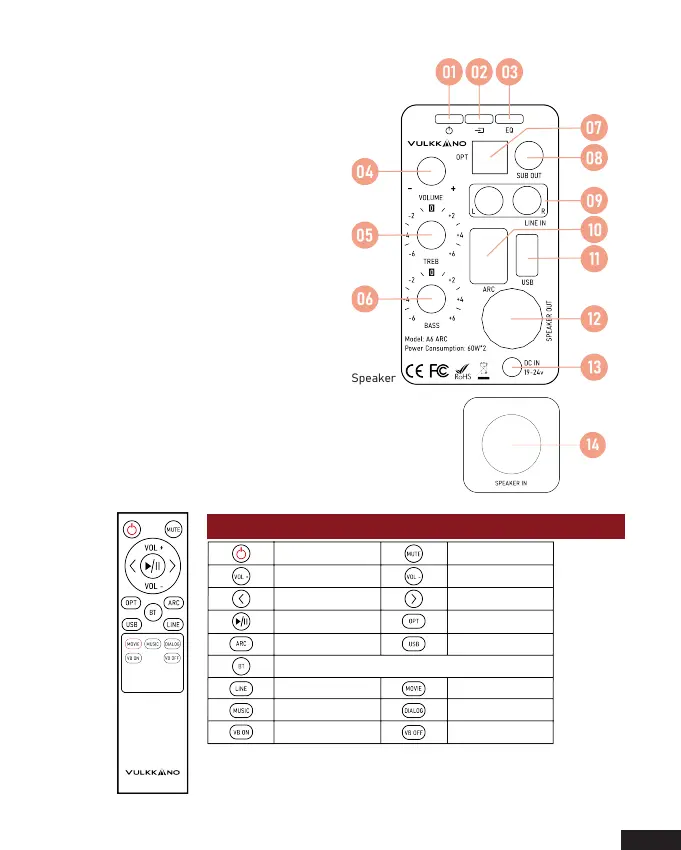
01. Power switch
02. Input selection
Press in to navigate between audio sources:
Bluetooth -> Optical -> Line in -> ARC -> USB
03. Sound effects
Press in to navigate between audio sources:
Music -> Dialogue -> Movie
04. Volume control
05. Treble control
06. Bass control
07. Optical input port
08. Connect a subwoofer
09. Line in input port
10. ARC input port
11. USB input port
12. Left speaker audio output
13. Power port
14. Left speaker audio in
Know your remote
Active Speaker
Passive Speaker
Power button Mute/Unmute
Volume up Volume down
Previous track
Next track
Play/Pause
Bluetooth mode
ARC mode
Line in mode
Optical mode
Virtual bass on
Virtual bass off
USB mode
Movie mode
Music mode Dialogue mode



 To Next Page