English
8
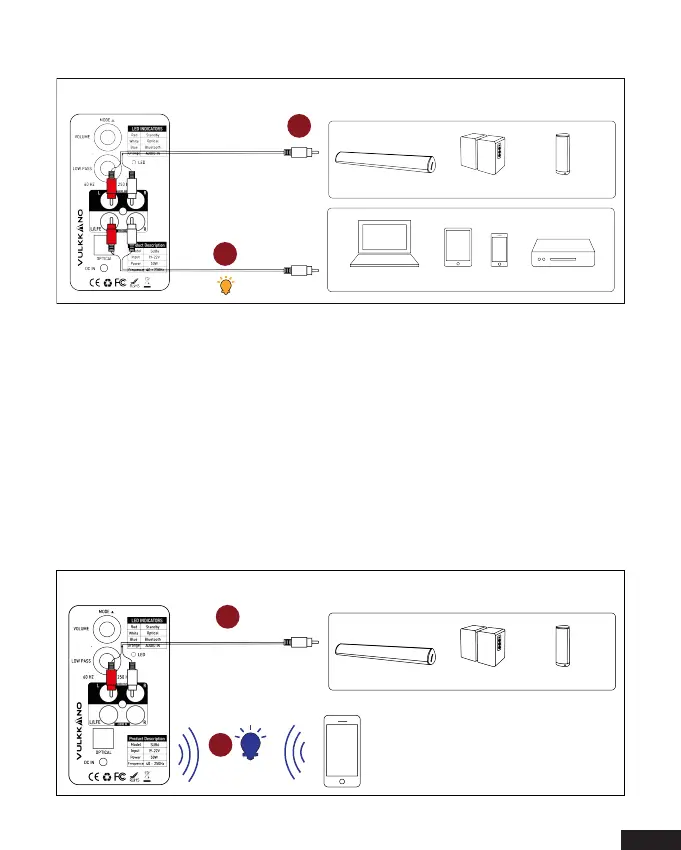
Connecting with a Bluetooth Device and an output device
1. a. Press the “MODE” button on the Subwoofer, when the VULKKANO SUB6
in Bluetooth Pairing mode, the LED indicator will flash blue quickly.
b. Now your can search for the Subwoofer(VULKKANO SUB6) in your
Bluetooth device, connect it. Once your device is paired, the LED indicator
will be blue.
2. Connecting using an RCA to 3.5mm cable between your Subwoofer
and Soundbar or other sources device.
3.5mm-RCA
audio cable
3.5mm-RCA
audio cable
Soundbar Bookshelf Speaker
Desktop Speaker
Laptop
Tablet
Phone
BD/DVD/Set-top box
/Game Console
1
2
Soundbar Bookshelf Speaker
Desktop Speaker
Telephone
1
2
3.5mm-RCA
audio cable


 To Next Page