EasyManua.ls Logo

VuPoint IPWF-P100-VP - User Manual

VuPoint IPWF-P100-VP
24 pages
Print Icon
To Next Page IconTo Next Page
Loading...
Question and Answer IconNeed help?

Do you have a question about the VuPoint IPWF-P100-VP and is the answer not in the manual?

Summary

Getting Started

Power Connection

Instructions for connecting the power adapter and cord to the printer.

Replacing the Cartridge

Compatible Devices & Connections

Apple Device Compatibility

Details compatibility with iPhone, iPad, and iPod touch via Wi-Fi.

Android Device Compatibility

Details compatibility with Android devices via NFC/Wi-Fi Direct.

Application Download & Installation (Apple Devices)

Connect to Wireless (Apple Devices)

Using Camera to Print (Apple Devices)

Choose Photo from Gallery (Apple Devices)

Application Download & Installation (Android Devices)

Connect to Wireless (Android Devices)

Using Camera to Print (Android Devices)

Choose Photo from Gallery (Android Devices)

Printing with PictBridge

LED Indications

Troubleshooting & Specifications

Troubleshooting Guide

Provides solutions for common problems encountered with the printer.

Photo Cube Wireless Specifications

Lists technical specifications for the Photo Cube Wireless printer.

Photo Cartridge Specifications

Details the specifications for the photo printer cartridges.
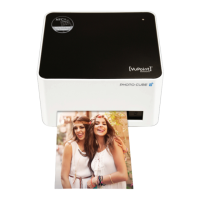
VuPoint IPWF-P100-VP Specifications

General IconGeneral
BrandVuPoint
ModelIPWF-P100-VP
CategoryPrinter
LanguageEnglish

Related product manuals