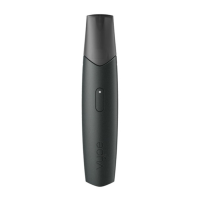
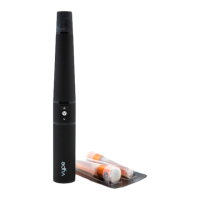
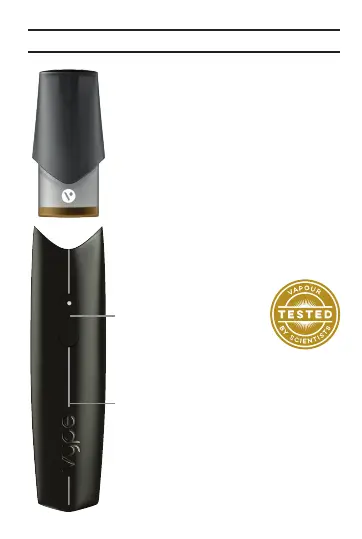
On/Off Button/
LED Indicator
ePen 3 device
Know your Vype ePen 3
Tips:
• Each Vype ePen 3
cartridge is designed for
single use. You should
not attempt to refill as
this may lead to leakage
and damage your device.
• All Vype eLiquids have
been developed
bespoke to Vype
devices for an optimal
vaping experience.
How to use your Vype
ePen 3
•
For optimal performance,
your Vype ePen 3
should be fully charged
before first use.
• Remove the Vype
ePen 3 cartridge from
the blister pack. Push
the cartridge onto the
device, it will click fit.
• To switch on your Vype
ePen 3, press the button
3 times within 2 seconds.
The LED will flash 3
times in a colour which
represents the
level of
remaining charge.
• For optimum enjoyment
and satisfaction it is
recommended to close
your lips over the
cartridge so the tip is
inside your mouth, not
resting directly on
your lips.
• To begin your vaping
experience, press the
button and hold it down
whilst inhaling. After the
button is released the
LED will indicate the
remaining level of charge.
• Only use Vype ePen 3
cartridges with the Vype
ePen 3 device.
• The Vype ePen 3 can be
switched off by rapidly
clicking on the button
three times. The device
will confirm that it has
switched off by flashing
the LED three times.
• If the Vype ePen 3
remains unused for
10 minutes, it will
automatically switch off
and will need to be
switched back on to use.
• To confirm whether your
Vype ePen 3 is on or off,
press the button once. If
the device is on, the LED
will illuminate for three
seconds. If the device is
off the LED will not
illuminate.
When to change your
Vype ePen 3 cartridge
It’s time to change your
Vype ePen 3 cartridge
when:
• The visible liquid level
has reached the base of
the cartridge.
• You notice a
deterioration in the taste
or quality of the vapour.
• Your Vype ePen 3 stops
producing vapour.
If your Vype ePen 3 stops
producing vapour and the
cartridge is not yet empty,
check your device is fully
charged.
Charge level indicators
on your Vype ePen 3
During the device turning
on procedure, or on a
single quick button press
when the device is on, or
just after releasing the
button when vaping, the
LED colour will indicate
the state of charge.
• Green: Your device is
between 40% and 100%
charged.
• Amber: Your device is
between 10% and 40%
charged.
• Red: Your device is less
than 10% charged.
Your Vype ePen 3 device
may run out of charge
before the Vype ePen 3
cartridge is finished so
don’t automatically
discard the cartridge
when charging the
device as there may be
eLiquid in it.
How to charge your
Vype ePen 3
• To charge your device,
attach the USB charging
cable supplied with your
Vype ePen 3 kit to the
micro USB port on the
base of the device.
• Connect the other end
of the USB charging
cable to a powered USB
port which is capable of
supplying 5V at 1.5A.
Charging in a standard
computer port is
possible but will take
longer to achieve full
charge.
• When charging, the LED
on the Vype ePen 3 will
indicate the charge level.
• It should take no longer
than 2 hours to fully
charge your device.
• Green: Your device is
between 85% and
100% charged.
• Red solid: Your device
is less than 85% charged.
• Red pulsing: Your
device is less than 10%
charged.
• When the LED shows
continuous green, the
Vype ePen 3 is fully
charged and the USB
charging cable should
be disconnected.
• If your Vype ePen 3 LED
starts to flash red
rapidly whilst charging
please disconnect and
contact the customer
care line.
• This product should
only be connected to a
safety extra-low voltage
(SELV) output,
corresponding to the
marking on the device.
• You can also charge
your Vype ePen 3
using a Vype USB car
charger or Vype wall
plug which are available
at govype.com.
Important product
use information
• To avoid the risk of fire,
injury and/or damage to
your Vype ePen 3 or
other property, only
charge your Vype
ePen 3 device with the
equipment provided in
your Vype ePen 3 kit or
with compatible Vype
charging accessories
(available at
govype.com).
• Never leave your device
unattended whilst on
charge.
• Rating of the USB
charging cable:
DC 4.5V 2A.
• The build-up of dirt
inside your Vype
ePen 3 cartridge and the
top of your device may
prevent you from
enjoying your
experience and it may
disrupt normal charging.
To prevent this, check
and if necessary detach
your Vype ePen 3
cartridge from the
device, clean with a dry
cloth and carefully blow
into the Vype ePen 3
cartridge to dislodge
any build-up of dirt.
• The device will
automatically stop
charging after a period
of 3 hours. It has an
overvoltage, an
overcurrent and
a short-circuit
protection function.
• Always keep your Vype
ePen 3 out of the reach
of children.


 To Next Page
 Loading...