EasyManua.ls Logo

W-KING H10 - Page 7

W-KING H10
13 pages
Print Icon
To Next Page IconTo Next Page
To Previous Page IconTo Previous Page
Loading...
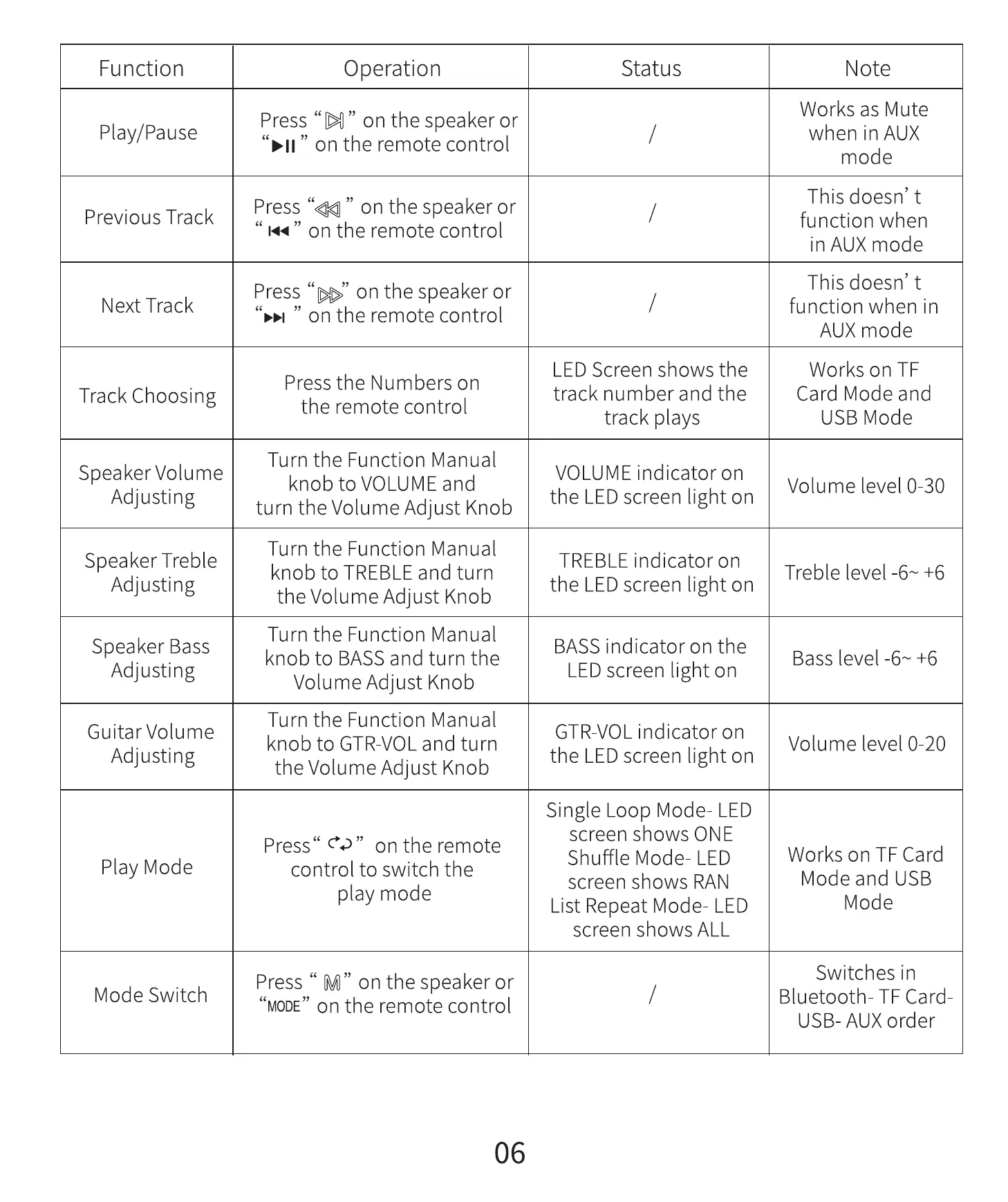
Function
Play/Pause
Previous Track
Next Track
Track Choosing
Speaker Volume
Adjusting
Speaker Treble
Adjusting
Speaker Bass
Adjusting
Guitar Volume
Adjusting
Play Mode
Mode Switch
Operation
" on the speaker or
on the remote control
" on the speaker or
" on the remote control
Press on the speaker or
" on the remote control
Press the Numbers on
the remote control
Turn the Function Manual
knob to VOLUME and
turn the Volume Adjust Knob
Turn the Function Manual
knob to TREBLE and turn
the Volume Adjust Knob
Turn the Function Manual
knob to BASS and turn the
Volume Adjust Knob
Turn the Function Manual
knob to GTR-VOL and turn
the Volume Adjust Knob
Status
LED Screen shows the
track number and the
track plays
VOLUME indicator on
the LEDscreen light on
TREBLE indicator on
the LEDscreen light on
BASS indicator on the
LEDscreen light on
GTR-VOL indicator on
the LEDscreen light on
Single Loop Mode- LED
screen shows ONE
Press" eo" on the remote
Shuffle Mode- LED
control to switch the
screen shows RAN
play mode
List Repeat Mode- LED
screen shows ALL
Press " M" on the speaker or
"MODE"on the remote control
06
Note
Works as Mute
when in AUX
mode
This doesn' t
function when
in AUX mode
This doesn' t
function when in
AUX mode
Works on TF
Card Mode and
USB Mode
Volume level 0-30
Treble level -6 & +6
Bass level -E +6
Volume level 0-20
Works on TF Card
Mode and USB
Mode
Switches in
Bluetooth- TF Card
USB- AUX order