
 Need help?
Do you have a question about the Wahoo Fitness Cadence Sensor and is the answer not in the manual?
Instructions for mounting the Wahoo RPM Cadence sensor onto a bicycle crank arm.
Instructions for attaching the Wahoo RPM Cadence sensor to a shoe using the clip mount.
Steps to pair the Wahoo RPM Cadence sensor with the Wahoo Fitness app on iOS.
Explanation of LED signals for Wahoo RPM Cadence sensor status and connection.
Guide to initiating a workout session with the Wahoo RPM Cadence on iOS.
Instructions for pausing, stopping, and saving workouts in the iOS app.
Guide to initiating a workout session with the Wahoo RPM Cadence on Android.
Instructions for pausing, stopping, and saving workouts in the Android app.
Information on sensor compatibility and pairing with other fitness applications.
Steps to test sensor hardware and connectivity using the Wahoo Utility app on iOS.
Steps to test sensor hardware and connectivity using the Wahoo Utility app on Android.
Details physical dimensions, weight, battery type, and battery life of the sensor.
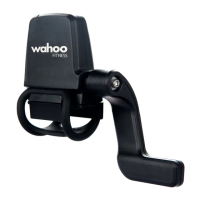
The Wahoo RPM Cadence sensor is a compact device designed to measure and transmit cycling cadence data to compatible fitness applications. It can be installed on a bicycle's crank arm or a rider's shoe, offering flexibility in how cadence is tracked. The sensor is intended to be used with the Wahoo Fitness app, available for both iOS and Android devices, but is also compatible with other third-party fitness applications.
The primary function of the Wahoo RPM Cadence sensor is to accurately detect and transmit a cyclist's pedaling rate (cadence). This data is crucial for training, performance analysis, and maintaining an efficient cycling rhythm. The sensor utilizes Bluetooth technology to wirelessly communicate with smartphones or other compatible devices running fitness apps.
When installed on a bike's crank arm, the sensor detects the rotation of the crank, translating this motion into a cadence measurement. Similarly, when attached to a shoe, it senses the movement of the foot during pedaling to calculate cadence. The sensor is designed to be activated by motion, either by shaking it for a few seconds or by spinning the bike's crank arm a few times.
The Wahoo RPM Cadence sensor provides visual feedback through a Blue and Red LED. These LEDs help users during the pairing process and indicate the sensor's operational status. The Red LED flashes to indicate cadence detection, while the Blue LED communicates the connection state. A slow blink (about once per second) signifies that the sensor is awake but not yet paired. A rapid four-flash sequence indicates an instant connection, and a quick blink (about twice per second) means the sensor is successfully paired to a device. These LED indicators operate for approximately 30 seconds to conserve battery life.
The Wahoo RPM Cadence sensor offers two primary installation methods: on the bike's crank arm or on the rider's shoe.
The Wahoo Fitness app will remember the sensor's pairing for future workouts. Users simply need to wake up the sensor and start a new workout to begin recording data.
The Wahoo RPM Cadence sensor is compatible with various third-party apps. Users should open the desired compatible app, navigate to its settings, and look for options like "connect to sensor" to pair the device. It's important to note that Bluetooth devices can only pair to one app at a time, so any background apps using the sensor should be closed before connecting to a new app.
If persistent issues arise, users are advised to contact support for more information. The Wahoo Fitness app's Settings>Info+Help>Email Us (iOS) or Settings>Info+Help>Send support email (Android) function can attach a log with the query to assist in troubleshooting.
If a firmware update is available for the sensor, the Wahoo Fitness app will prompt the user to perform the update. For Android users, the free Wahoo Utility app is required for firmware updates. Applying updates when available is recommended to improve sensor performance. Sensors with available updates will be marked with a badge in the "Saved Sensors" menu.
 General
| Type | Cadence Sensor |
|---|---|
| Battery | CR2032 |
| Battery Life | Up to 12 months |
| Water Resistance | IPX7 |
| Connectivity | Bluetooth, ANT+ |

 To Next Page
