EasyManua.ls Logo

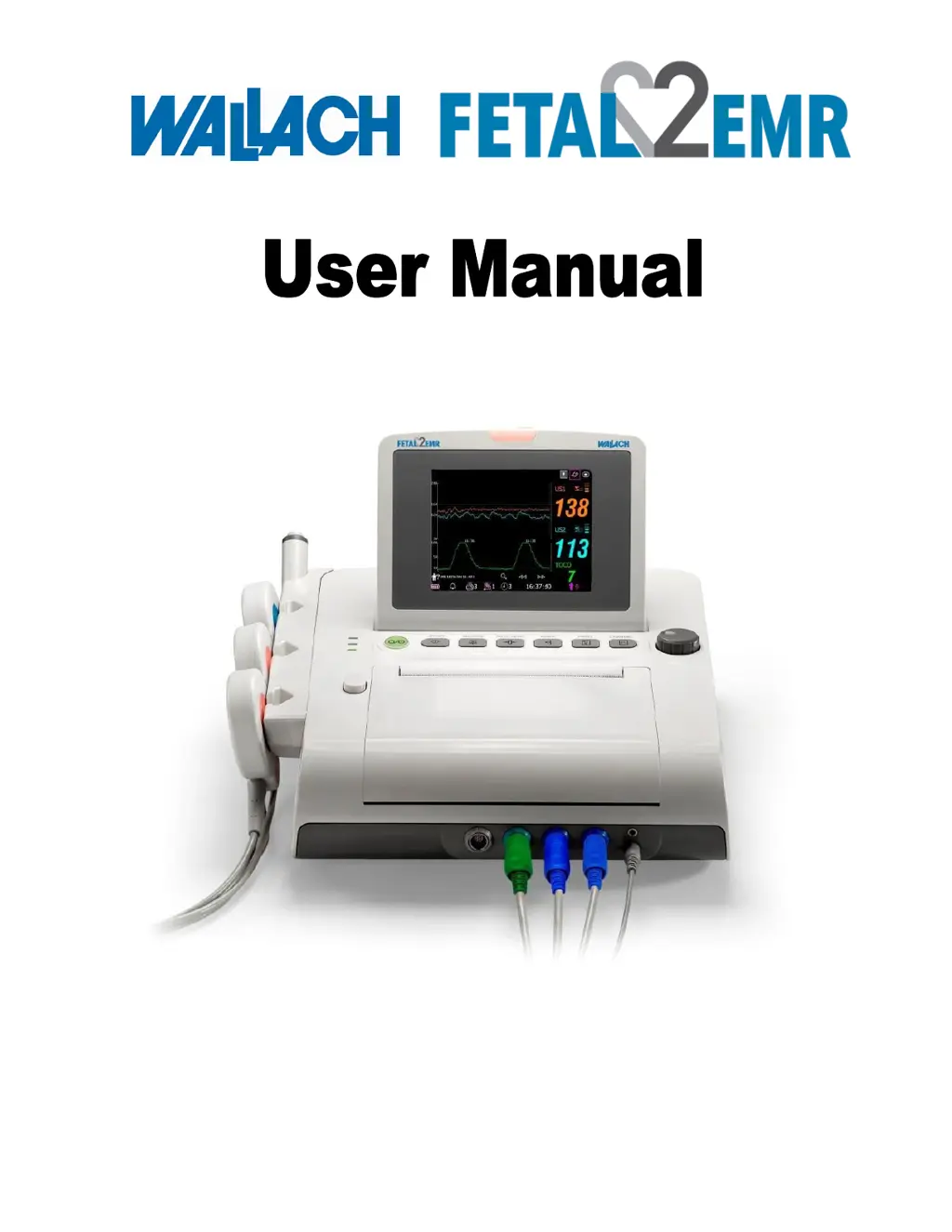
WALLACH FETAL2EMR 902300 - User Manual

WALLACH FETAL2EMR 902300
89 pages
Print Icon
To Next Page IconTo Next Page
Loading...
37474 • Rev B • 2/12
Fetal Monitor
REF 902300

Table of Contents

Questions and Answers

  • I
    ijacobsAug 6, 2025
    How to fix no display on WALLACH FETAL2EMR 902300?
    • J
      Joseph KirkAug 6, 2025
      If your WALLACH Monitor isn't displaying anything, here are a few things to check: 1. Make sure the power cable is securely tightened. If it's loose, tighten it. 2. Check the fuse. If it's blown, replace it. 3. If you're running on battery, connect to an AC power supply.
  • F
    fernandezclaytonAug 11, 2025
    What to do if I get a Recorder Error on my WALLACH FETAL2EMR 902300 Monitor?
    • P
      Patrick MccarthyAug 11, 2025
      If you're getting a Recorder Error on your WALLACH Monitor, try the following: 1. Ensure the paper is loaded correctly and is not damp. Keep paper away from moisture. 2. Use the paper provided by the manufacturer, or contact the manufacturer for service if you are using the wrong paper. 3. Press the PRINT key to turn on the recorder. 4. Load paper if it's out of paper. 5. Close the drawer cover and press it until both latches are locked in position if the paper drawer is not locked.
  • B
    Brandy BlackwellAug 15, 2025
    Why is my WALLACH FETAL2EMR 902300 Monitor making noise?
    • C
      Charles ValenzuelaAug 15, 2025
      If your WALLACH Monitor is making noise, here are a few things to try: * Turn down the volume if it's set too high. * Identify and turn off or remove any sources of interference, like mobile phones. * Move the monitor to a place with less interference.
  • V
    Vincent MooreAug 19, 2025
    How to fix trouble with Contractions Monitoring (External) on WALLACH FETAL2EMR 902300?
    • J
      Julian JonesAug 19, 2025
      To address trouble with Contractions Monitoring (External) on your WALLACH Monitor, adjust the belt. The issue may be that the belt is either too tight or too loose.
  • T
    Taylor CarterAug 25, 2025
    What to do if WALLACH Monitor has faint trace or no trace?
    • B
      Beth TrujilloAug 25, 2025
      If you are getting a faint trace or no trace on your WALLACH Monitor, use paper recommended by the manufacturer.
  • A
    alyssa50Aug 27, 2025
    How to decrease TOCO sensitivity on WALLACH Monitor?
    • W
      william99Aug 28, 2025
      If the TOCO sensitivity is too high (higher than 100 units) on your WALLACH Monitor, confirm good contact to patient skin with the TOCO transducer and change the position of the TOCO transducer, if necessary. This issue occurs when the body pressure from uterus to TOCO transducer is far higher than the average numeric.
  • M
    Mary SmithNov 1, 2025
    Why am I having trouble with Ultrasound FHR Monitoring on my WALLACH FETAL2EMR 902300 Monitor?
    • O
      orichardsNov 1, 2025
      If you're having trouble with Ultrasound FHR Monitoring on your WALLACH Monitor, here are a few things to check: * If the pregnant woman is too obese, monitor FHR with DECG, if applicable. * Adjust the position of the transducer until a better signal is received. * Tighten the belt. * Wipe off excess ultrasound coupling gel. * Delay the monitoring if there are frequent fetal movements. * Request the patient to reduce movements if there is maternal movement. * Add ultrasound aquasonic coupling gel if there is inadequate ultrasound coupling gel. * Change the position of the ultrasound transducer if you are recording maternal heart rate inadvertently. * Adjust the position of the transducer if it is not securely placed in position, and the mixed noise has been recorded. * ...

Summary

Chapter 1 Safety Guide

Intended Use

Defines the intended application and limitations of the fetal monitor.

Safe Operation Instructions

Provides essential guidelines for operating the fetal monitor safely.

Ultrasound Safety

Details safety considerations for using ultrasound in fetal monitoring.

General Safety Precautions

Lists critical safety measures for operating the device.

Battery Safety

Outlines precautions for handling and using the device's battery.

Definitions and Symbols

Explains key terms and symbols used throughout the manual.

Chapter 2 Monitor and Accessories

Package Inspection

Procedures for unpacking and verifying the contents of the monitor package.

Monitor Hardware Overview

Description of the monitor's physical components, buttons, and ports.

Keys and Control Knob Functions

Details the functions of the monitor's keys and control knob for operation.

Indicator Lights

Explains the meaning of various indicator lights on the monitor.

Included Accessories

Lists and describes the accessories that come with the fetal monitor.

Screen Interface

Details the main and setup interfaces of the monitor's display.

Chapter 3 Installation Guide

Battery Installation Procedure

Step-by-step guide for installing the rechargeable battery.

Monitor Placement

Instructions on where and how to place the fetal monitor unit.

Loading Recorder Paper

Guide for correctly loading the paper into the monitor's recorder.

Transducer Connection

Instructions on how to connect the ultrasound and TOCO transducers.

Power Cable Connection

Steps for connecting the monitor to a power source.

Chapter 4 Alarms

Alarm Classification

Explains the different types and levels of alarms in the monitor.

Audible Alarm Functionality

Details how audible alarms are activated, silenced, and managed.

Visual Alarm Indicators

Describes the visual cues for alarms on the monitor screen.

Alarm Silence Configuration

How to adjust the duration for silencing alarms.

Alarm Display Format

How to change the way alarm messages are displayed.

Alarm Volume Adjustment

How to set the volume for audible alarms.

Alarm Review and History

How to access and review past alarm messages.

Alarm Handling Measures

Procedures for responding to alarms during monitoring.

Alarm Testing Procedure

Steps to test the functionality of the monitor's alarms.

Default Patient Alarm Settings

Lists the default settings for patient alarms.

Chapter 5 Printing

Recorder Functionality

Describes the features and capabilities of the built-in thermal recorder.

Printing Configuration Options

Settings for auto start printing, paper speed, and print timer.

Interpreting Recorder Printouts

Guide to understanding the information presented on the recorder paper.

Chapter 6 Pre-Monitoring Preparation

Confirming Fetal Vitality

Procedures to confirm fetal life before starting monitoring.

Monitor Power On Procedure

Steps for safely switching on the fetal monitor.

Recorder Paper Check

How to verify the recorder paper is loaded correctly.

Date and Time Configuration

Instructions for setting the monitor's date and time.

Audio Volume Adjustment

How to adjust the monitor's audio volumes for monitoring and keys.

Chapter 7 Fetal Monitoring

FHR Monitoring Setup

Steps for preparing and performing FHR monitoring using ultrasound.

Twin FHR Monitoring

Procedures for monitoring fetal heart rates of twins.

Uterine Activity Monitoring

How to monitor uterine activity using the TOCO transducer.

Fetal Movement Monitoring

Methods for monitoring fetal movement (AFM and MFM).

Initiating Monitoring Session

Steps to begin a new patient monitoring session.

Maternal Information Input

How to input and manage patient identification and information.

Chapter 8 Understanding Measurement Results

Screen Display Modes

How to switch between trace-numeric, trace, and numeric display modes.

Interpreting Traces

Guide to understanding FHR, TOCO, and AFM traces on the screen.

Time Scale Adjustment

How to change the time format for trace display.

Patient Record Search

How to find and access previous patient monitoring records.

File Management and Export

Procedures for managing, exporting, and deleting data via USB.

Trace Review and Playback

How to review and navigate through recorded traces.

Understanding Numeric Values

Explains the numeric displays for FHR, TOCO, IUP, and MFM.

Alarm Message Interpretation

Lists and explains potential alarm messages, causes, and countermeasures.

Chapter 9 After Monitoring

Saving Monitoring Data

How the monitor automatically saves monitoring data.

Completing a Monitoring Session

Steps for finishing a patient monitoring session.

Monitor Power Off Procedure

Instructions for safely switching off the fetal monitor.

Chapter 10 Maintenance and Cleaning

Routine Maintenance Inspections

Details visual, routine, and mechanical inspections for monitor upkeep.

Monitor Maintenance

Guidelines for maintaining the monitor's exterior and screen.

Transducer Care

Instructions for cleaning and maintaining the ultrasound and TOCO transducers.

Recorder Paper Storage

Recommendations for storing recorder paper to maintain quality.

Recorder Maintenance

Procedures for cleaning the recorder's print head and sensor.

General Cleaning Procedures

Steps for cleaning the monitor and its accessories safely.

Disinfection Methods

Allowed disinfectants and procedures for cleaning equipment.

Sterilization Limitations

Notes on when sterilization is or is not permitted for the monitor.

Chapter 11 Warranty and Service Policy

Product Warranty Overview

Details Wallach's warranty obligations for the fetal monitor.

Material and Manufacturing Warranty

Covers defects in materials and manufacturing within the warranty period.

Software and Firmware Warranty

Warranty for software and firmware issues related to defects.

Warranty Limitations

Conditions under which the product warranty becomes void.

Appendix 1 Product Specifications

Environmental Operating Specs

Defines temperature, humidity, and pressure ranges for operation and storage.

Physical Device Specifications

Details monitor dimensions, weight, power, and compliance standards.

Performance Characteristics

Outlines performance parameters for Ultrasound, TOCO, AFM, and Marking.

Recorder Technical Details

Specifies paper width, print speeds, scaling, and recorded information.

Battery Specifications

Provides technical details for the rechargeable lithium-ion battery.

Appendix 2 Signal Input;Output Connector

DB9 Interface Pinout

Details the pins, signals, and I/O for the DB9 connector.

RJ45 Interface Pinout

Details the pins, signals, and I/O for the RJ45 connector.

Appendix 3 Troubleshooting

Display and Noise Issues

Solutions for issues like no display, power loss, and audio noise.

Recorder Errors and Paper Jams

Troubleshooting steps for recorder not working, paper jams, and errors.

FHR Monitoring Problems

Addresses issues with FHR traces, display, and signal quality.

Contractions Monitoring Issues

Solutions for bad trace quality or fluctuating TOCO baselines.

Fuse Replacement

Procedure for replacing blown fuses in the monitor.

Appendix 4 Abbreviations

List of Abbreviations

A list of abbreviations used in the manual and their full meanings.

Appendix 5 Ordering Information

Available Accessories and Part Numbers

Lists accessories, their part numbers, and notes on compatibility.

Appendix 6 EMC Information

Electromagnetic Emissions Guidance

Information on electromagnetic emissions and their compliance.

Electromagnetic Immunity (General)

Immunity requirements for electrostatic discharge, surges, and power frequency fields.

Electromagnetic Immunity (Non-Life-Support)

Immunity guidance for non-life-supporting equipment and RF separation.

Recommended RF Separation Distances

Guidelines for maintaining safe distances from RF transmitters.

Appendix 7 Limitations of Ultrasonic Monitoring

Ultrasound Working Principle

Explanation of how ultrasound technology functions in diagnostic imaging.

Fetal Heart Monitoring Artifacts

Discusses common artifacts like doubling, halving, and erratic traces.

Audio vs. Screen Reading Differences

Explains discrepancies between monitor audio output and screen readings.

WALLACH FETAL2EMR 902300 Specifications

General IconGeneral
ModelFETAL2EMR 902300
ManufacturerWallach
CategoryMonitor
TypeFetal Monitor
TOCO Range0-100%
Power SupplyAC 100-240V, 50/60Hz
BatteryRechargeable lithium-ion
PrintingThermal printer
Paper Speed1, 2, 3 cm/min
ConnectivityEthernet, USB