EN
22
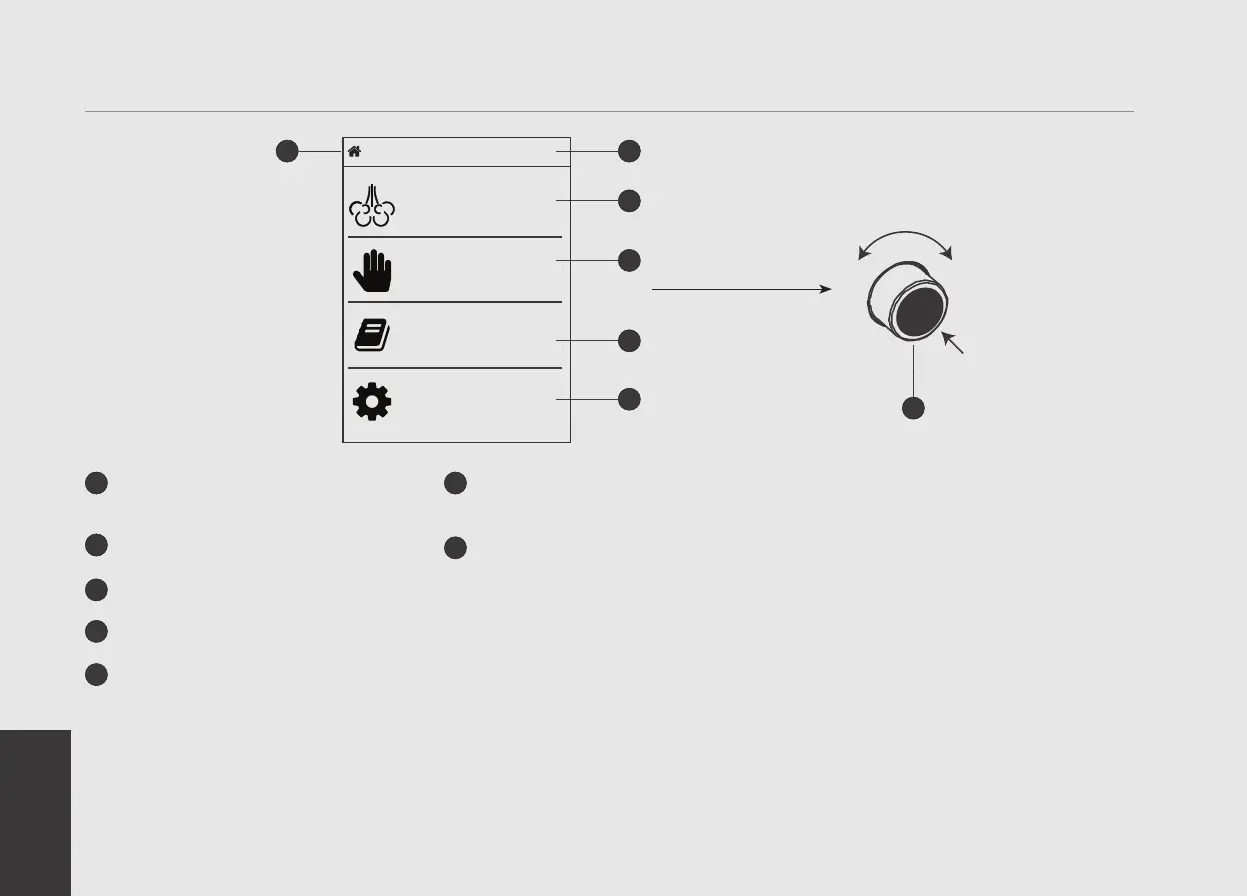
Programming Display
1
Graphic programming display with
Encoder
2
Steam temperature
3
Steaming recipe list
4
Steaming in manual mode
5
Recipe management
6
Machine conguration (access the
programming menu
7
Encoder knob: Rotating to the right
increases the value. Rotating to the
left decreases the value. Pressing
allows to browse the software menu,
to access the functions or to conrm
the rst installation.
You can turn on/off the machine by
pressing and holding the Encoder knob.
7
Home 0°C
+-
PUSH
1
3
The display enables the operator to interact with the appliance to visibly change parameter values. The display also provides valuable
information to the operator.
There are several warnings that the can be displayed to alert the operator of an unusual condition or a fault. Additionally, simple
messages are displayed alerting the operator that an action has been started or that a process needs to begin.
Recipe
Steaming
Manual
Steaming
Manage
Recipes
Machine
Conguration
2
4
5
6


 To Next Page