7
1. Main Power ON/OFF Switch (not shown)
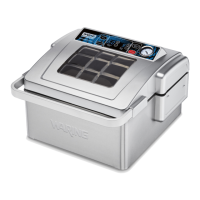
2. Vacuum/Seal
• Press to start default/programmed vacuum operation of the pouch.
Pouch is automatically sealed when vacuum cycle is completed.
3. Cancel
• Press to stop the vacuum or sealing cycle.
4. Seal
• Use to seal open end of a pouch when making pouch from roll.
• To avoid crushing delicate items: During automatic Vacuum/Seal
function, press Seal to immediately stop the vacuum process and
start the bag-sealing process.
5. Vacuum Time
• Shows the working time and progress of vacuuming.
6. Vacuum Time Adjust Buttons (Vac Time “+” or “–”)
• Press to increase (+) or decrease (-) vacuum time.
7. Seal Time
• Shows the working time and progress of sealing.
8. Seal Time Adjust Buttons (Seal Time “+” or “–”)
• Press to increase (+) or decrease (-) seal time
9. Marinate (99 seconds per cycle)
• Use this function to ensure wet marinades or dry rubs penetrate
the product through drawing and releasing a vacuum.
• This helps to open the pores of the food and create maximum
infusion.
10. Vacuum Gauge
• Indicates the vacuum level inside the chamber.
11. Cover Handle
• Heavy-duty handle used to open/close lid.
12. Gasket (not shown)
• Ensures all air is drawn out between the chamber and lid.
13. Sealing Bar
• Provides wide, effective seals on pouches up to 11" wide.
14. Pouch Clamps
• Hold pouch securely in place during the vacuum packaging process.
15. Pouches Included (not shown)
• (50) 1-quart and (50) 2-quart-sized pouches are included.


 To Next Page