Setting the FLASH
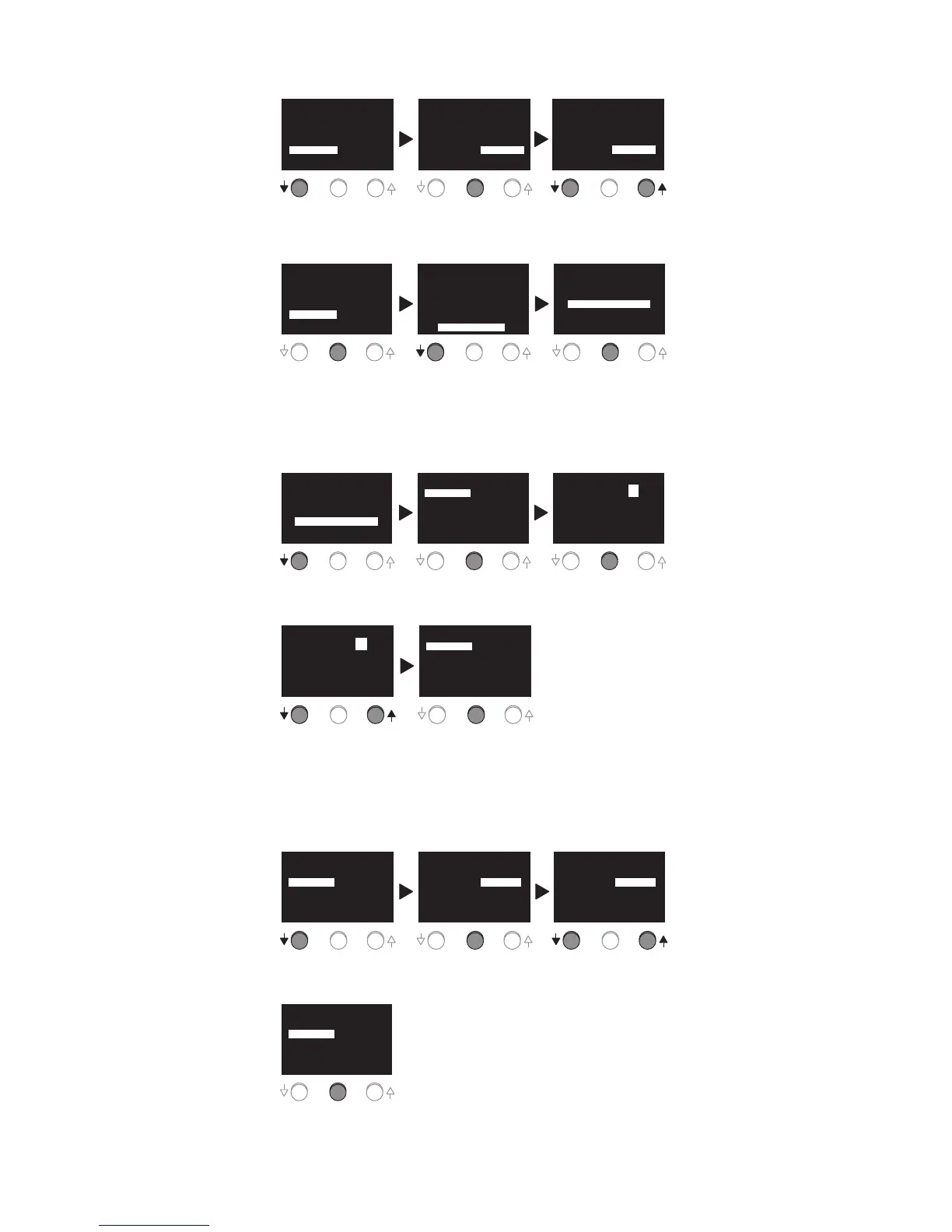
Press the ↓ button to
highlight FLASH.
Press the CENTER
button to highlight
DISABLED.
Press the ↓ or the
↑ button to choose
ENABLED or DISABLED.
PREFERENCES
PREVIOUS MENU
TIME FMT: 12 HOURS
DATE FMT: MM/DD/YY
SOUND: DISABLED
FLASH: DISABLED
PREFERENCES
PREVIOUS MENU
TIME FMT: 12 HOURS
DATE FMT: MM/DD/YY
SOUND: DISABLED
FLASH: DISABLED
PREFERENCES
PREVIOUS MENU
TIME FMT: 24 HOURS
DATE FMT: MM/DD/YY
SOUND: DISABLED
FLASH: ENABLED
Once flash preference is
set, press the CENTER
button to save the setting.
PREFERENCES
PREVIOUS MENU
TIME FMT: 12 HOURS
DATE FMT: MM/DD/YY
SOUND: DISABLED
FLASH: ENABLED
PREFERENCES
PREVIOUS MENU
TIME FMT: 12 HOURS
DATE FMT: MM/DD/YY
SOUND: DISABLED
FLASH: ENABLED
SETUP
SET TIME AND DATE
LOCATION
PREFERENCES
SCHEDULING
MAIN PAGE
SCHEDULE
Setting the PROGRAM
Press the ↓
button to highlight
SCHEDULING.
Press the CENTER
button to enter the
PROGRAM menu.
Press the CENTER
button to highlight the
program #.
SETUP
SET TIME AND DATE
LOCATION
PREFERENCES
SCHEDULING
MAIN PAGE
SCHEDULING
PREVIOUS MENU
SCHEDULING
PREVIOUS MENU
PROGRAM: # 1
DAY(s): None
ON: DUSK OFF: DUSK
+00 Min +00 Min
PROGRAM: # 1
DAY(s): None
ON: DUSK OFF: DUSK
+00 Min +00 Min
Press the ↓ or the ↑
button to decrease or
increase program #.
Once the program # is
set, press the CENTER
button to save the setting.
SCHEDULING
PREVIOUS MENU
PROGRAM: # 2
DAY(s): None
ON: DUSK OFF: DUSK
+00 Min +00 Min
SCHEDULING
PREVIOUS MENU
PROGRAM: # 2
DAY(s): None
ON: DUSK OFF: DUSK
+00 Min +00 Min
There are 8 different programs that can be set.
Setting the DAY(s)
This refers to the days of the week when the program will be initiated
Press the ↓ button to
highlight DAY(s)
Press the CENTER
button to highlight the
day(s) options.
Press the ↓ or the ↑
button to choose the
day(s) options.
SCHEDULING
PREVIOUS MENU
SCHEDULING
PREVIOUS MENU
PROGRAM: # 2
DAY(s): None
ON: DUSK OFF: DUSK
+00 Min +00 Min
PROGRAM: # 2
DAY(s): None
ON: DUSK OFF: DUSK
+00 Min +00 Min
SCHEDULING
PREVIOUS MENU
PROGRAM: # 2
DAY(s): Mon - Fri
ON: DUSK OFF: DUSK
+00 Min +00 Min
Press CENTER button to
save the setting.
SCHEDULING
PREVIOUS MENU
PROGRAM: # 2
DAY(s): Mon - Fri
ON: DUSK OFF: DUSK
+00 Min +00 Min
Options include:
None, All, Mon – Fri, Weekends, Sun, Mon, Tue, Wed, Thu, Fri, Sat.
Once PREVIOUS MENU
is highlighted press the
CENTER button to return
to SETUP menu.
Press the ↓ button to
highlight PREVIOUS
MENU.
Call 800.879.8585 for Technical Support


 To Next Page
 Loading...