1.
For frequency control
with positive
dc
inputs
at VCG
IN, set the dial for
a
lower
frequency limit.
2.
For frequency control
with negative
dc
inputs
at VCG
IN,
set
the
dial for an upper frequency
limit.
3.
For modulation
with an
ac
input
at VCG
IN,
set the
dial
at
the
desired center frequency.
Do not exceed
the maximum dynamic
range of the selected
frequency
range.
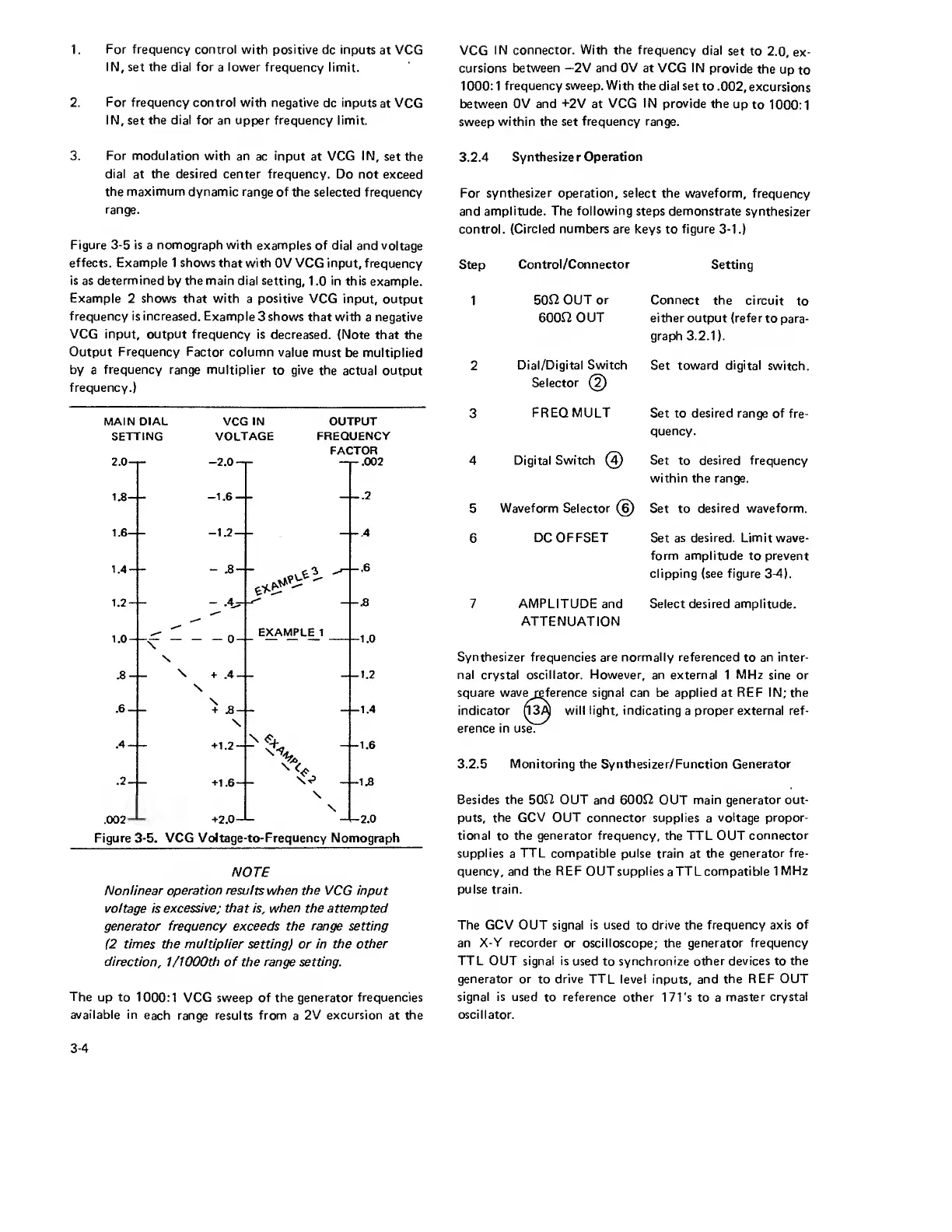
Figure
3-5
is a nomograph with
examples of dial
and voltage
effects. Example
1
shows that with
OV
VCG
input,
frequency
is
as
determined
by
the main
dial setting,
1
.0
in
this
example.
Example 2 shows that
with a positive VCG
input,
output
frequency is increased.
Example
3
shows
that with
a
negative
VCG input,
output frequency
is decreased. (Note
that the
Output Frequency
Factor column
value must
be multiplied
by
a
frequency range multiplier
to
give
the actual output
frequency.)
MAIN DIAL VCG IN
OUTPUT
SETTING VOLTAGE
FREQUENCY
FACTOR
Figure
3-5.
VCG Voltage-to- Frequency Nomograph
NOTE
Nonlinear
operation
results when the VCG input
voltage
is
excessive; that is,
when
the attempted
generator frequency exceeds the range setting
(2
times the
multiplier
setting)
or
in
the other
direction,
1
/1000th
of the
range setting.
The
up to
1000:1 VCG
sweep
of the generator
frequencies
available in
each range results from a
2
V
excursion
at
the
VCG
IN connector.
With
the frequency
dial
set to
2.0, ex-
cursions
between
—
2V and 0V at VCG IN
provide
the
up
to
1000:1 frequency sweep.
With the
dial set
to
.002, excursions
between 0V and +2V at
VCG IN provide
the
up
to
1000:1
sweep
within the set
frequency
range.
3.2.4
Synthesizer
Operation
For synthesizer operation, select the waveform,
frequency
and
amplitude. The following steps demonstrate
synthesizer
control. (Circled numbers are
keys to
figure 3-1.)
Step
Control/Connector
Setting
1
son
OUT or Connect
the
circuit
to
6000
OUT either
output
(refer
to
para-
graph 3.2.1).
2
Dial/Digital Switch
Set
toward
digital
switch.
Selector
(2)
3
FREQ MULT
Set to
desired
range of
fre-
quency.
4 Digital Switch
(4)
Set to desired frequency
within
the
range.
5
Waveform Selector
(6)
Set to
desired waveform.
6
DC OFFSET
Set
as desired. Limit wave-
form amplitude to prevent
clipping (see figure
3-4).
7
AMPLITUDE
and
Select
desired amplitude.
ATTENUATION
Synthesizer frequencies
are normally referenced
to
an inter-
nal crystal oscillator. However, an external
1
MHz
sine or
square wave reference
signal can be applied at
REF
IN; the
indicator
n3A
will light, indicating
a
proper external ref-
erence
in
use.
3.2.5
Monitoring
the Synthesizer/Function Generator
Besides the 50L2 OUT
and
600J2
OUT main generator out-
puts, the GCV OUT
connector supplies a
voltage propor-
tional
to
the generator
frequency, the TTL OUT
connector
supplies
a
TTL compatible pulse
train at
the generator fre-
quency, and the
REF
OUT supplies
a
TTL compatible 1
MHz
pulse train.
The GCV OUT signal is used
to
drive the frequency
axis of
an
X-Y recorder
or oscilloscope; the generator
frequency
TTL
OUT signal is
used to synchronize
other devices to the
generator or
to
drive
TTL level inputs, and
the REF OUT
signal is used
to reference other
171's to a
master
crystal
oscillator.
3-4


 To Next Page
 Loading...
