Using your WaveWall Airtubes
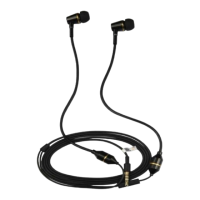
The WaveWall Airtubes are headphones which offer crisp, clear sound with good
bass.
Carefully unpack the carton and confirm that the following parts are included:
● One set of headphones
● One bag with replacement earbuds
Choosing an earbud size:
Select an earbud size that best suits your ears. Make sure to properly attach the new
earbud to the headphones before placing it in your ear. The standard sized earbuds
will be suitable for most users.
Connecting to your device:
Attach the headphone cable to the standard 3.5mm headphone connector on your
device.
Troubleshooting
If you experience any trouble using your headphones, try the following
troubleshooting instructions.
No audio/intermittent audio
Securely connect the headphone cable
to 3.5 mm headphone connector on
your device.
Try another audio device.
Turn off any audio enhancement
features on the audio source.
Securely attach the earbuds to the
earpiece.
Contact WaveWall for replacement
earbuds
Sound is muffled from earpiece
Clear any debris or wax build-up from
the earbuds.
Unplug the headphones from the audio
source, then plug back in making sure
they are securely connected.
Try another audio device.


 To Next Page
 Loading...