
 Need help?
Do you have a question about the WEIGHSOUTH VS-2501 and is the answer not in the manual?
Steps to assemble the scale, including attaching feet, placing the base, connecting the indicator, and mounting bracket.
How to reset the unit to zero before weighing.
Steps to perform tare weighing, subtracting container weight.
Setting calibration unit (kg/lb) and decimal digits.
Setting graduation, max capacity, and zero calibration options.
Performing span calibration and resetting default parameters.
Troubleshooting for overload, wrong load cell connection, and quality issues.
Solutions for calibration errors, negative input signals, and unstable signals.
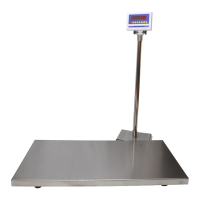
The VS-2501 Veterinary Scale is a robust and reliable weighing instrument designed for accurate measurement in veterinary settings. This device is engineered to provide precise weight readings for animals, ensuring optimal performance and ease of use for professionals.
The primary function of the VS-2501 is to accurately weigh animals. It operates by utilizing a weighing platform connected to an indicator, which displays the weight. The scale is designed to be stable and provide consistent readings, crucial for monitoring animal health and treatment. It supports both pounds (lb) and kilograms (kg) as weighing units, offering flexibility for various operational standards.
The scale incorporates several basic weighing functions to enhance its utility. It can indicate when the weight is zero and stable, ensuring that readings are taken under optimal conditions. The "Gross" function displays the total weight on the platform, while the "Tared" function indicates when a tare value has been stored, allowing for the subtraction of container weights. The "Hold" feature, which can be set to either automatic or manual, is particularly useful for weighing active animals, as it captures and locks a stable weight reading even if the animal moves.
For more complex operations, the VS-2501 includes an "Accumulation Operation." This feature allows users to sum multiple weight readings, which is beneficial for tracking total weight over several measurements or for weighing multiple small items sequentially. The accumulated weight and the number of weighments can be displayed, providing a comprehensive overview of the total.
A "Check Weighing Function" is also integrated, enabling users to determine if a weighed sample falls within a predefined upper and lower limit. This is useful for quality control or for ensuring animals meet specific weight criteria. The indicator lights will function to show if the weight is within, above, or below the set limits.
The scale is equipped with an internal rechargeable battery, providing portability and continuous operation even when disconnected from a power supply. It automatically switches to battery mode, and indicators show when the battery is low (red light) or fully charged (green light).
Operating the VS-2501 is designed to be straightforward. To power on or off, users press and hold the ON/OFF button for two seconds. After a brief self-inspection, the unit will display "0.0" in weighing mode, indicating it's ready for use.
Before weighing, it's essential to ensure the unit is on a level and stable surface. The "Zero" function allows for manual resetting of the display to 0.0, compensating for any minor fluctuations or residual weight on the platform.
For straight weighing, items or animals are carefully placed on the platform. The weight is displayed once stable, and upon removal, the display returns to 0.0.
The "Weighing With Tare" feature simplifies the process of weighing items in containers. By placing the empty container on the platform and pressing the "Tare" button, the display resets to zero, effectively subtracting the container's weight. Subsequent placement of the actual weight (including the tared container) will then show only the net weight of the item. The tare value can be removed by pressing the "Tare" button again with no weight on the platform.
The "Accumulation Operation" is initiated by pressing the "Total" button after the first stable weight is loaded. The "Total" enunciator illuminates, confirming the mode is active. Subsequent weights are added by removing the previous item, placing the new one, and pressing "Total" again. To view the total accumulated weight and the number of weighments, the "Print" and "Total" buttons are pressed simultaneously.
The "Hold Function" is particularly valuable for weighing live animals that may not remain still. In "Auto Hold" mode, the scale automatically calculates an average from various readings once the animal is stable, locking in the weight and illuminating the "Hold" light. The weight returns to normal after the animal is removed. In "Manual Hold" mode, the user presses the "Hold" key once the animal is stable, and the scale then calculates and locks the average weight.
The scale also offers "Unit Switching" between kilograms and pounds using the "kg/lb" button, providing convenience for users who need to work with different measurement systems.
The VS-2501 is designed with consideration for maintenance and longevity. The operations manual emphasizes the importance of handling the scale with care, avoiding excessive loads, and preventing unnecessary roughness during operation.
For optimal performance, the scale should be placed in a stable, vibration-free, and level location. The ground must be capable of safely bearing the weight of the fully loaded scale. The assembly instructions detail how to properly install the adjustable feet and ensure all four feet are touching the ground surface for stability.
The manual also provides crucial safety notices, warning that any changes to menu settings can affect weighing accuracy. It is recommended that only qualified individuals make such changes to avoid voiding the warranty or compromising performance. Untrained personnel should not operate, clean, inspect, maintain, or tamper with the scale.
An "ATTENTION" label highlights that the indicator is static-sensitive equipment. Users are advised to remove power during electrical servicing to prevent damage. Touching internal components by hand will void the warranty.
When the platter is removed for cleaning, users are cautioned to be careful not to damage internal components. This suggests that the design allows for the platter to be removed for cleaning, which is a practical maintenance feature for hygiene in a veterinary environment.
The internal rechargeable battery requires an initial charge of eight full hours when the VS-2501 is used for the first time, ensuring the battery is conditioned for long-term use.
The "Set Up Menu" provides access to various "C" functions that allow for customization and calibration. These functions, such as "Calibration Unit," "Decimal Readings," "Scale Graduation," "Scale Maximum Capacity," "Scale Zero Calibration," and "Scale Calibration," enable precise adjustments to the scale's operation. However, the manual explicitly states that changes to C01-C07 can dramatically affect performance and may void the warranty if not done correctly, reinforcing the need for qualified technicians to perform these adjustments.
The "Reset Default" function (C07) allows users to restore the scale to its factory settings, which can be a useful troubleshooting step if performance issues arise due to incorrect settings.
The manual also includes an "Error Codes" section, which is a valuable maintenance feature. It lists common error messages (e.g., UUUUUU for overload, nnnnnn for calibration issues) and provides corresponding solutions, guiding users or technicians in diagnosing and resolving problems efficiently. This includes advice on reducing weight, checking connections, replacing load cells, ensuring level placement, and inputting correct calibration data.
Overall, the VS-2501 Veterinary Scale is designed for reliable and accurate animal weighing, with features that support ease of use, precise measurement, and practical maintenance in a professional setting.
 General
| Display | LCD |
|---|---|
| Material | Stainless steel |
| Weight | 12 kg |
| Platform Size | 400 x 500 mm |
| Power Source | AC adapter / Rechargeable battery |

 To Next Page