28 | EN Ⓒ weinor GmbH & Co. KG
Ⓒ weinor GmbH & Co. KG EN | 29
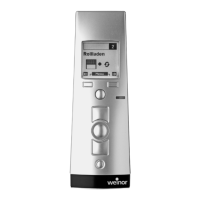
Display languages in the BiEasy 15M
German English French
Italian Spanish Portuguese
Dutch Swedish Danish
Polish Hungarian Czech
Slovenian Turkish
Tab. 9 Available languages in BiEasy 15M
• "Save" menu key
(Display) "Lighting" submenu
You can switch the display backlighting on or off.
The backlighting automatically switches off after 10 seconds
if a key is not pressed. The lighting is enabled in the factory
setting.
"Channel settings" submenu
"Group" submenu
"All" submenu (with activated function only)
The above three submenus ("Channel Settings", "Group",
"All") branch further into three submenus
• "Product selection"
• “Intermediate position”
• "Ventilation/tilting position"
Product selection (for channels only)
Regardless of products previously defi ned during
programming (INTERNAL setting), the product view can
be redefi ned individually for the channel with the assigned
pictogram.
• "Save" menu key
Important:
The customised product views will be lost and must be
redefi ned if the device is reset to the factory settings.
Intermediate position
You can set a runtime from zero to 360 seconds for
approaching an intermediate position from the top end
position if the radio receiver product (roller shutter, venetian
blind, awning) does not support saving an independent
intermediate position.
The runtime can be set in 1-second steps by time
preselection by joystick or intuitively with the DOWN or
OPEN key with travel distance setting; the factory setting
for the intermediate position runtime is zero seconds
(no runtime setting).
• "Save" menu key
The intermediate position is approached by the defi ned
runtime by double-clicking the DOWN key.
Ventilation/tilting position
You can set a runtime in 0.1-second steps for approaching
a ventilation position (roller shutter) or tilting position
(venetian blind) from the bottom end position if the radio
receiver product does not support saving an independent
intermediate position.
The runtime can be set in 0.1-second steps by time
preselection by joystick or intuitively with the DOWN
or OPEN key with travel distance setting; the factory
setting for the ventilation position runtime is zero seconds
(no runtime setting).
• "Save" menu key


 To Next Page
 Loading...