2 Welch Allyn AED 10 Trainer
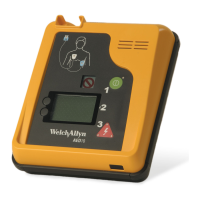
User Interface
1 Green ON/OFF button Turns the Trainer on and off.
2 Red Shock button Flashes to prompt a simulated shock, and is
pressed to deliver a simulated shock.
3 ECG Pad Connector Connect the cable from the pads to the Trainer
here.
4 LCD Status Indicator
Ready for operation.
Do not use the Trainer. Replace the batteries or
service the Trainer.
Do not use the Trainer. Replace the batteries or
service the Trainer.
5 Battery Level Indicator Displays the current battery level. The Trainer
displays text and voice prompts when the battery
needs to be changed.
Note: The Battery Level Indicator is only available on Welch Allyn AED 10
defibrillators using software versions 2.06.02 and earlier.
6 Menu buttons Control volume, contrast, scenario, CPR timer, and
language.
7 Remote Control Window
and Command Status LED
Receives light pulses from the Remote Control.The
Command Status LED next to the Remote Control
window illuminates when a command is received.
1. ON/OFF button
2. Shock button
7. Remote control window (IR)
and command status indicator
4. System status indicator
6. Menu buttons
3. Connect cable from
defibrillator pads
5. Battery level indicator


 To Next Page
 Loading...