User Manual Introduction 11
Getting the Welch Allyn AED 10 Ready
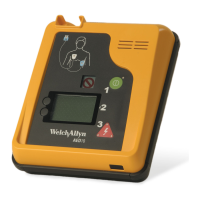
Carefully unpack and inspect all the Welch Allyn AED 10 system components and
accessories. Install the battery. Verify that the self-test passes before putting the unit into
service. The device will perform an automatic self test upon being turned on.
Unpacking and Inspecting
Visually inspect the carton for any signs of damage or mishandling (carton perforations,
cuts, or dents; bent or collapsed corners; or broken carton seal). Remove the Welch Allyn
AED 10 from the carton and inspect it carefully.
Before proceeding
1. Open and carefully unpack each carton.
2. Examine the instruments and accessories for signs of damage.
3. Check the packing list to determine that all accessories have been received.
4. Contact Welch Allyn (see page ii) if anything looks damaged or is missing.
Installing the Battery
The Welch Allyn AED 10 uses an extended-life, lithium manganese dioxide non-
rechargeable battery.
To install the battery
1. Open the battery compartment (located near the bottom of the back of the AED 10)
by removing the thumbscrews and then sliding the battery cover up and off.
2. Locate the 3 battery contact pins in the bottom-right corner of the battery
compartment
3. Push the 3-pin battery connector onto the contact pins. The connector can be
installed in either direction.
4. Place the battery into the battery compartment and replace the battery cover. Slide
the cover back so that the screw holes are aligned.
1. Remove the battery cover.
2. Plug in the 3-pin connector.
3. Insert the battery and
replace the cover.


 To Next Page
 Loading...