32 Using the Defibrillator Welch Allyn AED 10 Automatic External Defibrillator
Transmitting the Internal Log via the Infrared Data Port
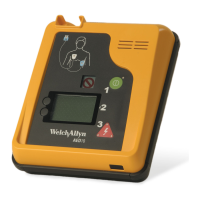
Transmitting data via the infrared data port is fast and easy. Using the Welch Allyn AED 10
Infrared Communications Kit (Part No. 002143), simply connect the infrared adapter cable
to a PC serial communication port. Next, align the infrared adapter to the infrared data
port on the AED 10.
Start the SmartLink program on the PC and access the AED 10 main menu by holding
down the lower menu soft key while powering on the unit. Select the Log Menu and then
select “Smartlink.” The “Smartlink” selection flashes during data transfer.
The Welch Allyn AED 10 also stores a service log used for keeping track of system
information. If any error messages or malfunctions occur, the service log can be
transferred to SmartLink and then sent to Welch Allyn service technicians for review. The
internal log retains its data after transmitting to the PC and may contain data from multiple
incidents. Therefore, it is recommended that the user clear the internal log after
successfully transferring its contents. Any error messages or malfunctions should be
reported and corrective actions taken before storing the unit for reuse.
Note
Keep the infrared data port and adapter cable roughly 6 to 10 inches apart.
Note
The bit rate of the AED 10 must be the same as the bit rate set in SmartLink to
transfer the log. Refer to “Setting the Bit Rate” on page 51.
Note
See “Setting Up the Internal Log” on page 42 and “Transmitting or Clearing the
Internal Log” on page 41 for more information.
AED10
infrared data port
infrared adapter
to PC serial port


 To Next Page
 Loading...