36 Programming Welch Allyn AED 10 Automatic External Defibrillator
Menu Structure Diagram
Menu Structure Overview
The operating options are available to the operator through a simple menu structure. The
basic system operating options are accessed through the Main Menu. The advanced
system operating options are accessed through the Supervisor Menu.
Accessing the Main Menu from Startup
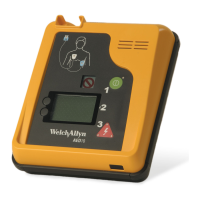
To access the Main Menu, hold down the lower Enter soft key while powering-on the
unit. A menu similar to the above diagram will appear on the left side of the LCD display.
Although unlabeled on the front panel/decal of the AED 10, the display will turn on and
identify the keys while in menu mode. To exit, shut off power.
Use the Next soft key on the left side of the LCD display to move from one menu
selection to the next. The selected menu item is highlighted by a dark box. Press the
Enter button to select the highlighted menu item.
User-selectable
options
Soft keys for
menu selection
Next
Enter
Volume
Contrast
Date
Time
Log
Main Menu
Supervisor
Volume
Contrast
Date
Time
Log
Supervisor
Main Menu
Next
Enter


 To Next Page
 Loading...