OVERVIEW
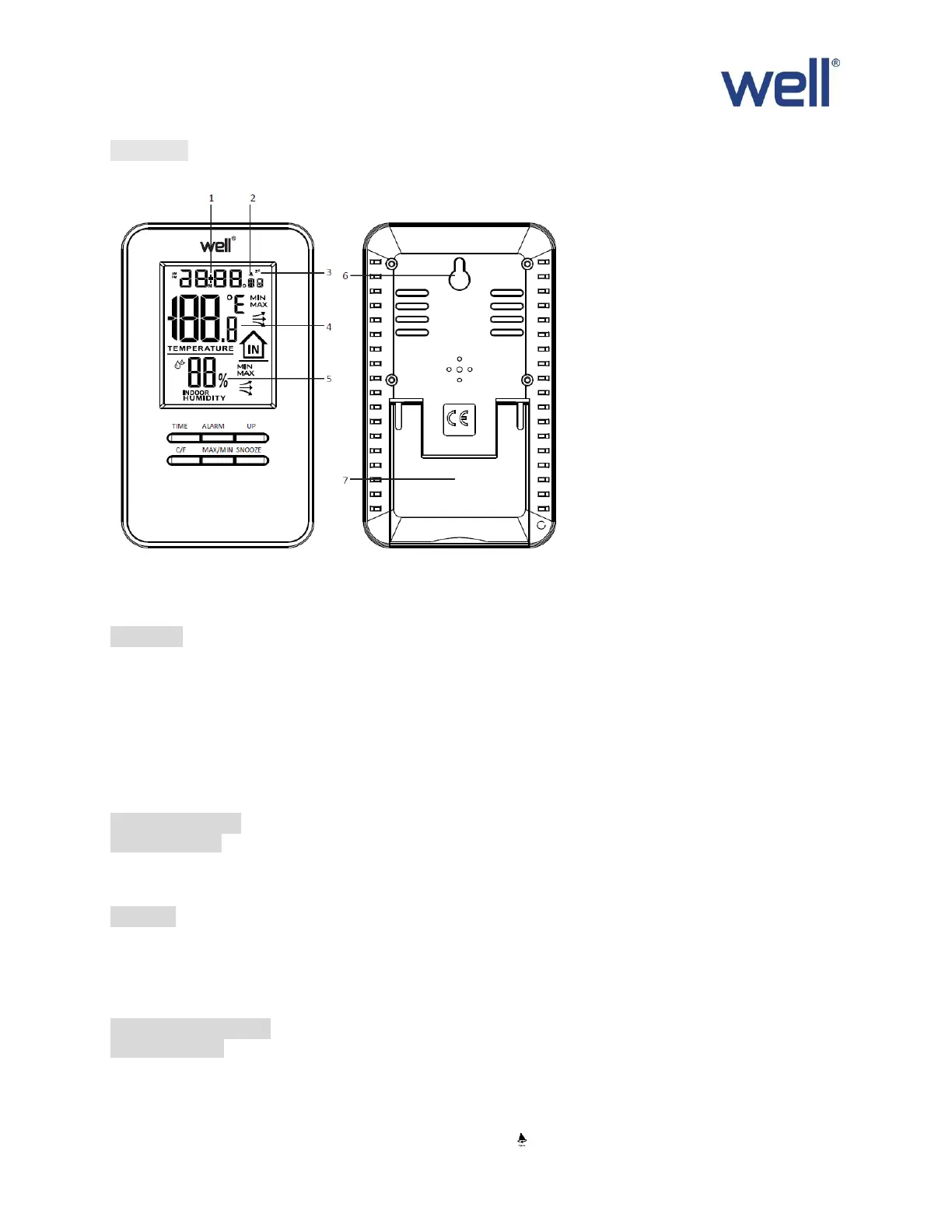
MAIN UNIT
1. TIME 2.ALARM 3. SNOOZE 4. INDOOR TEMPERATURE 5. INDOOR HUMIDITY 6.HANGING HOLE
7.STANDING BRACKET
FEATURES
1. Calendar display.
2. 12/24 hours selectable.
3. Alarm function & Snooze function.
4. Indoor Temperature display with ℃/℉ selectable.
5. Indoor temperature range: -9℃ ~ +50℃.
6. Indoor humidity range: 20% ~ 90%
7. Records Min/Max Indoor temperature/humidity.
8. Temperature/Humidity trend indication.
GETTING STARTED
POWER SUPPLY
1. Remove the battery compartment cover.
2. Insert 2x AAA battery matching the polarity (+and-).
TIME SET
1. Press and hold “TIME” key for 2 seconds to enter into time setting
2. The figure to be set will be flashing.
3. Press “UP” key to change the settings
4. The setting order is: 12/24-hr format , Second, Hour, Minute Year, Month, Date.
5. Press “TIME” again to confirm and exit setting.
ALARM & SNOOZE SET
ALARM SETTING
1. Press “AlARM” key for 2 seconds to enter into alarm setting.
2. The figure to be set will be flashing.
3. Press “UP” key to change the settings,
4. The setting order is: Hour Minute.
5. Press “ALARM” again to confirm and exit setting. indicate alarm is ON
6. Press “UP” to off alarm function


 To Next Page
 Loading...