6
4.1 Install the Fitdays App
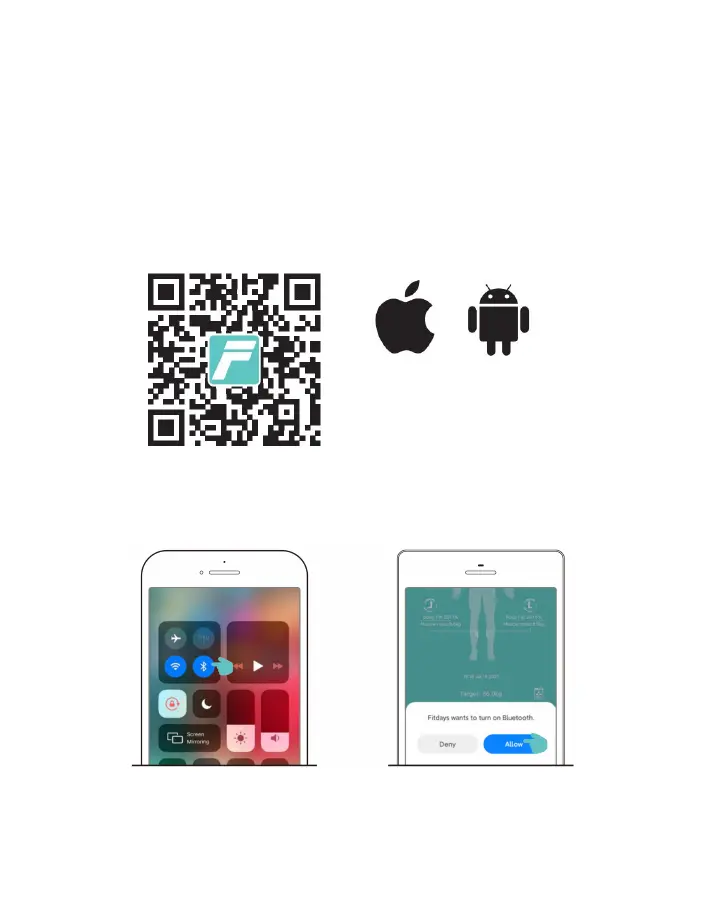
Search for "Fitdays" in App Store or Google play, or scan the QR code below to download and
install the App to connect to the device. If you use WeChat to scan the QR code, click on the upper
right corner on the screen and choose to open it in the browser. Apps downloaded from other
platforms or sources may be unusable.
Before connecting the Fitdays App to the smart body fat scale, please make sure that your device
meets the following requirements:
iPhone/iPad/iPod touch running IOS 8.0 and above.
Android 4.3 and above and equipped with Bluetooth 4.0.
Turn on Bluetooth and open the Fitdays App on your phone
It will automatically connect with the device. The real-time data can be synchronized to the App
and recorded when measuring on the scale.
Enable iOS Bluetooth:
Swipe down from the top of the screen,
open the control center and click the
Bluetooth icon.
Enable Android Bluetooth: Open
the App, and click Yes after the
Bluetooth prompt pops up.
Scan the QR code
Install the Fitdays App


 To Next Page