10
EN
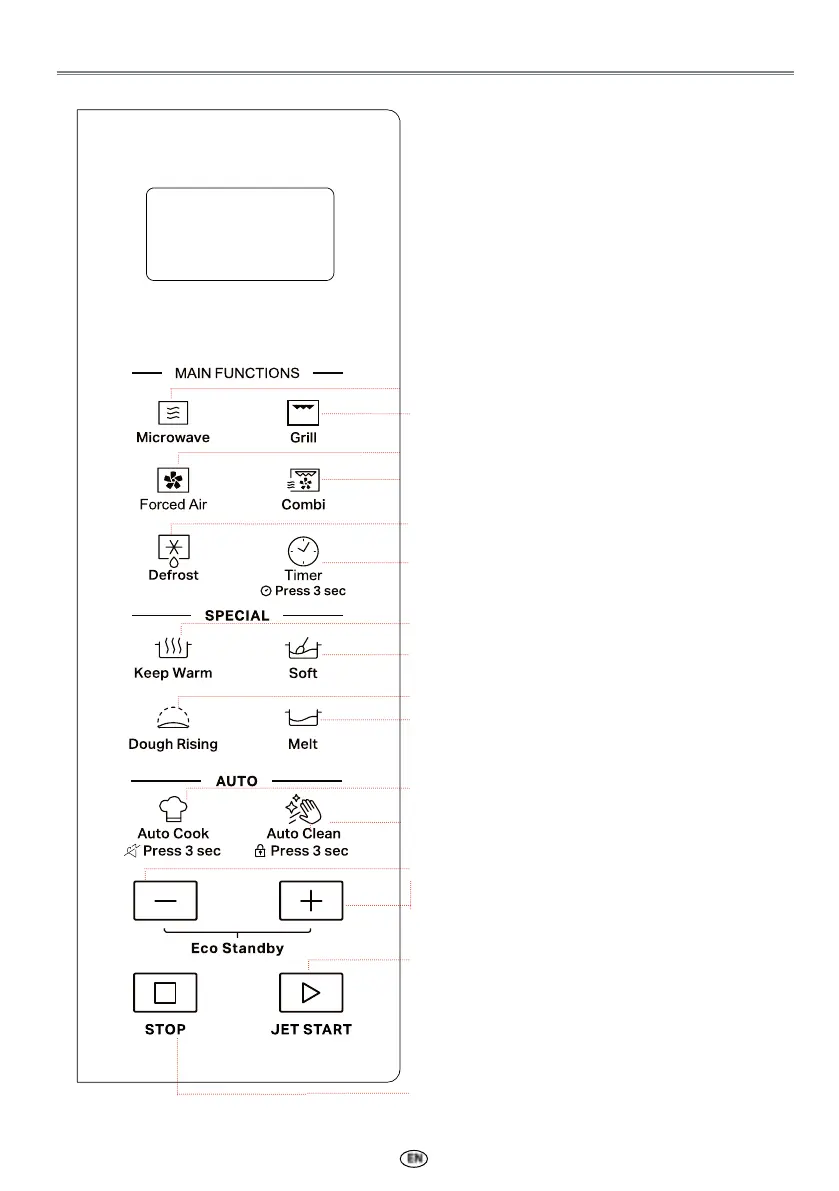
CONTROL PANEL DESCRIPTION
q
w
e
r
t
y
u
i
o
a
s
d
f
g
q
Microwave
Use to select a Microwave cooking function.
w
Grill
Use to set Grill cooking function.
e
Forcoed Air
Use to set the Forced Air cooking programs.
r
Combi
Use to select one of three Combination cooking
settings.
t
Defrost
Use to set Defrost programs.
y
Timer
Use to set the Timer function
OPTION: Clock setting by pressing 3 sec.
u
Keep Warm
Use to set Keep Warm function.
i
Soft
Use to set Soft programs.
o
Dough Rising
Use to set Dough Rising function.
a
Melt
Use to Melt programs
s
Auto Cook
Use to access the automatic recipes menu.
OPTION: Mute ON/OFF by pressing 3 sec.
d
Auto Clean
Use to set Auto Clean function.
OPTION: Panel lock setting by pressing 3 sec
f
+ / -
Use to input food menu code, clock time, cook
weight.
OPTION: Eco Standby mode by pressing +/-
at the same time to turn on / o Eco Standby
mode.
g
JET START
Use to start the cooking or 30sec Quick Start
during Standby mode, or use to conrm
selection.
STOP
Use to cancel cooking.
NOTE: The protective film of the touch panel
can be removed if you want.



 To Next Page