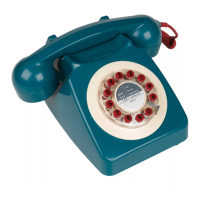
746
PARTS INCLUDED
Telephone base set
Handset with handset cord
Wall socket adapter
Hand set cord socket
INSTALLATION
TELEPHONE
Line cord socket
Connect one end of the line cord to the telephone and connect the other
end to the wall socket using the supplied wall socket adapter. In some
countries you may need to purchase a different local adaptor. To ensure
proper connection at both ends press firmly until the locking tabs 'click'
into place. Connect the handset cord to the telephone base.
Volume Normal/High
RECEIVER VOLUME NORMAL/HIGH
Use the volume Normal/High switch on the bottom of the phone to
adjust the volume of the caller from the handset speaker.
MAKING CALLS
To make a call simply pick up the handset and wait for a dial tone. Then
dial the required number using the numeric keys. To end a call. replace
the handset.
Press for redial
LAST NUMBER REDIAL
for hold
If you wish to call the last number dialled. press the redial key. This is
the lower half of the dial centre.
HOLD
'Hold' is located on the top half of the dial centre. Press •hold' to switch
to a new incoming call. Press 'hold' again to end the new call and return
to the first call. This service only works with services such as call
waiting and may not operate with all telephone service providers.
TROUBLESHOOTING
If you experience problems with your telephone. try the following suggestions:
No dial tone:
1. Make sure that all plugs are connected properly. Check the connections at
the wall jack. the telephone cabinet. handset and wallsocket.
2. Try another wall socket within your home which you know to beworking properly.
Telephone does not ring:
If there are several telephones connected to the same line. try disconnecting
some of the other telephones.Having too many telephones connected to the
same line can cause low ringer volume or poor sound quality during calls.
CARE AND MAINTENANCE
Avoid rough treatment to your phone. Dc not drop the handset and always place
gently back on the cradle. Clean only with a dry or damp cloth. Do not use
detergent. wax. solvent. spray. alcohol or excessive water.
IMPORTANT SAFETY INSTRUCTIONS
When using your telephone equipment. basic precautions should always be
followed to reduce the risk of fire, electrical shock and injury.
Unplug the telephone from the wall outlet before cleaning.
2.
Do not use liquid or aerosol cleaners.
3.
Do not use the telephone near water or potentially wet locations.
Do not place the telephone on an unstable surface.
5. Avoid use during a lightning storm.
IMPORTANT SAFETY INSTRUCTIONS
When using your telephone equipment. basic safety precautions should always be followed to reduce the
risk of fire. electric shock and injury to persons. including the following:
. Read end understand all Instructions.
Follow all warnings and instructions marked on the product.
Unplug this product from the wall Outlet before cleaning. DOnot use liquid cleaners or aerosol cleaners.
use a damp cloth for cleaning
Do not place this product cn an unstable stand cr table. The product may fall. causing it serious damage.
5. The product should never placed or over a radiator or other heat source.
Never push objects of any kind into this product through cabinet slots as they may touch dangerous
voltage parts or short cut parts that could result in a risk of tire electric shock. Do not spill liquid of any
kind onto this product.
7. Tc reduce the risk of electric shock. do not disassemble this product. Take it to a qualified telephone
technician or centre, Opening or rernoving covers may expose you to dangerous voltage or other
risks. Incorrect re-aessembly can cause electric shock when the appliance is subsequenty used.
8 Unplug this product from the wall outlet and refer serv.c.ng to a qualified service technician in the
following cases:
A1When the power supply cord cr plug is damaged or frayed.
81If liquid has been spilled into the product.
C) If the product has been exposedto rain or water _
Dl If the product does not operate normally by following the operating instructions. adjust only those
controls that are covered by the operating instructions. Improper adjustment of other controls may
result in damage and may require extensive work by a qualified technician to restore the product to
normal operation.
El If the product has been dropped or the cabinet has been damaged.
Fl If the productexhibitsadrstlnctchar•ge•nperformance.
9. Do not allow anything to rest on the power cord. Do not locate this product where the cord is liable to
be walked orv
10_Do not use this product near water. for example. near a bath tub. wash bowl. kitchen sink or laundry
tub. in a wet basement or near a swimming POOL
11. Avoid using a telephone [other than a cordless type) during an electrical storm. There may bea remote
rish Ofelectnc shock from lightning.
12. DOnot use the telephone to report a gas leak in the vicinity Ofthe leak.
SAVE THESE INSTRUCTIONS
WILD & WOLF
CONSUMER INFORMATION
a) This equipment complies with Part 68 of the FCC rules and the requirements
adopted by the ACTA. On the bottom of this equipment is a label that contains.
among other information. a product identifier in the format US.'HlJ4TE14B746.
If requested. this number must be provided to the telephone company
bl An applicable certification jacks Universal ServiceOrder Codes(USOC)for the
equipment is provided li.e.,RJ1ICl in the packagingwith each piece of approved
terminal equipment.
CJA plug and jack used to connect this equipment to the premises wiring and
tclcphonc network must comply with thc applicable FCC Port 68 rules and
requirements adopted by the ACTA. A compliant telephone cord and modular
plug is provided with this product. It is designed to be connected to a compatible
modular jack that is also compliant. See installation instructions for details.
dl The RENis used to determine the number of devices that may be connected tc
a telephone line. Excessive RENs on a telephone line may result in the devices
not ringing in response to an incoming call. In most but not all areas. the sum of
RENs should not exceedfive 15.01.To becertain of the number of devices that may
be connected to a line. as determined by the total RENs. contact the local
telephone company [For products approved after July 23rd 2001, the REN for this
product is part of the product identifier that has the format
The digits represented by ## are the RENwithout a decimal point (e.g. 03 is a
RENof 0.3]. For earlier products. the RENis separately shown on the label.]
e) If this equipment 746Phone causes harm to the telephone network. the
telephone company will notify you in advance that temporary discontinuance
of service may be required. But if advance notice isn't practical. the telephone
company will notify the customer as soon as possible. Also, you will be advised
of your right to file a complaint with the FCC if you believe it is necessary.
fl The telephone company may make changes in its facilities, equipment, operations
or procedures that could affect the operation of the equipment. If this happens
the telephone company will provide advance notice in order for you to make
necessary modifications to maintain uninterrupted service.
gl Should you experience trouble with this equipment, please remember to include
the original purchase receipt and send the telephone and contact details to:
United States
CS Hutter Company
156 Old Dominion Drive
Madison Heights
Vi inia
vk%572
Tel: 866 285 "07
for repair or warranty information. If the equipment is causing harm to the
telephone network, the telephone company may request that you disconnect
the equipment until the problem is resolved.
h) Please follow instructions for repairing if any (e.g.battery replacement section):
otherwise do not alternate or repair any parts of device except specified.
iJ Connection to party line service is subject to state tariffs. Contact the state
public utility commission. public service commission or corporation commission
of information.
j] NOTICE.
• If your home has specially wired alarm equipment connected to the
telephone line, ensure the installation of this 746 Phone does not disable your
alarm equipment. If you have questions about what will disable alarm equipment,
consult your telephone company or a qualified installer.
k) This equipment is hearing aid compatible.
NOTICE.
• According to telephone company reports. AC electrical surges, typically
resulting from lightning strikes, are very destructive to telephone equipment
connected to AC power sources. To minimize damage from these types of surges,
a surge arrestor is recommended.
l) Product information:
Model: 746 Phone
This unit complies with the requirement of 47 CFR Part 68. REGISTRATION
REN: 1.4B
USOC Jack: RJI


 To Next Page
 Need help?
 General