27
EN
HEAT PUMP · NARVIK 30 & 40
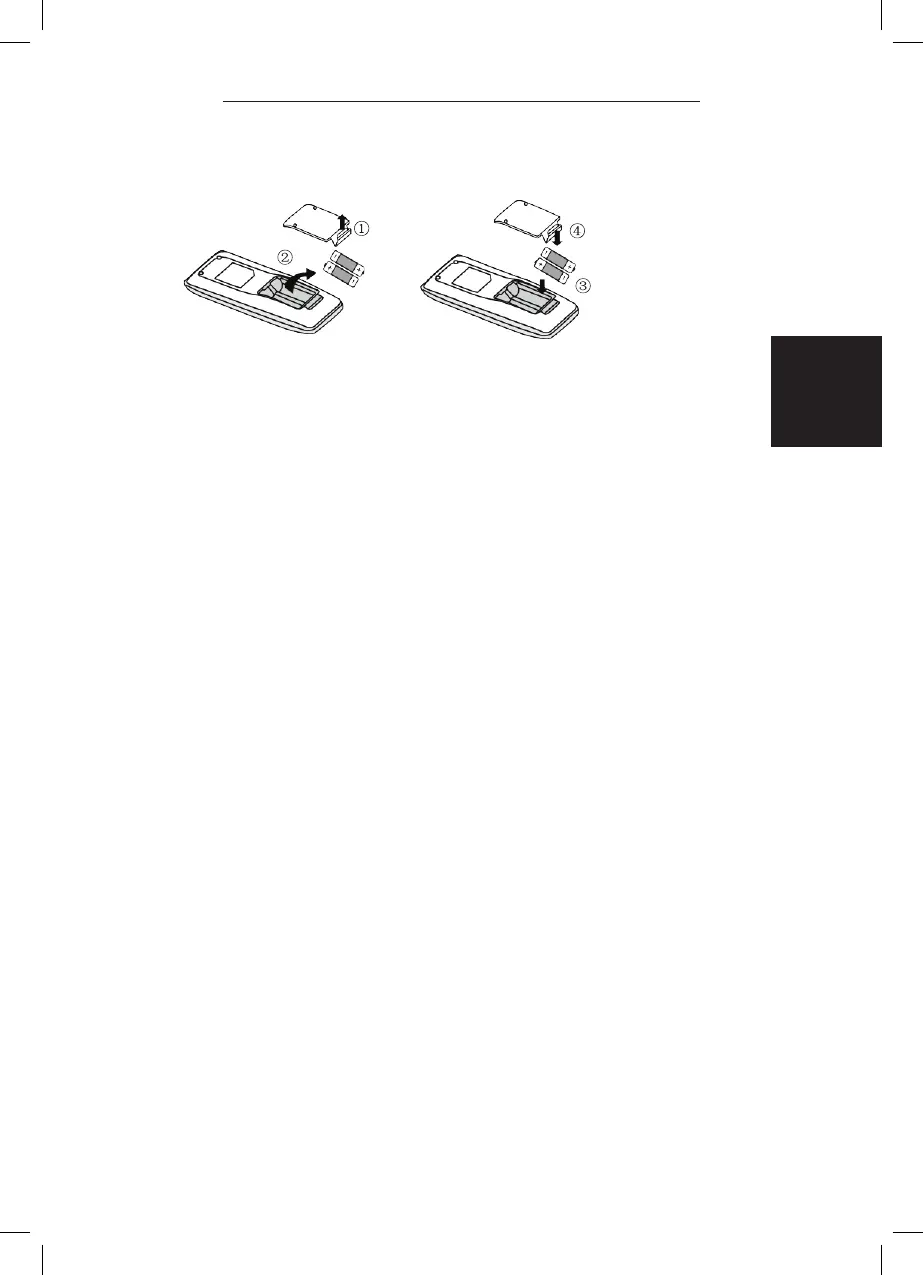
REPLACEMENT OF BATTERIES IN REMOTE CONTROLLER
1. Lift the cover along the direction of arrow (as shown in Fig 1
Q
).
2. Take out the original batteries (as shown in Fig 1
W
).
3. Place two 7# (AAA 1.5V) dry batteries, and make sure the position of “ + “
polar and “ - “ polar is correct (as shown in Fig 2
E
).
4. Reinstall the cover (as shown in Fig 2
R
).
Note:
• During operation, poin t the remote control signal sender at the receiving
window on indoor unit.
• The distance between signal sender and receiving window should be no more
than 8m, and there should be no obstacles between them.
• Signal may be interfered easily in the room where there is fuorescent lamp or
wireless telephone; remote controller should be close to indoor unit during
operation.
• Replace new batteries o f the same model when replacement is required.
• When you don’t use remote controller for a long time, please take out the
batteries.
• If the display on remote controller is fuzzy or there ‘s no display, please
replace batteries.
Under unit off status, hold
11MODE11
and
11FAN11
buttons simultaneously for 5s to turn on or turn off the
auto clean function. When the auto clean func- tion is
turned on, indoor unit displays
11CL11
. During the
auto clean process of evaporator, the unit will
perform fast cooling or fast heating. There may be
some noise, which is the sound of flowing liquid or
thermal expansion or cold shrinkage. The air con-
ditioner may blow cool or warm air, which i
s a normal
phenomenon. During cleaning process, please make
sure the room is well ventilated to avoid affecting the
comfort.
•
When the remote controller is turned off, power
limiting function is cancelled. If you want to acti-
vatethe function, please repress this button.
•
If the current power is lower than the maximum
power of mode, then the power will not be
limited after entering into such mode.
•
For the model with one outdoor unit and two indoor
units, if any one of indoor units enters into power
limiting function, the outdoor unit will enter into the
set limiting power mode of indoor unit;
when two
indoor units enter into power limiting mode, then the
power of outdoor unit will be limited according to the
lower power of the two indoor units.
Replacement of batteries in
remote controller
Under cooling or heating mode, when turning on
sleep mode and turn to low speed or quiet notch, the
outdoor unit would enter into night mode.
1.
Lift the cover along the direction of arrow
(as shown in Fig 1
① ).
2.
Take out the original batteries (as shown in
Fig 1
②
).
3.
Place two 7# (AAA 1.5V) dry batteries, and make
sure the position of " + " polar and " - " polar is
correct (as shown in Fig 2
③ ).
4.
Reinstall the cover (as shown in Fig 2
④ ).
Press 11MODE11 and 11SLEEP11 buttons simultaneou-
sly to start function.
function is for limiting power of the whole unit.
Press this button, the remote controller will circu- larly
display as the following:
•
If you want to cancel the power limiting function,
Auto clean function
•
During operation, poin t the remote control signal
sender at the receiving window on indoor unit.
•
The distance between signal sender and receiving
window should be no more than 8m, and there
should be no obstacles between them.
•
Signal may be interfered easily in the room where
there is fuorescent lamp or wireless telephone;
remote controller should be close to indoor unit
during operation.
•
Replace new batteries o f the same model when
replacement is required.
•
When you don
'
t use remote controller for a long time,
please take out the batteries.
•
If the display on remote controller is fuzzy or there
'
s
no display, please replace batteries.
•
When you feel that the cooling and heating effect is
poor, please press 11FAN11 button to other fan speed
or press
11SLEEP11
button to exit the night mode.
•
The night mode can only work under normal ambient
temperature.
•
This function is only available for some models.
Night mode
•
The auto clean function can only work under normal
ambient temperature. If the room is dusty, clean it
once a month; if not, clean it once every three
months. After the auto clean function is turned on, you
can leave the room. When auto clean is finished, the
air conditioner will enter standby status.
•
This function is only available for some models.
•
This function is only available for some models.


 To Next Page
 Loading...