Playing back via Bluetooth
You can listen to music from a target
Bluetooth device through the System.
Once the pairing is successful, the System
will switch the current source mode to
Bluetooth mode automatically.
NOTE:
• In order to use these functions, the
device must be compatible with AVRCP
and A2DP proles.
• Some Bluetooth devices may not be
available to the System.
Registering a Bluetooth device for the
rst time
1. Press the button to power on the
System.
2. Press the Volume down button to
turn down the volume.
3. Hold the button for more than 5
seconds. The LED indicator
blinks red
and white alternately
.
4. Perform the pairing operation on the
target Bluetooth device. For information
on operating the target Bluetooth device,
see the instruction manual for the
Bluetooth device.
Making Calls with a Bluetooth
Mobile Phone
Before you make a call with the
System, you need to pair and link
your Bluetooth-enabled phone with
the System. Please refer to
“Registering a Bluetooth device for
the first time” .
Answering a call
1. To answer a call, press the
button .
2. Speaker into the Microphone
(hidden on the behind of the
speaker grill ) and press the
Volume button to adjust the
call volume.
You can enjoy the sound from an
optional component such as a portable
digital music player through the
speakers of System. Be sure to turn off
the power of each component before
making any connections. For details, refer
to the instruction manual of the
component to be connected.
1. Set the volume level of the System to
minimum.
2. Connect an external device to the
LINE IN jack on the back of
System using a stereo mini plug cord.
3. Hold the button to power on
the System.
NOTE: The LED indicator starts
blinking slowly.
3. To end the call, press the button
again.
Dialing a call
1. Once the System is paired to a
Bluetooth mobile phone, you can
use the keypad on your phone to
dial a phone number.
2. Press the Volume button to
adjust the call volume.
3. Press the button to end the
call.
5. Select “Williams-Sonoma” from the list.
When the target device requests the
passkey during pairing operation, enter
“0000”. The pairing is completed and
the target Bluetooth device is
connected to the System automatically.
The LED indicator lights solidly.
• You can operate the target device to
pair with the System within the range
of 33 feet (10m).
• Try again above steps 3-5 if the LED
indicator starts blinking slowly after
blinking for 3 minutes.
6. Start playback of the target Bluetooth
device. The sound from the Bluetooth
device is emitted from the System.
• Playback may start automatically with
some Bluetooth devices.
NOTE: The pairing is necessary only when
connecting for the first time. If registering
other Bluetooth devices, you can repeat
the above steps 3-5.
NOTE: In this user manual, “iPod” is used as
a general reference to functions on an iPod,
iPhone or iPad, unless otherwise specified
by the text or illustrations.
The two USB ports can be used to
charge iPod devices.
The battery of the iPod is always charged
through the unit when it is connecting to a
wall outlet.
Troubleshooting
Charging an iPod/iPhone or an iPad
Charging the Built-in Battery
Technical Specification
The System has a built-in Lithium-Ion
battery to give you portable power when
not using the AC adaptor. When the
adaptor is plugged in, the unit will charge.
When operating the unit in battery mode, a
red LED indicator means the battery is
below. You must charge this unit for 12
hours before using for thefirst time.
NOTE:
• When the battery is in low, the LED
indicator lights red for 10 seconds,
and then the System is powered off .
• The battery cannot be replaced by the
user.
• It takes about 3 hours to charge the
battery from empty to full.
• Do not dispose of unit in fire; battery
may explode or leak.
Type: Lithium-Ion Rechargeable Battery
Rated Voltage: 3.7 V (* 1)
Capacity: 1200 mAh
WARNING!There is a danger of
explosion if the battery is incorrectly
replaced. Replace it only with the same or
equivalent type. Do not expose it to
excessive heat such as sunshine, fire, etc.
If you are having a problem with the System, check this list for a possible solution
before calling for service.
General
Power does not come on.
No power is supplied. Check the
power cord connection.
The System turns off automatically.
Auto power save function is
working. If the System is idle (no
operation and no sound output) for
more than 20 minutes.
No sound is heard.
The volume is set to the minimum.
iPod Operations
No sound is heard through the
System.
Disconnect the Bluetooth
connection and then the System
will restore the LINE IN mode
automatically.
Adjust the volume of the external
device.
Bluetooth Operations
No sound is heard through the
System.
The volume of the target Bluetooth
device connected to the System is
set to the minimum.
The target Bluetooth device is out of
the Bluetooth connection effective
range.
Unable to connect/operation a
Bluetooth device.
When performing a Bluetooth
connection between the System
and your target device for first
time, if the connection is not
completed, you need to disconnect
the AC power cable from the wall
outlet, wait for a while, then
connect the cable again and then
power on again to clear the target
device name. Perform a Bluetooth
connection again.
The device does not support
A2DP/AVRCP Bluetooth profile.
A2DP/AVRCP profile is necessary to
stream music data. Refer to the
instruction manual of the
Bluetooth device.
Calling Operations
Cannot hear caller’s voice.
The Bluetooth mobile phone is out
of the Bluetooth connection effect
range.
The volume of the System is too
low.
Cannot hear my voice/Voice is not
clear to listener.
You are too far from unit
microphone.
Input: AC 100-240V, 50/60Hz
Output: DC 12 V 2 A
120 mm
351 Kg
Model
WSBS2000 Bluetooth Speaker
version
Prole
Output power
Input Sensitivity
Speaker
AC Adaptor
Dimensions (Diameter)
Weight
AUX Input 1100 mV
Output power 1.8 W
Bluetooth 2.1 + EDR certied
A2DP (Advanced Audio Distribution Prole),
AVRCP (Audio/Video Remote Control Profile)
Bluetooth power class 2
Bluetooth
iPod/iPhone
iPad
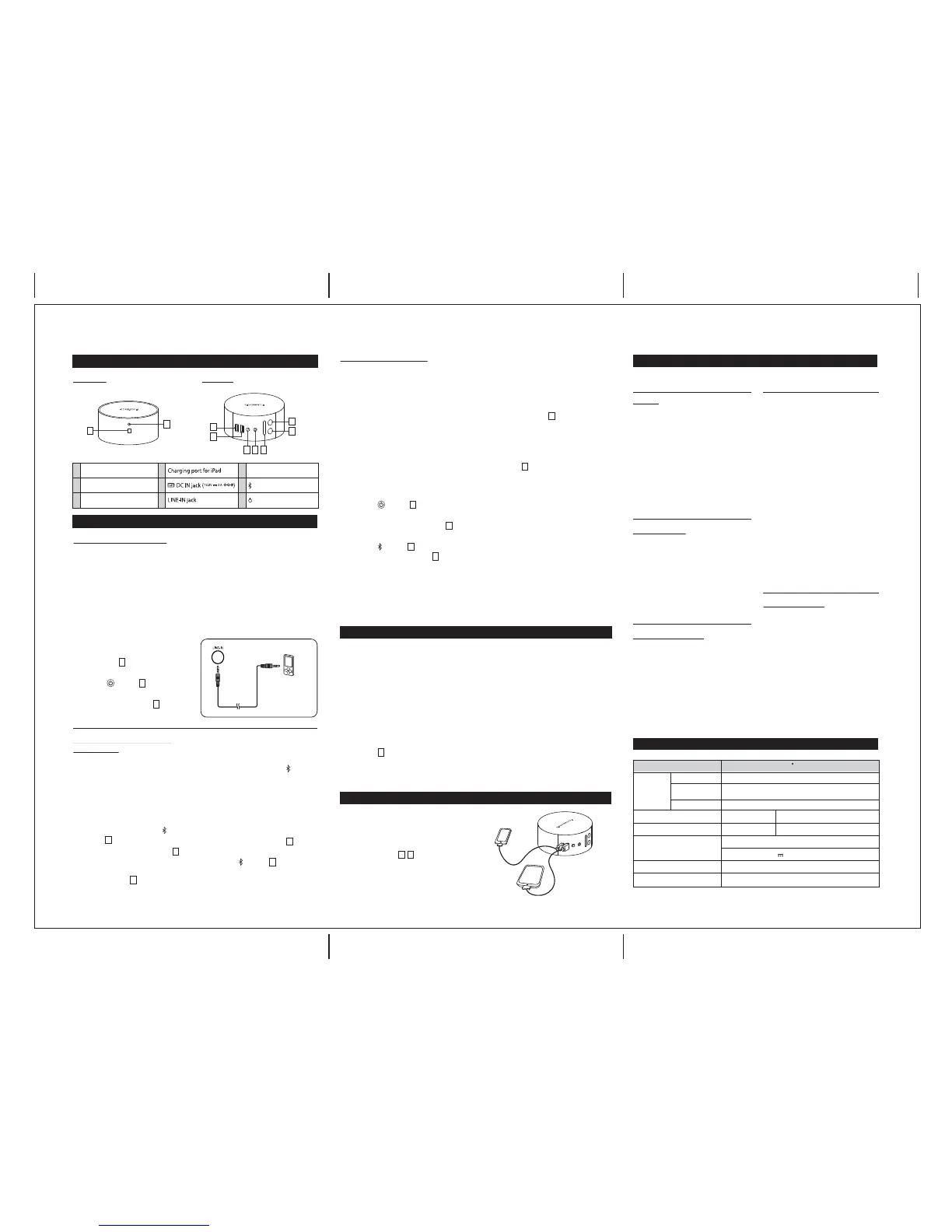
Location of Controls
Front Panel Back Panel
1
2
3
LED indicator
Microphone
Charging port for iPod/iPhone
7
8
9
Volume +/- buttons
Bluetooth button
Power on/Standby button
4
5
6
5
4
7
9
6
3
1
43
6
9
7
8
8
8
8
2
7
7
9
1
1
1
1
1
2
4. Start playback of the external device.
5. Adjust the volume of the System and
of the external device.
NOTE: Before enjoying music from an
external device, you need to unplug the
iPod from the System and disconnect
your Bluetooth connection.
Listening to an External Device
To audio output such
as CD/MD/digital
music player, etc.
Audio cable
(Not supplied)
Connections & Operations


 To Previous Page
 Loading...