5
2.4
b
a
1
0
S
E
C
.
e
d
2
-
3
S
E
C
.
f
c
b
c
d
e
5
2.4
a
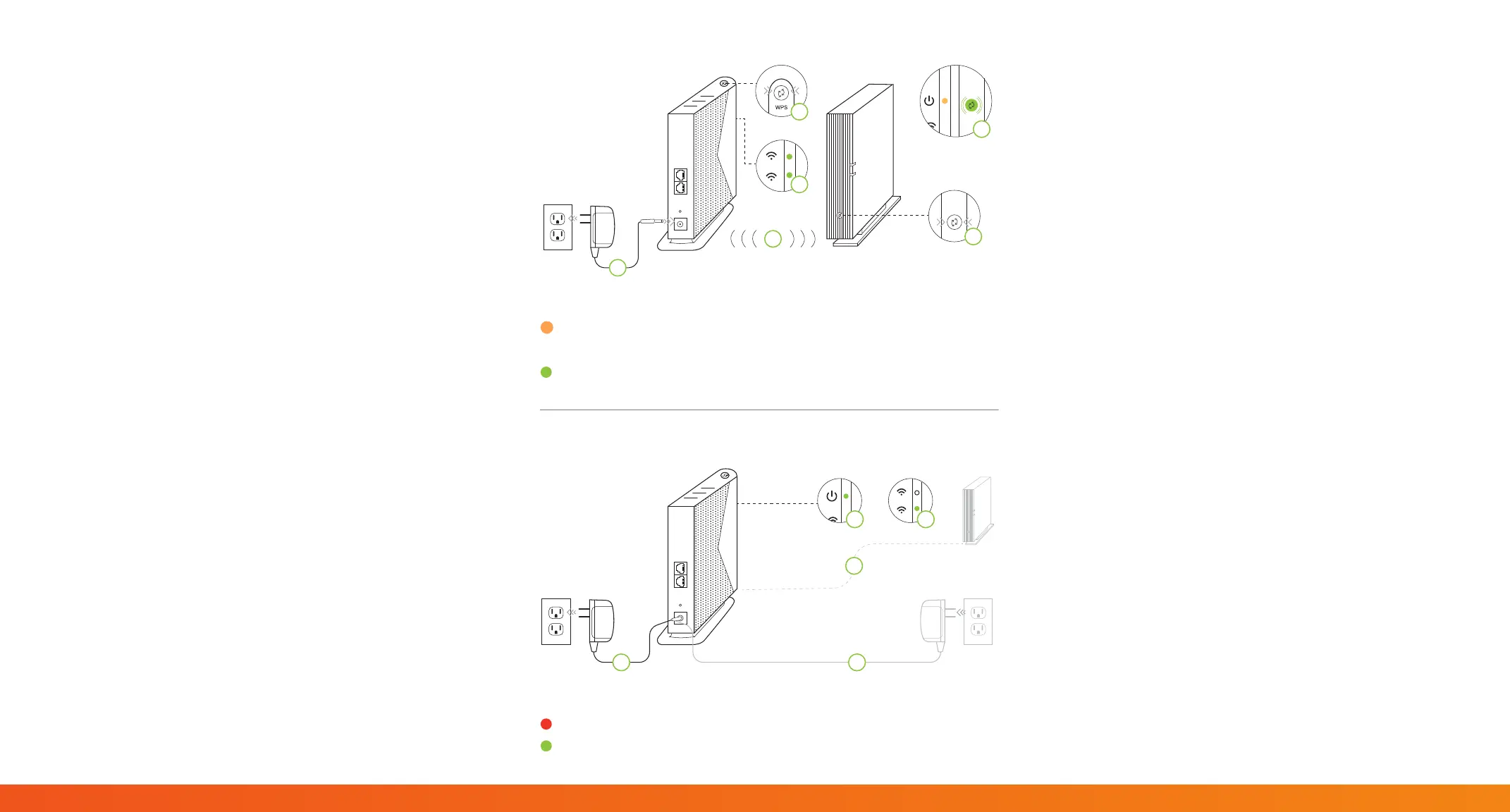
Step 1
Step 2
Power Light Indicator
AMBER = Extender needs to be paired with Wireless Gateway
GREEN = Extender is paired with Wireless Gateway
5 GHz Light Indicator
RED= Signal is poor. Change location.
GREEN = Signal is strong. This is a good location.
Step 1:
Sync your Kinetic My-Fi Extender with
your Kinetic My-Fi Gateway
a Place the Extender next to your Wireless Gateway.
b Plug one end of the Power Adapter into the Power
Port on the back of the Extender. Plug the other
end of the Power Adapter into a nearby Electrical
Wall Outlet.
c Wait until the Power Light on the front of the
Extender is AMBER and the 2.4 GHz and 5 GHz
lights are solid GREEN. This usually takes about 2
minutes.
d Press the WPS button on the Extender for 10
seconds. The WPS button will begin to ash.
e Press the WPS button on the Wireless Gateway for
2-3 seconds. The Wi-Fi light on the Gateway will
begin to ash.
f Wait until the Power Light on the Extender is
GREEN. This usually takes about 3 minutes.
Note: The Extender will now have the same Network Name
(SSID) and Password as your Wireless Gateway.
Step 2:
Move your Kinetic My-Fi Extender
to a New Location
a Unplug the Extender.
b Move the Extender to a new location, halfway
between the Wireless Gateway and the area with a
poor Wi-Fi signal.
Note: The location you chose must be within range of your
existing Wireless Gateway.
c Plug one end the Power Adapter into the Power
Port on the back of the Extender. Plug the other
end of the Power Adapter into a nearby Electrical
Wall Outlet.
d Wait until the Power Light on the front of the
Extender is GREEN. This usually takes about 2
minutes.
e Check the 5 GHz LED. If the 5 GHz LED is GREEN
then you have placed the Extender in a good
location. If the 5 GHz LED is Red, you should
move the Wireless Extender closer to the Wireless
Gateway.
f Get a smartphone, tablet, laptop or other device
and make sure that it is connected to the Wi-Fi
network.


 To Previous Page
 Loading...