Need help?
Do you have a question about the Winegard DPH42 and is the answer not in the manual?
This document provides an installation guide for the Winegard DPH42 Switch, designed for use with the Winegard TRAV'LER SK-1000 Satellite TV Antenna. The DPH42 Switch is a crucial component for optimizing satellite TV reception, particularly for users of DISH Network Hopper and Joey systems in mobile environments such as RVs.
The DPH42 Switch acts as a central distribution point for satellite signals received by the TRAV'LER SK-1000 antenna. Its primary function is to manage and route the multiple satellite signals (from satellites like 110, 119, and 129) to various DISH Network receivers within a vehicle. This switch is specifically engineered to be compatible with the DISH Network's DPH (DISH Pro Hybrid) technology, which allows for a simplified cabling scheme while supporting multiple tuners and receivers.
The DPH42 Switch receives multiple coaxial cable inputs directly from the TRAV'LER antenna. These inputs carry the raw satellite signals. Internally, the switch processes and combines these signals into a format that can be efficiently distributed to the DISH Hopper and Joey receivers. This processing ensures that each receiver can access the full range of channels and services provided by DISH Network, regardless of which satellite transponder they originate from.
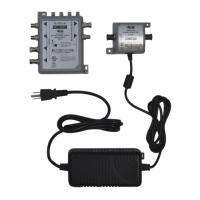
A key aspect of the DPH42 Switch's functionality is its integration with a power inserter. The power inserter is a separate but essential component that supplies the necessary electrical power to the DPH42 Switch and, indirectly, to the LNBs (Low-Noise Block downconverters) on the satellite antenna itself. This power is critical for the operation of the LNBs, which amplify and convert the high-frequency satellite signals into a lower frequency range that can be transmitted through coaxial cables. The power inserter must be installed inside the vehicle to protect it from environmental elements and ensure a stable power supply.
The DPH42 Switch is designed to facilitate the wiring of a Hopper/Joey system. It provides multiple output ports, typically labeled for connection to the "Hub Hopper 3 Joeys" or directly to individual receivers. This allows for a flexible setup, enabling users to connect multiple TVs and enjoy independent programming on each, a common requirement in RVs and other mobile setups. The switch ensures that each connected receiver receives the correct satellite signals without interference, allowing for simultaneous viewing and recording capabilities offered by the Hopper system.
The DPH42 Switch is designed for straightforward installation and integration into an existing TRAV'LER SK-1000 satellite system. The installation process involves connecting the coaxial cables from the TRAV'LER antenna to the input ports of the DPH42 Switch. These connections are typically clearly marked to ensure correct signal routing. The outputs of the DPH42 Switch are then connected to the DISH Network receivers (Hopper/Joey) and the power inserter.
A critical usage feature is the requirement for the power inserter to be installed inside the vehicle. This not only protects the inserter from weather but also ensures it has a reliable power source, often from the vehicle's 12V DC system or an inverter-supplied AC outlet. The power inserter typically has an indicator light to confirm it is receiving power and functioning correctly.
Once the physical connections are made, the system requires configuration through the DISH Network receiver's settings. The manual highlights the importance of running a "Test Installation" from the receiver's diagnostics menu after the TRAV'LER antenna has acquired the satellite signal. This test verifies that the DPH42 Switch is correctly communicating with the receivers and that all satellite signals (e.g., from satellites 110, 119, 129) are being received with adequate strength. The receiver's diagnostics screen provides valuable feedback, showing the "SWITCH STATUS" and "SIGNAL STRENGTH" for each satellite and tuner, allowing users to troubleshoot any reception issues.
The DPH42 Switch is specifically designed to work with DISH Network approved devices. This ensures compatibility and optimal performance within the DISH ecosystem. Users are advised to only use approved devices when wiring their Hopper/Joey system to maintain system integrity and avoid potential signal degradation or compatibility issues.
The TRAV'LER SK-1000 antenna, in conjunction with the DPH42 Switch, offers automatic satellite acquisition. Once powered on, the antenna will automatically search for and lock onto the designated DISH Network satellites. This automation simplifies the user experience, eliminating the need for manual aiming, which is a significant advantage for mobile users.
The DPH42 Switch itself is largely a maintenance-free device once installed correctly. Its robust design is intended for long-term, reliable operation in mobile environments. However, general maintenance practices for the overall satellite system are important to ensure continued performance.
Regular inspection of the coaxial cable connections is recommended. Over time, connections can loosen due due to vehicle movement or exposure to vibrations, which can lead to signal loss or intermittent reception. Ensuring all F-connectors are tight and secure will prevent such issues.
While the DPH42 Switch is designed for indoor installation (or in a protected compartment), the coaxial cables connecting it to the outdoor TRAV'LER antenna are exposed to the elements. Inspecting these cables periodically for any signs of wear, fraying, or damage from UV exposure or physical abrasion is advisable. Damaged cables can lead to signal degradation and should be replaced promptly.
The power inserter, being an electrical component, should also be kept in a clean, dry environment. While it is installed indoors, ensuring it is not subjected to excessive heat or moisture will prolong its lifespan. If the power inserter has an indicator light, periodically checking this light to confirm it is illuminated indicates proper power supply to the system.
In case of reception issues, the DISH receiver's diagnostic tools, accessible through the "Settings" menu, are the primary method for troubleshooting. The "Test Installation" feature provides real-time feedback on signal strength and switch status, which can help pinpoint whether an issue lies with the antenna, the DPH42 Switch, or the receiver itself. For example, if signal strength for one satellite is low, it might indicate an issue with the antenna's alignment or a specific LNB, whereas if the "SWITCH STATUS" shows errors, it could point to a problem with the DPH42 Switch or its connections.
For more complex issues or persistent problems, the manual directs users to Winegard's support resources, including an email address and a toll-free phone number. This indicates that while the system is designed for user-friendly operation, professional support is available for diagnostics and repair if needed. The product's online presence at winegard.com/skdph42 also serves as a resource for up-to-date product information and warranty details, which is crucial for long-term maintenance planning and support.
 General
| Ports | 4 |
|---|---|
| Inputs | 2 |
| Outputs | 4 |
| Input Frequency Range | 950-2150 MHz |
| Operating Temperature | -40°C to +60°C |

 To Next Page