EasyManua.ls Logo

Winnebago Awning Light Switch - User Manual

Winnebago Awning Light Switch
2 pages
Print Icon
To Next Page IconTo Next Page
Loading...
1
AWNING – POWER
–If Equipped
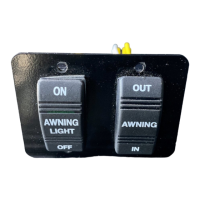
The Power Awning and Awning Light
switches are located near the entrance door.
Operating the Awning
Press and Hold the Power Awning switch IN
or OUT to extend or retract the awning as
desired.
Ignition Lockout System
The Ignition Lockout System will disable the
extend function while the vehicle ignition key is
in the On position. With this feature, the Awning
will only extend when the vehicle ignition key is
in the Off position. The Awning can retract
anytime regardless of the ignition key position.
Further Information
For complete operating instructions, features,
safety precautions, and maintenance care, refer to
the Power Awning manufacturer’s information
provided in your InfoCase.
CAUTION
Pinch Hazard. Ensure there are no
people who could be harmed or objects
that can be damaged. Failure to heed this
warning could result in severe injury and/
or property damage.
Power Awning and Awning Light Switch
(Located near entrance door.)
-Typical View
Power
Awning
Switch
•Press to
Extend
(OUT).
•Press to
Retract
(IN).
Awning Light
Switch
CAUTION
Keep the Coach Battery ON when vehicle
is in motion or in use. Coach batteries
provide power to the awning active brake,
preventing unintentional deployment.
Failure to do so can result in property
damage and, or personal injury.
Question and Answer IconNeed help?

Do you have a question about the Winnebago Awning Light Switch and is the answer not in the manual?

Overview

This document describes a Power Awning system, likely for a recreational vehicle (RV) or similar mobile dwelling, manufactured by Winnebago. The system includes a power awning, an awning light, and a motion sensor for wind detection.

Function Description

The Power Awning system allows for the automatic extension and retraction of an awning, providing shade and outdoor living space. It is controlled by dedicated switches located near the entrance door of the vehicle. An integrated awning light provides illumination. A key safety feature is the Ignition Lockout System, which prevents the awning from extending when the vehicle's ignition key is in the "On" position, ensuring the awning is not accidentally deployed while driving. However, the awning can be retracted at any time, regardless of the ignition key position.

The system also incorporates a Bluetooth Feature, enabling users to control the awning's extension and retraction via a smartphone app. This provides an additional layer of convenience and remote control.

A crucial safety component is the Awning Motion Sensor. This sensor detects brisk wind conditions and automatically retracts the awning to prevent damage. This feature is battery-powered, and the system provides an audible alert (beeping sound) inside the coach when the batteries need replacement.

Important Technical Specifications

  • Power Source: The awning's active brake requires power from the coach battery. It is critical to keep the coach battery "ON" when the vehicle is in motion or in use to prevent unintentional deployment.
  • Motion Sensor Batteries: The motion sensor is battery-powered. The document mentions "AAA" batteries in a diagram, though the text itself does not explicitly state the battery type.
  • Motion Sensor Screws: The motion sensor module is secured with two #8 x .5 PHP screws.
  • Control Module: The system utilizes a BT12 Module for Bluetooth connectivity and potentially for pairing with the motion sensor.

Usage Features

  • Awning Extension/Retraction:
    • Controlled by "OUT" (extend) and "IN" (retract) buttons on the Power Awning switch.
    • Users must press and hold the switch to extend or retract the awning.
    • The Ignition Lockout System prevents extension when the vehicle ignition key is "On."
    • Retraction is possible at any time.
  • Awning Light Control:
    • Controlled by "ON" and "OFF" buttons on the Awning Light switch.
  • Bluetooth Control:
    • A smartphone app can be downloaded from an app store to control the awning.
  • Motion Sensor Operation:
    • Automatically retracts the awning in brisk wind conditions.
    • A beeping sound indicates low motion sensor batteries.
  • Pinch Hazard Warning: Users are cautioned to ensure no people or objects are in the path of the awning during operation to prevent injury or damage.

Maintenance Features

  • Motion Sensor Battery Replacement:
    1. Remove the two screws and the rear cover from the motion sensor module.
    2. Remove the two old batteries.
    3. Clean and bend out contact tabs for best connection.
    4. Insert new batteries, matching the orientation of the old batteries.
    5. Place the battery end next to the PC board first, then swivel the other end into the case to ensure a firm fit.
    6. Check that the seal is in place and flat.
    7. Reattach the rear cover with the screws.
    8. Testing: Hold the sensor vertically with the Carefree logo upright and repeatedly move it up and down to simulate a brisk wind. The awning should retract. If it doesn't, re-pairing may be necessary.
    9. Install the module onto the bracket.
  • Motion Sensor Pairing (for replacements/upgrades):
    1. Extend the awning using the switches.
    2. Place the awning in pairing mode.
    3. Insert the batteries into the motion sensor module.
    4. Hold the motion sensor next to the control module. The device should pair within 90 seconds.
    5. Testing: Hold the sensor vertically with the Carefree logo upright and repeatedly move it up and down to simulate a brisk wind. The awning should retract.
    6. Mount the module.
  • Further Information: For comprehensive operating instructions, features, safety precautions, and maintenance, users are directed to refer to the Power Awning manufacturer's information provided in their InfoCase.

Winnebago Awning Light Switch Specifications

General IconGeneral
BrandWinnebago
ModelAwning Light Switch
CategoryMotorhomes
LanguageEnglish

Related product manuals