- 13 -
Internet Radio
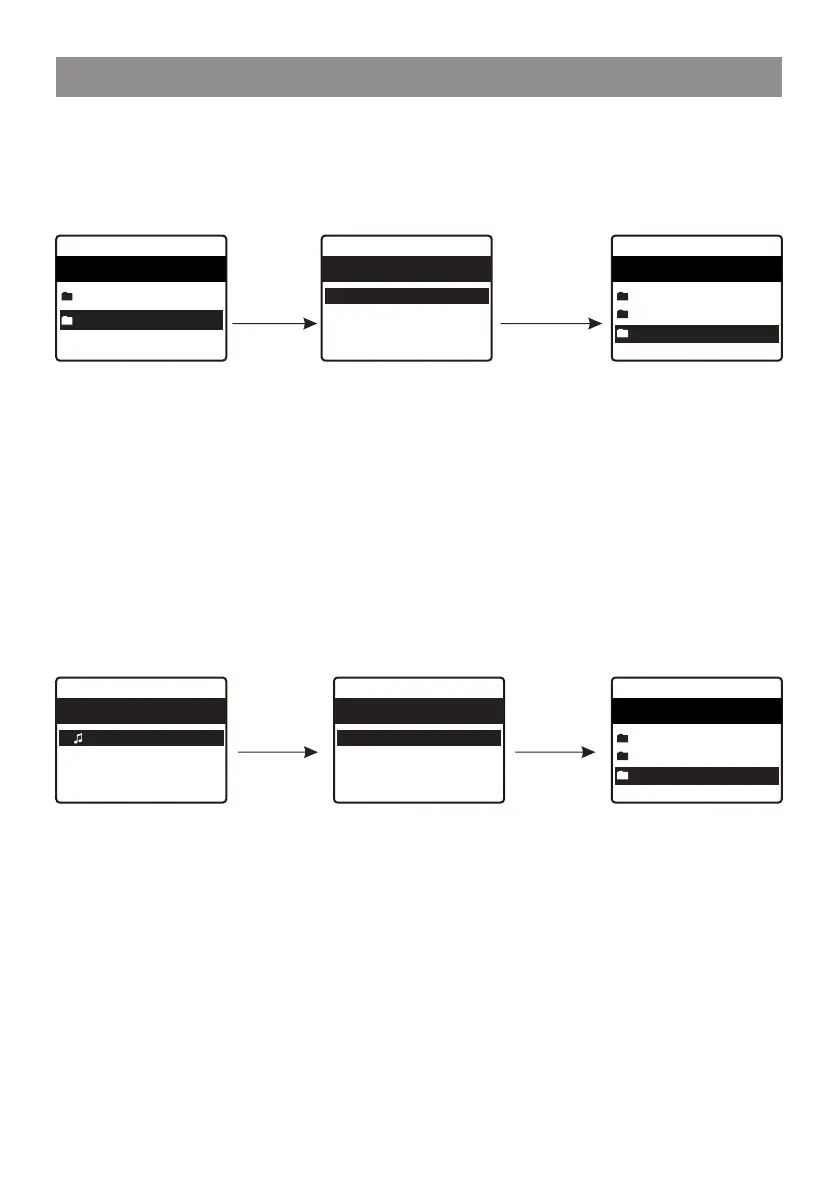
You can create new categories of your favorites and name it as you like,
e.g., "Morning mix", "My Jazz", "After work"...etc to manage your favorites.
In the page of "My Favorite", press the [ ► ] button, it will enter the edit
menu with "Create Category" as below:
When a category is created (can create more categories as you like), you
can now assign the stations to the category as desired. The
"Uncategorized" means the stations which are not assigned to any
categories yet.
To move the stations to the respective category, enter either the "All
Favorites" or "Uncategorized" folder, choose the station from the list and
select "move to category", then highlight the category to move it to and
press OK to confirm.
You can always move the station from one category to the other.
Press the
[ ► ] button
Highlight the station
to move category
press OK to confrim
Press OK,
enter the name
of category,
e.g. My Jazz
Choose "Move to category",
it will display the list and select
the one you want to move it to.
e.g., "My Jazz", then press OK.
The station is now moved
to "My Jazz" folder.
My favourite 1/3
12:48am
< 101 SMOOTH JAZZ
FM 106.30 MHZ
FM 98.90 MHz
Edit 1/2
12:48am
Move to category
Delete
My favourite 3/3
11:30am
All favourites 3
Uncategorized 2
My Jazz 1
My favourite 2/2
11:30am
All favourites 3
Uncategorized 3
Edit 1/1
12:48am
Create catogory
My favourite 3/3
11:30am
All favourites 3
Uncategorized 3
My Jazz


 To Next Page