POWER
8÷17 Vdc
LTC SYNC
LINK / ACT 10 / 100
USB 2.0 HS
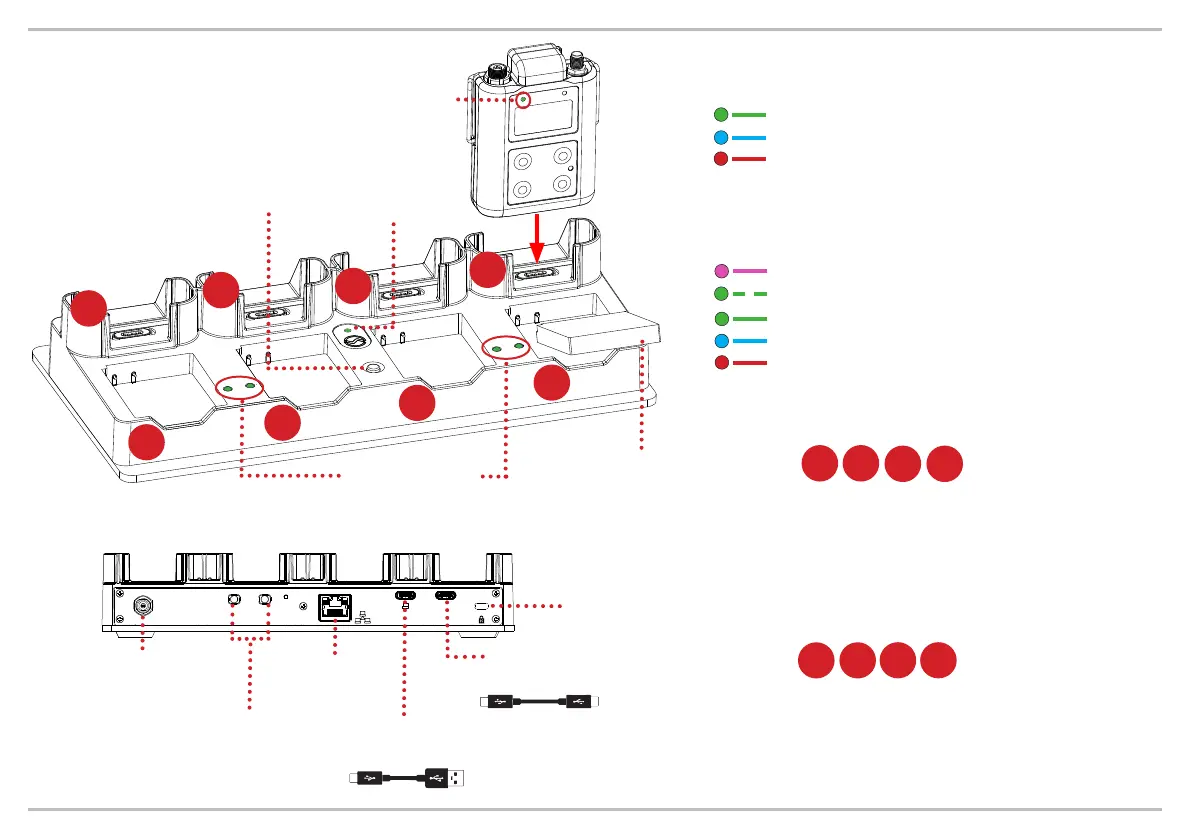
GREEN: unit ON
GREEN: connected to Wisycom Manager
RED: over temperature
(*) LBC61 status LED
PINK: no battery inside (MTP61 only)
RED: battery failure
GREEN BLINKING: in charge (<70%)
GREEN: in charge (>70%)
BLUE: fully charged (100%)
(**) MTP61/LBC61 battery status LED
When placed into a recharging slot
a unit enters a standby mode. It will
automatically begin charging. When
removed, the unti returns to the state it
was in prior to charging.
LBC61 BODYPACK SLOTS
1 2
3 4
A full battery recharge should
take less than 2 hours.
LBC61 BATTERIES SLOTS
A
A
Battery packs
LBP61
MTP61 battery
status led (**)
LBC61 batteries
status led (**)
LBC61
status led (*)
COMMAND BUTTON
Quick press for bodypacks
general info. Press and hold to
start bulk timecode jamming
1
2
3
4
POWER
8÷17 Vdc
LTC SYNC
LINK / ACT 10
/
100
USB 2.0 HS
Power Supply
PSP15V4A0
Timecode I/O
Minijack 3.5mm
Ethernet
(to PC)
Kensingthon
Security Slot
USB Type C
USB Cascade to next LBC61
REAR VIEW
C
C
USB 2.0/3.0
Type C to Type A to PC
C A
B
B
C
C
D
D



 To Previous Page