PHANTOM POWER
ADAPTER
PHA
60
Wisycom Italy
Wisycom Srl - Via Tiepolo, 7/E I-35019 Tombolo (PD) Italy
Tel. +39 0424 382605 - e-mail : sales@wisycom.com
Wisycom USA
5228 Eisenhower Avenue - Alexandria, Virginia 22304
Tel. +1 (888) 947-9266 - e-mail : sales@wisycomusa.com
PHA60-en-b01 - Subject to change without notice
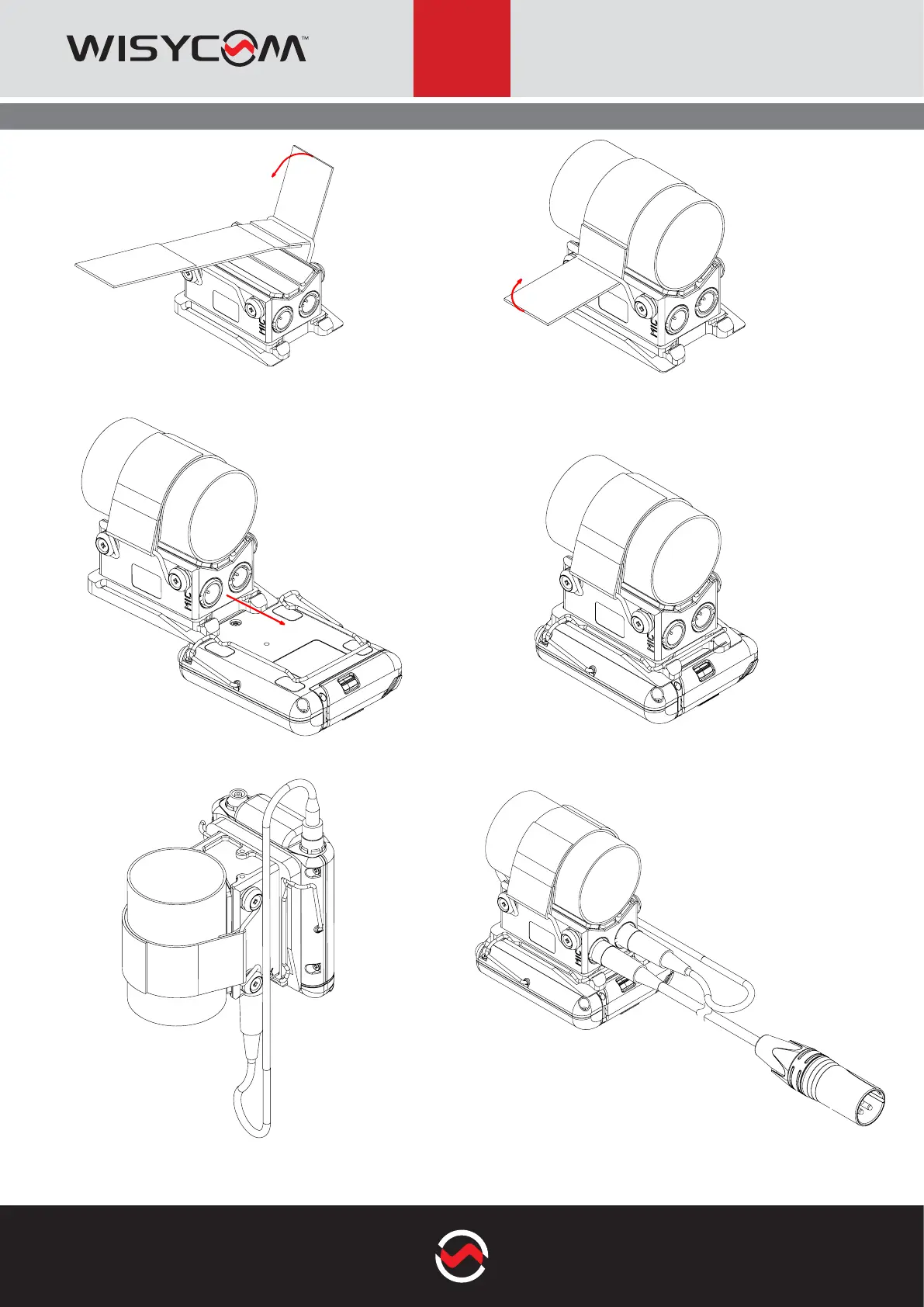
2. pass the felt around the pole and secure it on the
other end
3. mount the MTP60 xing it with the clip as shown in
the gure
4. make sure it is stable and pull the felt harder if
necessary
5. connect the CAL48S cable from the LEMO con-
nector of the MTP60 to the TX connector (TA5)of the
PHA60
1. insert the felt on the rst spring and x the felt on
one side
6. connect the audio cable from the MIC connector
(TA3) of PHA60 to the microphone/shotgun
ACCESSORIES & RELATED
MOUNTING INSTRUCTION


 To Previous Page